Job Tools Overview
Job Tools is Callings.ai's suite of AI-powered features that work behind the scenes when you save a job, automatically analyzing the role, researching the company, identifying networking contacts, and preparing customized materials so you can make informed decisions and present your best candidacy for every opportunity.
When you add a job to your tracker, Callings.ai immediately generates reports and materials tailored to that specific opportunity. These tools are organized into five categories based on what they help you accomplish.
Where to Find Job Tools
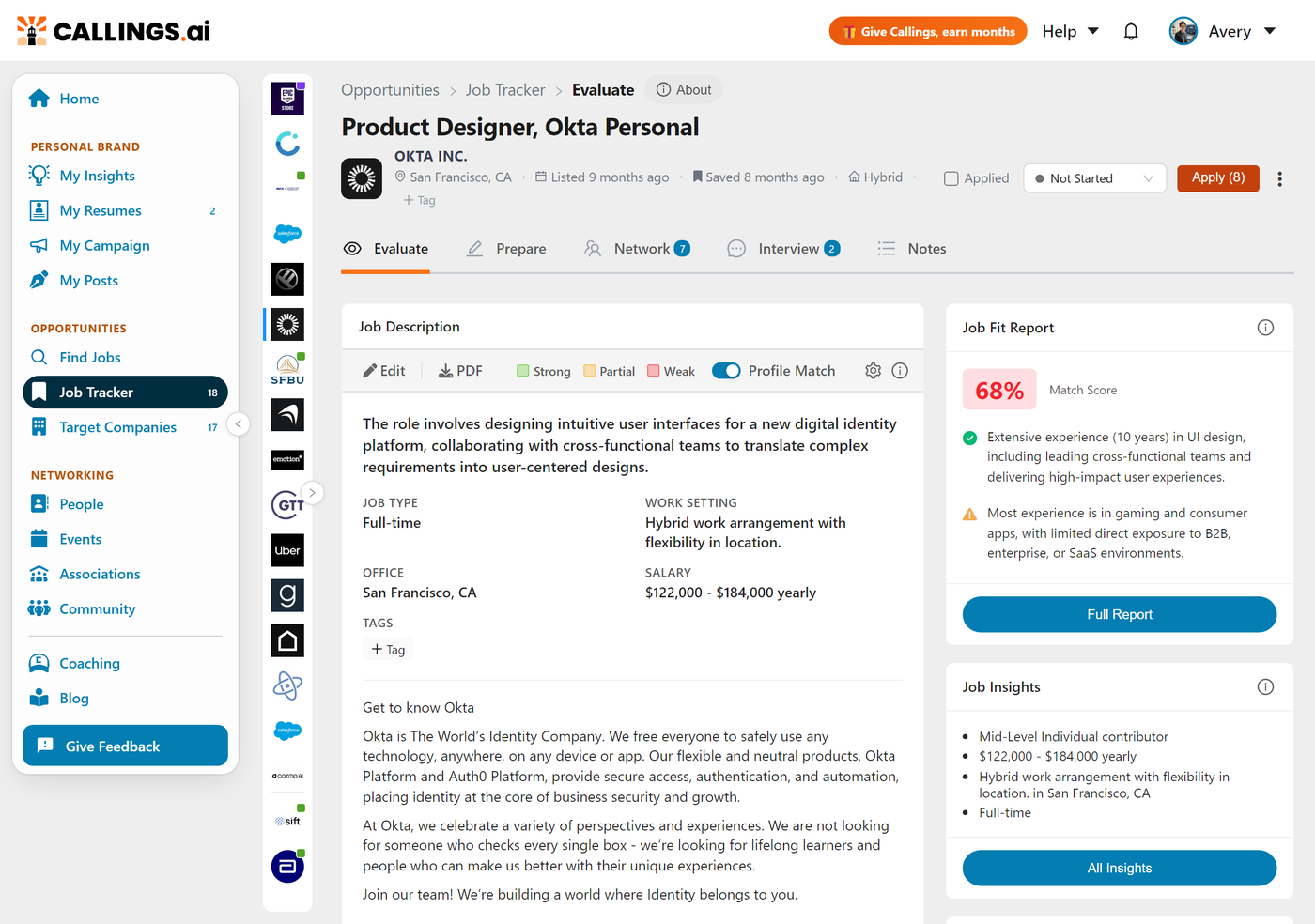
To access Job Tools, select any job in your Job Tracker, either from the Table View or Kanban View. This opens the Job Detail panel where you'll find tabs for each tool category.
Navigating Between Jobs
Once you're in the Job Detail view, you don't need to return to the tracker to switch jobs. A column of company logos runs down the left edge of the detail panel: click any logo to jump to that job's tools. You can also expand the column to reveal your job list, making it easy to browse and select jobs without leaving the detail panel.
The Job's Timeline
Under the job title, beside the location, a single date tells you where the job stands: when you applied, or when you saved it if you have not applied yet. Hover that date, or tap it on a phone, and the job's full timeline opens.
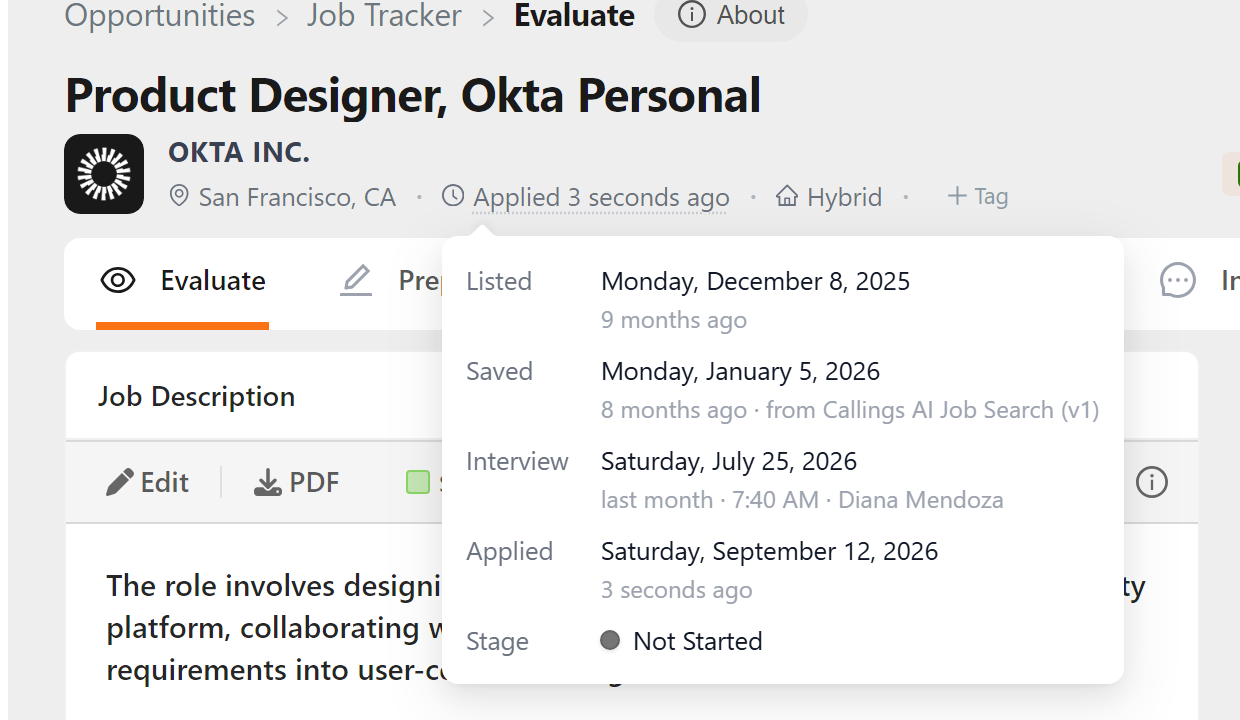
The timeline gathers every date Callings.ai knows about the job:
| Row | What it shows |
|---|---|
| Listed | When the employer posted the role, or Unknown when the posting carried no date |
| Saved | When the job entered your tracker, and how it got there |
| Applied | When you marked it applied |
| Interview | Each interview you have scheduled, with the time and who you are meeting |
| Apply before | The application deadline, when the posting sets one |
| Delisted | When we noticed the posting had left the job board |
| Archived | When you filed the job away |
| Stage | The stage the job sits in now, and when it moved there |
Rows appear only when they apply, and they run in date order, so the job reads as a story from posting to today. Every date shows the full day, with how long ago it was underneath.
The timeline keeps up as you work: tick Applied or change the stage, and the dates update straight away.
Tool Categories
Evaluate Tools
Help you decide whether an opportunity is worth pursuing.
| Tool | What It Does | Key Benefit |
|---|---|---|
| Job Description | Displays the full job posting with AI-extracted requirements, skills, and responsibilities | Quickly identify what matters most to this employer |
| Job Fit Report | Analyzes your match with detailed strengths, gaps, and overall fit score | Know your candidacy strength before investing time |
| Job Insights | Extracts and organizes key job details including compensation, skills, requirements, and benefits | Understand the role's specifics at a glance |
| Company Report | Provides company research including culture, size, recent news, and reputation | Understand the employer beyond the job posting |
Prepare Tools
Create tailored application materials for each role.
| Tool | What It Does | Key Benefit |
|---|---|---|
| Prepare Overview | Side-by-side view of Custom Resume and Cover Letter cards with toolbars | Efficiently create both application documents in one place |
| Custom Resume | Generates a resume version highlighting your most relevant experience for this specific role | Stand out by emphasizing what this employer values |
| Cover Letter | Creates a personalized letter addressing specific requirements and demonstrating genuine interest | Show you understand the role and company |
Network Tools
Identify and connect with people who can help your candidacy.
| Tool | What It Does | Key Benefit |
|---|---|---|
| Networking Targets | Discovers 3-7 relevant contacts at the company who could provide insights or referrals | Find the right people to reach out to |
| Custom Outreach | Generates personalized connection messages based on shared background | Start conversations that feel natural, not spammy |
Interview Tools
Prepare to perform your best in interviews.
| Tool | What It Does | Key Benefit |
|---|---|---|
| Interview Management | Tracks every interviewer with a preparation plan tailored to them, plus rounds, scheduling, debrief notes, thank-you notes, and a progress coach | Run the whole interview process from one place |
| Preparation Overview | Provides comprehensive preparation including likely questions, STAR examples, and company-specific talking points | Walk into interviews confident and prepared |
Notes Tools
Track your progress and document what you learn.
| Tool | What It Does | Key Benefit |
|---|---|---|
| Notes & To-Do Items | Document conversations, track action items, and maintain a timeline for each opportunity | Never forget an important detail or follow-up |
How Tools Are Generated
Automatic Generation
When you add a job to your tracker, Callings.ai immediately begins generating:
- Job Insights - Extracting key details from the job posting
- Job Fit Report - Analyzing how your background matches requirements
- Company Report - Researching the employer
- Networking Targets - Identifying potential contacts
These reports are typically ready within 30-60 seconds.
On-Demand Generation
Some tools generate content when you first access them:
- Custom Resume - Created when you open the Prepare tab
- Cover Letter - Generated when you request it
- Custom Outreach - Created for each networking target you select
- Preparation Overview - Generated when you access interview preparation
Regeneration
All tools can be regenerated if: - You update your Base Resume with new information - The job posting has been updated - You want a fresh perspective on your materials
Click the Regenerate button on any tool to create updated content.
Tool Dependencies
Some tools work best when others are in place:
Base Resume → Custom Resume → Cover Letter
     ↓
Job Fit Report → Preparation Overview
     ↓
Job Insights
     ↓
Company Report → Networking Targets → Custom Outreach
- Custom Resume draws from your Base Resume; keep it current for best results
- Preparation Overview incorporates insights from your Fit Report and Company Report
- Custom Outreach uses information from Networking Targets and your background
Tips for Getting the Most from Job Tools
Review AI-Generated Content
All tools produce drafts that you should review and personalize:
- Check facts and dates for accuracy
- Add specific details only you would know
- Ensure your voice comes through
- Remove anything that doesn't feel authentic
Use Tools Progressively
You don't need every tool for every job. Match your effort to your interest level:
| Interest Level | Recommended Tools |
|---|---|
| Evaluating | Job Fit Report |
| Interested | + Company Report, Networking Targets |
| Applying | + Custom Resume, Cover Letter |
| Interviewing | + Preparation Overview, Interview Management |
| All stages | Notes (document everything) |
Keep Your Base Resume Current
Your Base Resume is the foundation for all customization. When you discover better ways to describe your experience while reviewing Custom Resumes, update your Base Resume so future generations improve automatically.
Document as You Go
Use Notes to capture: - Who you've contacted and their responses - Insights from conversations - Questions to ask in interviews - Your impressions after each interaction
This information becomes invaluable as opportunities progress.
Frequently Asked Questions
Q: Do I need to customize my resume for every job?
A: For best results, yes. Generic resumes have a 1-3% success rate; customized resumes achieve 10-20%. The Custom Resume tool makes this efficient by automating the first draft: you just review and refine.
Q: How accurate is the Job Fit Report?
A: The Fit Report analyzes your resume against the job requirements and provides a reliable initial assessment. However, it can't know everything about your experience, so use it as a starting point for your own evaluation.
Q: Can I export my custom resumes and cover letters?
A: Yes. All materials can be downloaded as PDF or Word documents for use in application systems.
Q: What if the AI gets something wrong?
A: Always review and correct. The AI drafts based on your resume and the job description, but you're the expert on your actual experience. Edit freely to ensure accuracy.
Q: How do I improve the quality of generated content?
A: The most impactful improvement is keeping your Base Resume detailed and current. The more information Callings.ai has about your experience, the better it can tailor materials to each opportunity.
Q: Should I tell employers I used AI to help with my resume?
A: Using AI for resume preparation is similar to using spell-check or a professional editor. What matters is that the content accurately represents your real experience.
Q: Where do I see the date I applied to a job?
A: On the job's page, under the title. Once a job is marked applied, the date beside the location is the date you applied. Hover it for the full timeline, including when the role was listed and when you saved it.
Q: Why does the job header show only one date?
A: The line shows the latest thing that happened to the job, so it stays readable next to the location, the work arrangement and your tags. Everything else is one hover away.
Q: The Stage row does not say when the job moved. Why?
A: Two reasons. A job filed into a stage at the moment you saved it shows no separate date, because it would simply repeat the saved date. And stage changes made before September 2026 were not recorded, so those jobs show the stage without a date; move the job again and the date appears.
Related Topics
- Managing Your Pipeline - Job hunt strategies and workflow profiles
- My Base Resume - The foundation for all customizations
- Job Tracker Overview - Understanding the job tracker system
Job Tools transform each opportunity from a simple listing into actionable intelligence. With AI working behind the scenes to analyze fit, research companies, identify connections, and craft tailored materials, you spend less time on busywork and more time presenting your best candidacy to the roles that matter most.