Prepare Application Materials Overview
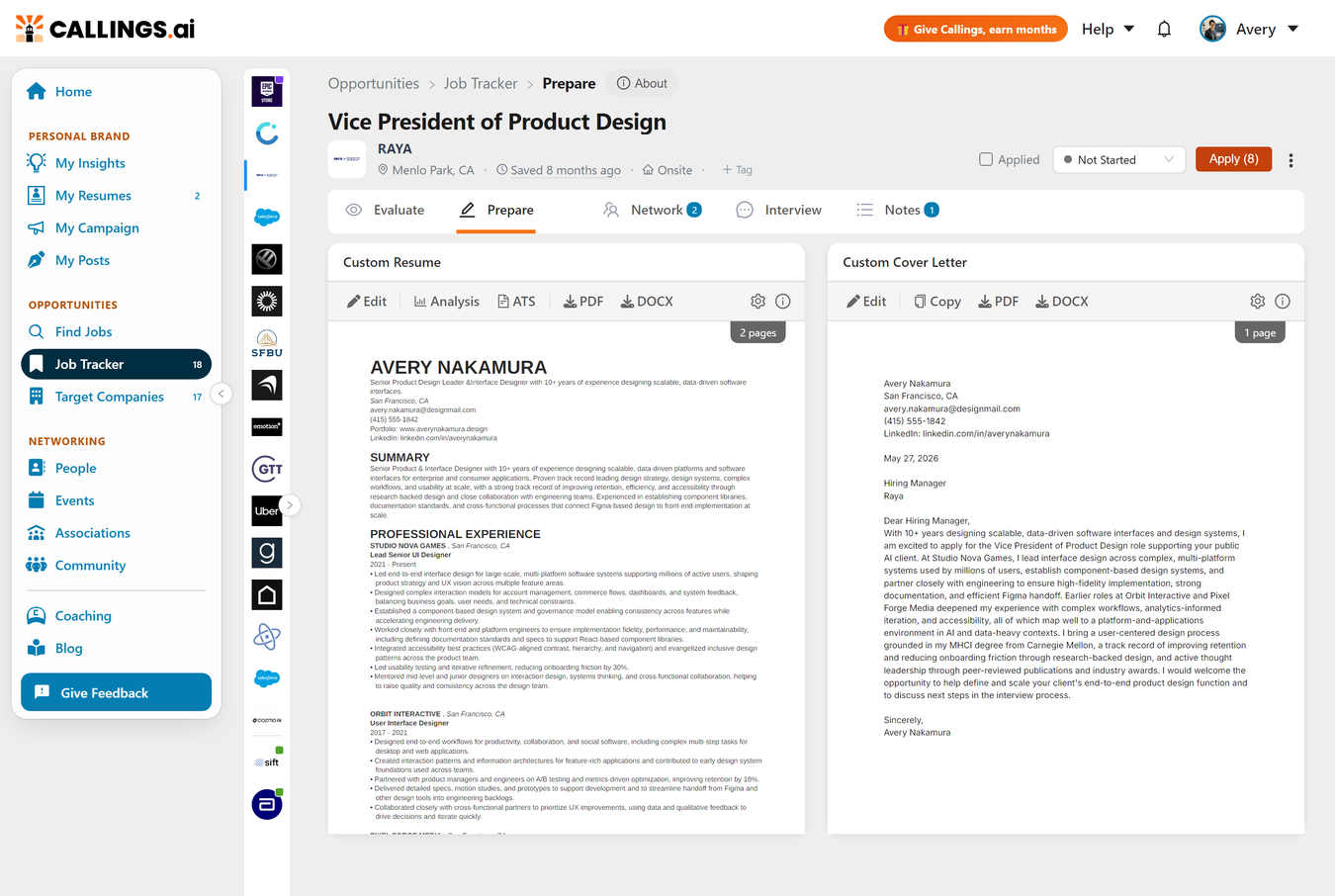
Prepare is the application materials hub where you create tailored documents for each job opportunity. When you open the Prepare tab, you'll see your Custom Resume and Custom Cover Letter displayed side by side as interactive cards, each with its own tools for generating, editing, and downloading professional application materials.
What You'll See
The Prepare section displays two document cards side by side:
| Card | Purpose | Learn More |
|---|---|---|
| Custom Resume (left) | AI-tailored resume highlighting your most relevant experience for this specific job | Custom Resume Guide |
| Custom Cover Letter (right) | AI-crafted letter connecting your background to this role and company | Custom Cover Letter Guide |
Each card shows a thumbnail preview of your document, a page count badge, and a toolbar with quick-access tools. Click anywhere on a document thumbnail to open the full editor.
Getting Started
Prerequisites
Before generating documents, you need a Base Resume: your comprehensive resume that serves as the source material for all customizations. If you haven't added one yet, you'll see a prompt with a link to the Base Resume page.
Generating Documents
- Click "Generate Resume" on the Custom Resume card (30-90 seconds)
- Click "Generate Cover Letter" on the Cover Letter card (45-90 seconds)
Both documents can be generated simultaneously; you don't need to wait for one to finish before starting the other.
Editing and Downloading
Once generated, each card provides:
- Edit - Open the AI-powered editor to refine your document
- Download - Export as PDF or DOCX
- Regenerate - Create a fresh version from scratch
For detailed information about each tool's editor, features, and best practices, see: - Custom Resume - Resume editor, AI suggestions, and ATS analysis - Custom Cover Letter - Cover letter editor and AI chat refinement
Workflow Tips
Recommended order: 1. Generate Custom Resume first to establish which experiences to emphasize 2. Generate Cover Letter second; the AI uses context from your resume 3. Review and edit both to ensure consistency
Pairing with other tools: - Use the Job Description to reference exact requirements and keywords - Check your Job Fit Report to identify top selling points to emphasize - Reference the Company Report for company-specific hooks in your cover letter
Related Topics
- Custom Resume - Complete guide to the resume editor
- Custom Cover Letter - Complete guide to the cover letter editor
- My Base Resume - The foundation for all customizations
- Job Tools Overview - Understanding the complete job tools suite
Preparation tools ensure every application puts your best foot forward. With AI-tailored resumes and cover letters that highlight exactly what each employer is looking for, you transform from one of hundreds of applicants into a candidate who clearly understands the role and has the experience to excel in it.