My Resumes Overview
Your resumes are the master career documents that power every AI feature in Callings.ai, including job matching, insight generation, and custom resume and cover letter creation. They serve as the "source of truth" our AI uses to understand your background, skills, and career history. Unlimited Membership users can keep up to 5 resumes for different job targets, while Basic Membership includes one primary resume.
Why Are Your Resumes Important?
Your resumes power three core AI capabilities: career insight generation, personalized job matching scores, and tailored application content creation. Unlike traditional job boards where your resume is just a file attached to an application, Callings.ai uses your resumes to:
- Generate Insights: We analyze your career path to infer your goals and ideal jobs.
- Match Jobs: We score every job opportunity against your specific background.
- Create Custom Content: When you apply for a job, we use your resumes as the starting point to generate a tailored resume and cover letter.
Multiple Resumes Support
Callings.ai allows you to upload and manage multiple base resumes (up to 5), each representing a different career direction or job target. These are distinct from Custom Resumes, which are generated for individual job applications:
| Resume Type | Purpose | Quantity |
|---|---|---|
| Base Resumes | Master documents representing your background for different career directions (e.g., "Product Manager", "UX Designer") | Up to 5 total |
| Custom Resumes | AI-tailored versions generated for specific job applications | Unlimited (one per job) |
| Membership | Base Resumes Included |
|---|---|
| Basic (Free) | 1 primary resume |
| Unlimited | Up to 5 resumes |
Why Multiple Base Resumes?
- Target different roles: A resume for Product Management roles and another for UX Design roles
- Target different industries: Customize emphasis for tech, finance, healthcare, etc.
- Career transition: Maintain your current resume while building one for a new direction
- Different experience levels: Executive summary for senior roles, detailed technical resume for hands-on roles
- Version management: Work on different versions of your resume before settling on a final version. Use the Duplicate feature to create variants, then compare and refine until you're satisfied.
Managing Your Resumes
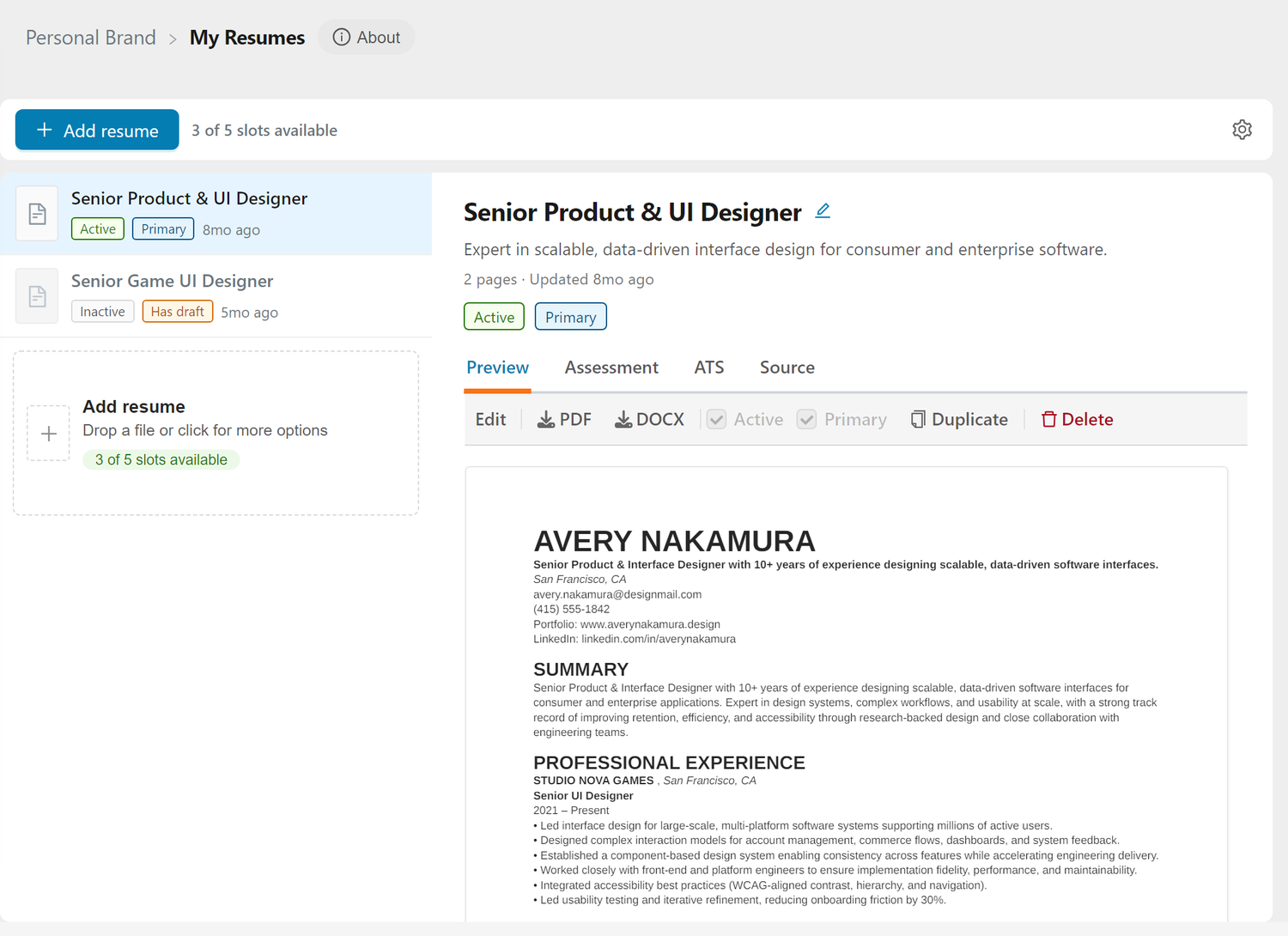
Open My Resumes from the Personal Brand section of the sidebar (My Resumes). The page has two columns: your resumes on the left, and the one you select on the right.
The resume list
Each row shows the resume's title, its tags, and when it was last updated:
- Active or Inactive: only active resumes are used by the AI. An inactive resume is dimmed in the list and in its preview.
- Primary: the resume Callings.ai uses by default.
- Has draft: you have unsaved edits waiting in the editor.
Drag the rows to put your resumes in the order you want; the order is kept. Drag the divider between the two columns to make the list wider or narrower; the width is remembered on this browser.
To add a resume, click Add resume at the top of the page, or the Add resume row at the end of the list, which also shows how many slots you have left. You can also drop a file anywhere on the list: PDF, Word, TXT, RTF, ODT and image files are accepted, up to 6 MB. A new resume shows Processing while we read it. See Uploading Your Resume for importing from LinkedIn or pasting text.
The selected resume
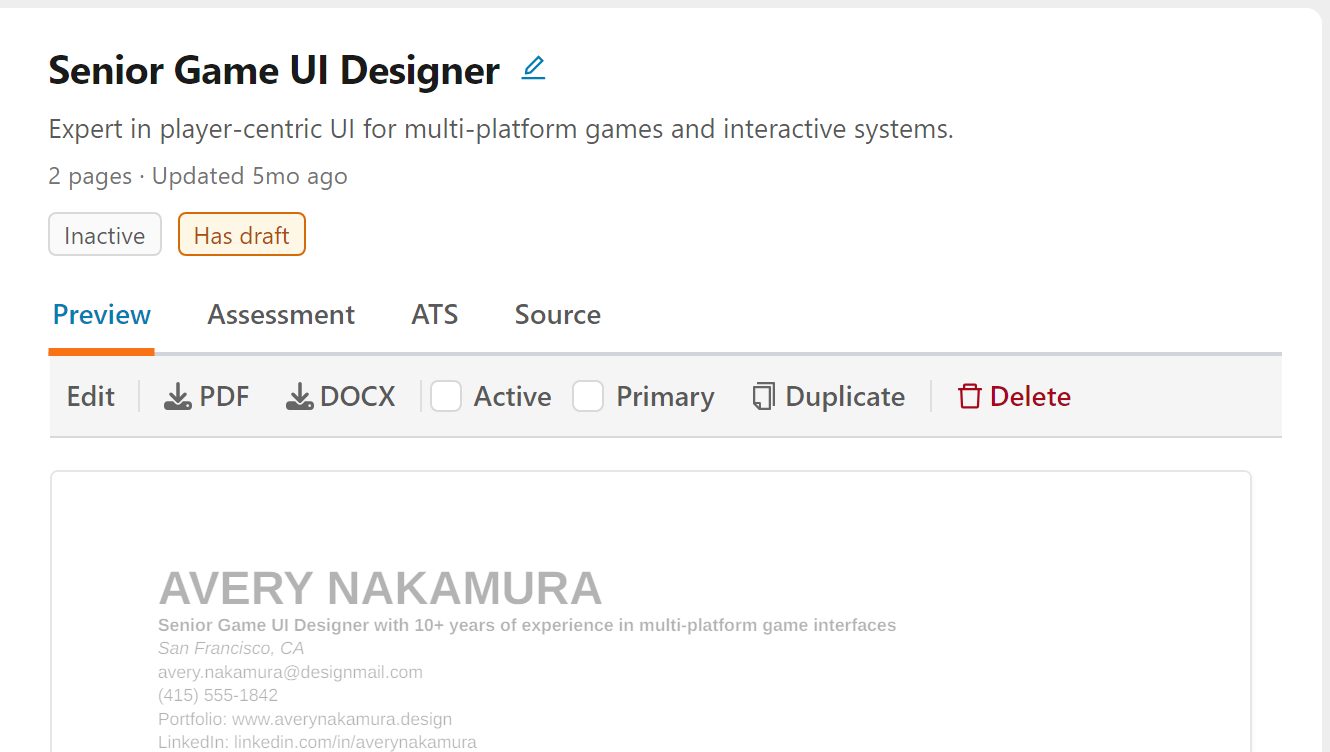
The top of the right column shows the resume's title, its description, how many pages it runs to, when it was last updated, and its tags. Below them are four tabs:
| Tab | What it shows |
|---|---|
| Preview | The resume exactly as it will download, with the toolbar described below. Click anywhere on the document to open it in the editor. |
| Assessment | The AI review of the resume: a six-second verdict and a scorecard, with Full report for the complete assessment. See Resume Assessment. |
| ATS | Formatting that could trip up an Applicant Tracking System, and the text an ATS would most likely extract from your PDF. See ATS Compatibility Report. |
| Source | The original file you uploaded or the LinkedIn profile you imported, with Preview original and Download original. The original is kept only for reference: it is never used by AI features and never sent to anyone. |
The toolbar
Every action on a resume is on the toolbar at the top of its Preview tab:
- Edit opens the resume in the AI Resume Editor.
- PDF and DOCX download the resume on the paper size chosen in Global Settings.
- Active switches the resume on or off for AI features. The primary resume always stays active, so its box is locked.
- Primary makes this resume your default. There is always exactly one primary resume, so making another one primary moves it.
- Duplicate copies the resume, a quick way to start a variant.
- Delete removes the resume after you confirm. This cannot be undone.
Title and description
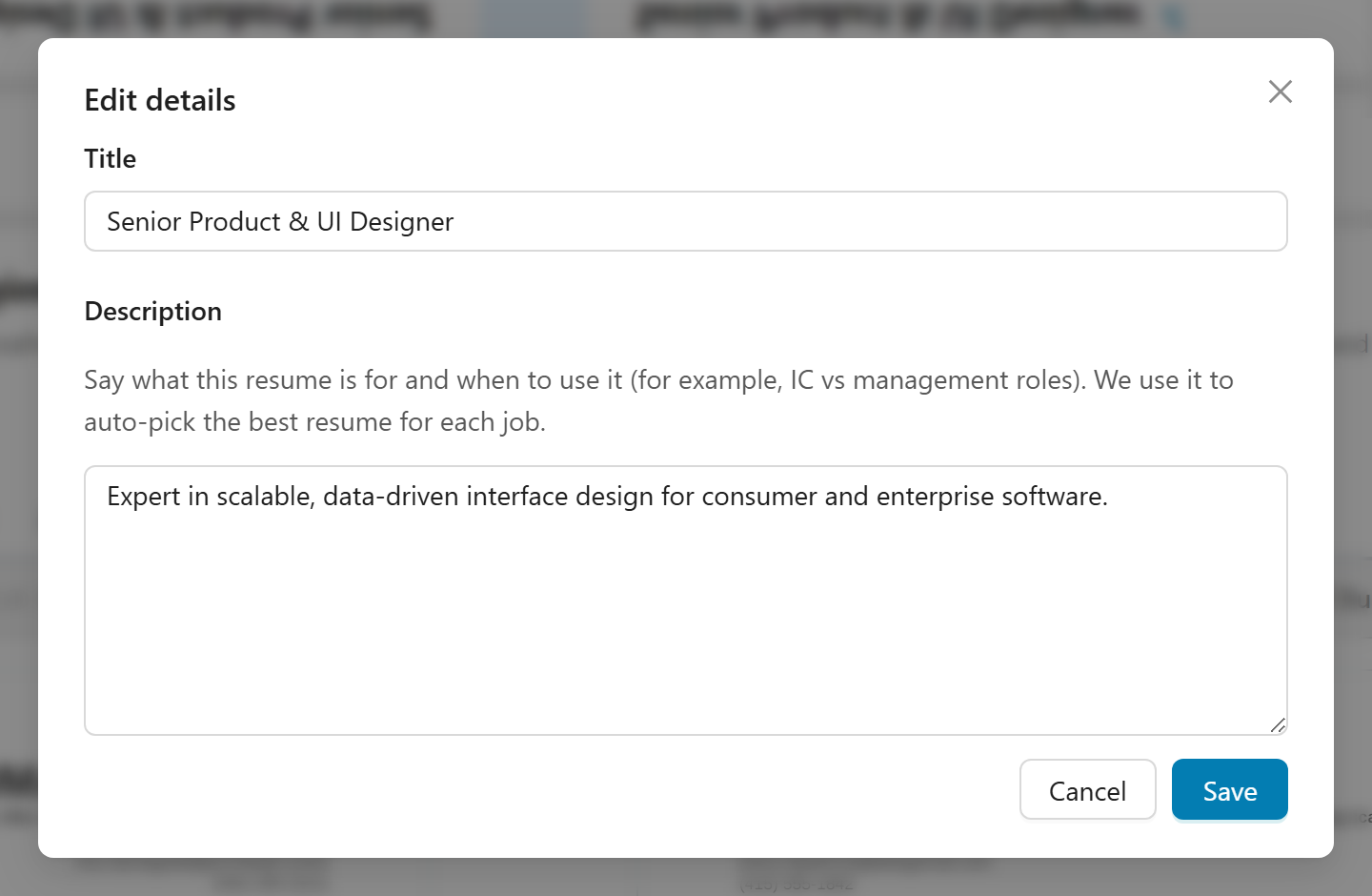
Click the title, the description, or the pencil icon to open Edit details. The description says what the resume is for and when to use it (for example, individual-contributor roles versus management roles). When you have several active resumes, Callings.ai reads it to pick the best resume for each job automatically.
Global Settings
The gear icon at the right of the top bar opens Global Settings, where you choose the Paper Size (US Letter or A4) and the Resume Font Size (9 pt compact, 10 pt or 11 pt) for your resumes.
On a phone
My Resumes shows your resumes as a list, and each resume has a menu with the same actions: view it, preview or download it, see its source, open its assessment or ATS audit, make it primary, change its status, or delete it.
Primary Resume: One resume is always marked as your primary resume. The primary resume is always active: it cannot be set to Inactive. This is the default resume used when: - Generating job match scores - Creating custom resumes and cover letters - Analyzing your career insights
Unlimited Membership users can change which resume is primary at any time by checking Primary on the toolbar of the resume they want. Making a resume primary automatically activates it. Basic (Free) users cannot change their primary resume.
The "Source of Truth" Concept
Think of your resumes as your master career documents. Each should be comprehensive and represent a complete view of your professional background, tailored for a specific career direction.
When you customize a resume for a specific job application, we may prompt you for relevant information that might not be in your base resumes to ensure the tailored version is as strong as possible.
Layout as a Template for Custom Resumes
Your base resume defines the layout template that Custom Resumes will follow. When you generate a Custom Resume for a job opportunity, the AI preserves your base resume's formatting decisions:
- Page breaks: Manual page breaks you insert are preserved in the same positions
- Section order: Your section sequence (Summary, Experience, Education, Skills, etc.) is maintained
- Bullet formats: Your bullet point styles and indentation levels are kept consistent
- Spacing and structure: Line breaks and spacing between sections are preserved
- Document structure: The overall document structure serves as the formatting template
Why this matters: - Customize your base resume's layout once, and all generated Custom Resumes will inherit that structure - If you prefer your Skills section before Education, arrange it that way in your base resume - Add page breaks where you want content to split across pages
Important: Changes you make to your base resume are only reflected in newly generated Custom Resumes. Existing Custom Resumes already generated for specific jobs will not automatically update. If you make significant layout changes to your base resume and want them reflected in a Custom Resume, regenerate that Custom Resume using the Regenerate button.
Page Preview
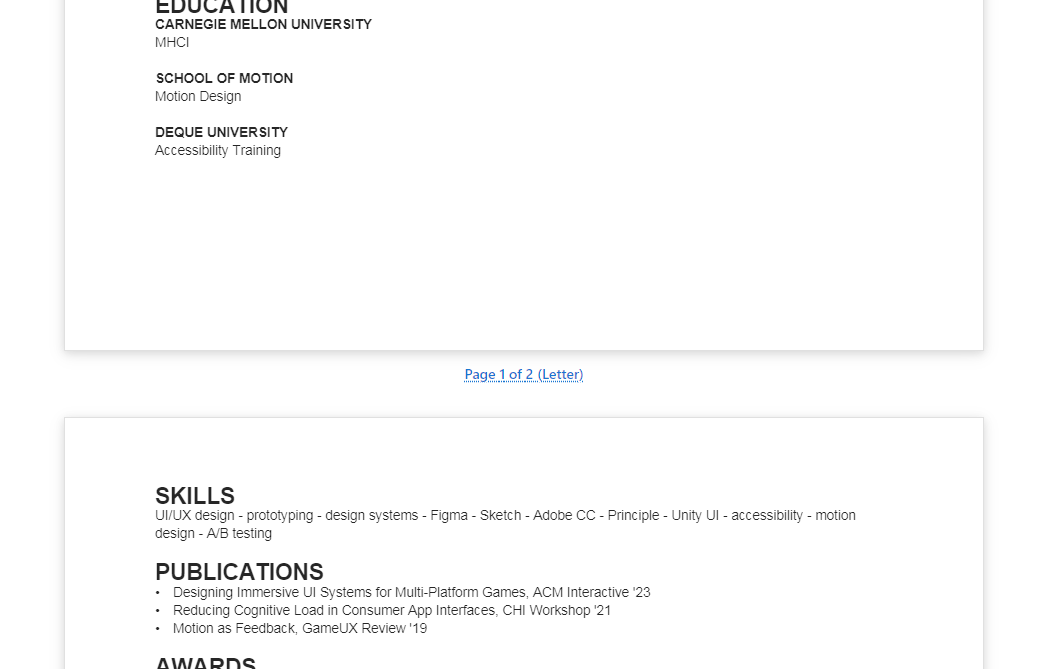
As you view and edit any resume, you can see exactly how it will look when downloaded. The preview shows page breaks between pages, so you know precisely where content splits:
Frequently Asked Questions
Q: How many resumes can I have?
A: Unlimited Membership includes up to 5 resumes. Basic Membership includes 1 primary resume. All users can upload up to 5 resumes total, but Basic members can only have their primary resume active for AI features.
Q: What's the difference between active and inactive resumes?
A: Active resumes are used by the AI for job matching, custom resume generation, and insights. Inactive resumes are stored but not used by AI features. Basic Membership users can only have their primary resume active.
Q: Where did the resume cards go?
A: My Resumes now shows your resumes as a list, with the one you select open beside it. Everything the card menu offered is on the toolbar of the Preview tab, and the assessment, the ATS check and the original file are tabs of the selected resume.
Q: Why does my resume look different from the file I uploaded?
A: When you upload a file or import from LinkedIn, we rebuild it into one clean, editable, ATS-friendly format so every tool can work with it. Your original is kept untouched: open the Source tab to preview or download exactly what you provided.
Q: How long should my resumes be?
A: Each resume should be comprehensive and include all relevant career information for that target direction. Focus on completeness rather than length.
Q: Should I use my base resume when applying for jobs?
A: No! Your base resumes are your comprehensive master documents. When you apply for a specific job, use the Custom Resume tool to create a tailored version optimized for that role.
Q: What if I update a resume later?
A: You can update any resume at any time. Job matching in the AI Job Search picks up the changes automatically. Reports do not: after updating, regenerate your insights, goals, and Resume Assessment when you want them to reflect the changes. Note that existing Custom Resumes already generated for specific jobs will not automatically update; only newly generated Custom Resumes will use your updated base resume content and layout.
Q: If I change my base resume layout, will my existing Custom Resumes update?
A: No. Changes to your base resume (including layout changes like page breaks, section order, and formatting) only affect newly generated Custom Resumes. To apply your updated layout to an existing Custom Resume, open that job and click "Regenerate" on the Custom Resume card.
Q: What if my resume is in a non-traditional format?
A: We accept any format and automatically normalize it into an industry-standard, ATS-friendly format.
Q: Can I duplicate a resume to create a variant?
A: Yes. Select the resume in the list and click Duplicate on the toolbar of its Preview tab. This is useful when creating a new resume variant from an existing one.
Q: How do I delete a resume?
A: Select the resume in the list, click Delete on the toolbar of its Preview tab, and confirm. Note that you cannot delete your only remaining resume or your primary resume if you have other resumes (you must first make another resume primary).
Next Steps
- Uploading Your Resume: Learn how to add resumes to your library.
- AI Resume Editor: Edit a resume with the AI assistant.
- Resume Assessment: Understand how our AI evaluates your resumes.
- ATS Compatibility Report: See how an Applicant Tracking System reads your resume.
Your resume is your first impression, so make it count. With AI-powered optimization, intelligent job matching, and tailored content generation, Callings.ai transforms your resume from a static document into a dynamic career asset that opens doors you didn't even know existed.