Custom Cover Letter Tool
Custom Cover Letter is an AI tool that generates a personalized cover letter connecting your background to a specific role and company in under 90 seconds. Instead of using a generic template, you get an AI-crafted letter that tells your story in a way that resonates with this particular opportunity - then refine it with AI assistance and see real-time page previews as you edit.
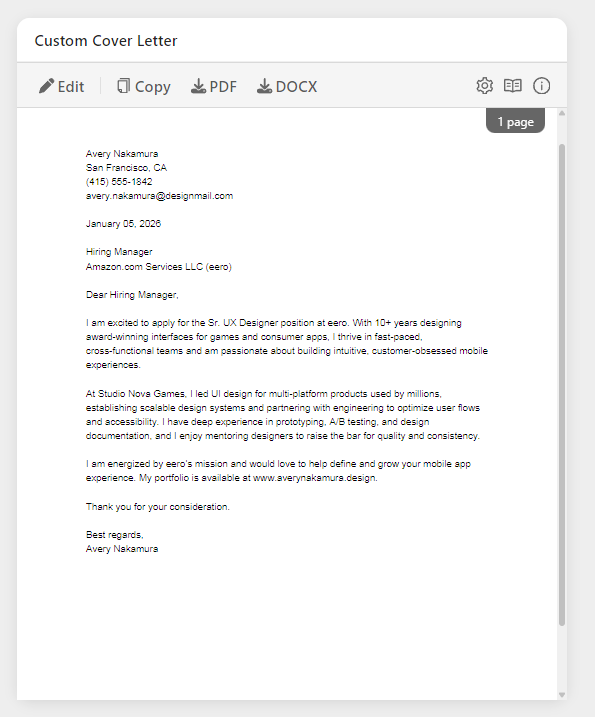
The Custom Cover Letter appears as an interactive card in the Prepare section, displayed alongside your Custom Resume for efficient application preparation.
What You'll See
AI-Generated Cover Letter
A complete, professionally written cover letter tailored to the job, displayed as a formatted page preview:
Standard structure: - Opening paragraph - Hook that shows genuine interest and key qualification - Body paragraphs (2-3) - Specific examples demonstrating fit - Closing paragraph - Call to action and enthusiasm for next steps - Professional sign-off - Appropriate closing and your name
What gets customized: - Company-specific references - Mission, values, recent news - Role-specific examples - Experience matching their requirements - Strategic storytelling - Accomplishments relevant to their needs - Tone and language - Matches company culture and formality level - Keywords - Natural integration of terms from job description - Gap positioning - When obvious gaps exist between your background and the role requirements, the AI proactively addresses them with positive framing and highlights transferable skills
What stays authentic: - Your actual experience - No invented accomplishments - True motivations - Genuine reasons for interest (or requests for your input) - Real achievements - Quantifiable results you actually achieved - Honest assessment - Transparent about fit and capabilities
Card Toolbar
Once your cover letter is generated, the card displays a toolbar with quick-access tools:
| Tool | Description |
|---|---|
| Edit | Open the AI Editor to refine your cover letter with AI assistance |
| Copy | Copy the plain text to clipboard for pasting into application forms |
| Download your cover letter as a PDF file | |
| DOCX | Download as Microsoft Word format |
| Regenerate (🔄) | Create a fresh version from scratch (confirms before replacing) |
Header Utility Icons
The card header includes three utility icons:
| Icon | Action |
|---|---|
| ⚙️ Settings | Configure AI Custom Instructions and paper size |
| 📖 Documentation | Open this documentation page |
| ℹ️ Tips & Info | Quick tips modal with usage guidance |
Built-In Editor
The Cover Letter Editor provides a powerful three-panel workspace for refining your letter. Click anywhere on the cover letter thumbnail or the Edit button in the toolbar to open the editor.
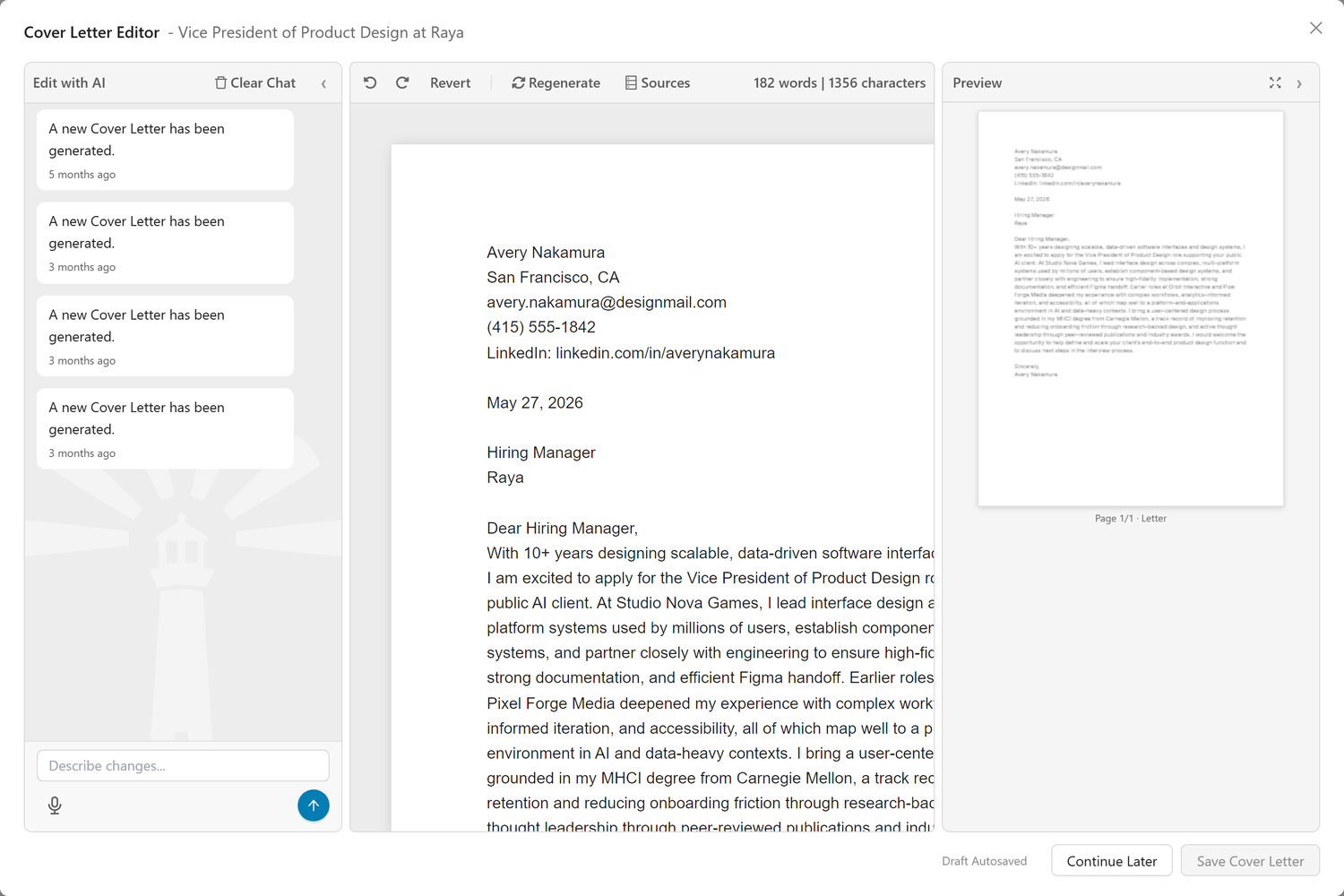
Editor Layout: - Left Panel - AI Chat: Conversational AI assistant to help refine your letter - Center Panel - Editor: Full-text editing area with your cover letter content - Right Panel - Page Preview: Real-time thumbnail preview showing how your letter will look when printed or downloaded as PDF
The three panels are resizable: drag the dividers between panels to adjust widths based on your preference.
You can edit your cover letter using two methods - AI-assisted editing and direct manual editing - and switch between them freely as you refine your letter.
AI-Assisted Editing
Use the AI chat panel on the left to guide changes to your letter. The AI has access to information you've shared with Callings.ai, including your resume, work history, and preferences, so it can make informed suggestions.
Useful prompts: - "Make it shorter and use today's date" - "Make the opening paragraph more enthusiastic" - "Focus on my experience at Orbit Interactive" - "Add more specific metrics to the second paragraph" - "Make the tone slightly more formal" - "Emphasize my leadership experience more" - "Condense to fit on one page" - "Add a sentence about why I'm excited about remote work"
How prompts work: 1. Type your request in the chat input at the bottom of the left panel 2. Click Submit to send your request 3. AI processes your request and updates your letter 4. Review the changes in the center editor and right preview 5. Use Undo/Redo if needed, or continue refining with more prompts
Chat controls: - Clear Chat - Start a fresh conversation while keeping your letter content - Revert to Last Saved - Restore your letter to the last saved version (undoable)
Direct Manual Editing
Edit the text directly in the center editor panel for precise control:
- Content manipulation - Add, delete, or rearrange paragraphs
- Tone adjustment - Make it more formal, conversational, enthusiastic, etc.
- Length control - Expand or condense as needed
- Word/character count - Monitor length in real-time (shown in the toolbar)
Editor toolbar features: - Undo/Redo buttons - Step through your edit history - Revert to Last Saved - Restore the last saved version - Word and character counter - Shows "125 words | 890 characters" format
Flexible workflow: You can freely switch between AI-assisted and manual editing. Make direct changes, then ask the AI to refine a section, then edit manually again - whatever works best for you.
Page Preview
The right panel displays a real-time thumbnail preview of your cover letter as it will appear when downloaded as PDF:
- Visual formatting check - See exactly how your letter will look on paper
- Page break visibility - Shows where content splits if your letter spans multiple pages
- Auto-refresh - Preview updates automatically as you edit
- Paper size support - Renders in your selected paper size (Letter or A4)
Note: The page thumbnails are for previewing page breaks only, not for navigation. Use the center editor panel to scroll through and edit your letter content.
Auto-Save and Draft Management
Your work is automatically saved as you edit:
- Auto-save indicator - Shows "Draft saved" when your changes are safely stored
- Has draft badge - Appears on the card when you have unsaved edits
- Continue Later - Close the editor and return anytime; your draft and chat history are preserved
- Save Cover Letter - Finalize your letter and save it to your job application
Your saved draft, including the full chat conversation history, will be available when you return, so you can continue refining exactly where you left off.
Why edit? The AI provides an excellent draft, but you need to: - Add personal touches only you know - Adjust tone to match your authentic voice - Include specific details about why you're excited - Ensure every claim is accurate - Make it feel genuinely like you wrote it
AI Custom Instructions
Personalize how your cover letters are generated by setting AI Custom Instructions in your Account Settings. This is a global setting that shapes the AI's output, including language, tone, style, and focus areas, for all newly generated Cover Letters across every job.
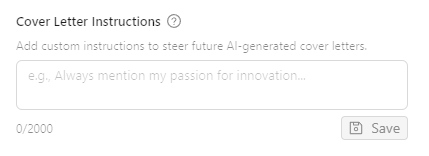
Access Custom Instructions: - Click the Settings icon (gear) in the Cover Letter section to go to your account settings - Or navigate to Profile → Settings → AI Custom Instructions
Example instructions:
| Goal | Instruction |
|---|---|
| Generate in another language | "Always write cover letters in German" |
| Adjust formality | "Use a warm, conversational tone while remaining professional" |
| Emphasize narrative | "Focus on storytelling and my career journey rather than listing qualifications" |
| Highlight specific experience | "Emphasize my startup experience and entrepreneurial mindset" |
| Address career transition | "Frame my military background as an asset for corporate leadership roles" |
| Cultural fit | "Match the casual, innovative tone typical of tech startups" |
How it works: Your custom instructions are injected into the AI prompt when generating new cover letters. The AI will: - Follow your language and style preferences - Adjust the narrative focus based on your guidance - Maintain authenticity: it won't invent experience or accomplishments - Continue crafting compelling, job-specific content
Important: Custom Instructions apply only to newly generated content. If you've already generated a Cover Letter and want to apply updated instructions: - Regenerate: Click "Regenerate" to create a fresh version using your current instructions - Use the AI Editor: Open the existing cover letter and use the AI chat to request specific changes (e.g., "rewrite this in French" or "make the tone more conversational")
Download & Copy Options
Multiple ways to use your finished letter:
Download as PDF: - Formatted for attachment to applications - Professional appearance - Preserves formatting
Download as DOCX: - Editable Microsoft Word format - For applications requiring Word docs - Easy to update for similar roles
Copy to clipboard: - Paste directly into application forms - Quick for online applications - Preserves content, loses formatting
How to Use This Tool
Initial Generation (2-3 minutes)
When you first open the Prepare tab for a job:
- Click "Generate Cover Letter" on the Custom Cover Letter card
- AI analyzes your resume
- Reviews the job description
- Researches company if information available
- Generates personalized letter
-
Usually takes 45-90 seconds
-
Read the generated letter completely
- Does it sound like you?
- Are all facts accurate?
- Does it address key requirements?
-
Is the tone appropriate?
-
Check the three-paragraph structure:
- Opening: Does it hook and establish credibility?
- Body: Does it tell compelling stories with results?
- Closing: Does it express enthusiasm and next steps?
Refining for Authenticity (10-20 minutes)
Transform the draft from "good" to "great":
Opening paragraph enhancement: - Add specific reason you're excited about THIS company - Reference something you genuinely admire (product, mission, culture) - Establish immediate credibility with your top qualification - Make it memorable - not generic
Example transformation: ❌ Generic: "I am writing to express my interest in the Senior Product Manager position."
✅ Specific: "When I saw that Callings.ai is revolutionizing how job seekers navigate their careers with AI, I knew I had to apply. As someone who built career tools at LinkedIn for 5 years, I'm excited to bring my experience in user-centric product development to help job seekers succeed."
Body paragraphs personalization: - Add quantifiable metrics to accomplishments - Include specific project names or clients (where appropriate) - Explain how you achieved results, not just what you achieved - Connect your experience to their specific challenges
Example transformation: ❌ Vague: "In my previous role, I improved team productivity."
✅ Specific: "At TechCorp, I led a cross-functional team of 8 to redesign our workflow automation, reducing manual processing time by 40% and saving the company $200K annually. This experience directly aligns with your goal of optimizing operational efficiency."
Closing paragraph authenticity: - Express genuine enthusiasm (not forced) - Reference specific aspects of the role that excite you - Confidence without arrogance - Clear next step / call to action
Example closing: "I'm genuinely excited about the opportunity to bring my product strategy experience to Callings.ai's mission of empowering job seekers. I'd love to discuss how my background in scaling B2B SaaS products can contribute to your growth. Thank you for considering my application; I look forward to the possibility of speaking with you."
Length and Structure Decisions (5 minutes)
Ideal cover letter length: - Standard: 3-4 paragraphs, 250-400 words, fits on one page - Concise: 2-3 paragraphs, 150-250 words (for quick applications) - Extended: 4-5 paragraphs, 400-500 words (for highly detailed roles only)
Structure options:
Classic format: 1. Opening: Hook + key qualification 2. Body: 2-3 examples of relevant experience 3. Closing: Enthusiasm + call to action
Story-driven format: 1. Opening: Brief story demonstrating key skill 2. Body: How that experience connects to their needs 3. Additional example: Second strength area 4. Closing: Enthusiasm + next steps
Problem-solution format: 1. Opening: Acknowledge company/role challenge 2. Body: How you've solved similar challenges 3. Evidence: Specific results and approach 4. Closing: Excitement to do this for them
Choose based on the role and company culture.
Tips & Best Practices
When Cover Letters Really Matter
Highly important when: - Small companies or startups - More personal, everyone reads materials - Competitive roles - Differentiation is critical - Career transitions - Need to explain why you're qualified despite different background - Applications with "Why do you want to work here?" - They explicitly want to know - Roles emphasizing cultural fit - Values-driven companies - When you have a unique story - Gap explanation, unusual path, relocation
Less critical when: - Large companies with high-volume hiring - Often not read - Technical roles at tech companies - Skills matter more - Recruiters explicitly say optional - Save your time - Internal applications - Already known to the company - Volume applications to similar roles - Better to apply to more places
Reality check: Some hiring managers read every cover letter; others never read them. You don't know which type you're dealing with. When in doubt and you're serious about the role, include one.
Maintain Authenticity vs Optimization
The tension: - AI can write perfectly optimized cover letters - But they can feel generic or overly polished - Hiring managers can spot AI-written letters - Authenticity creates connection
The solution: Use AI for structure and ideas, but make it yours:
DO add: - Specific personal reasons you're interested - Unique perspectives only you have - Real enthusiasm in your own words - Details about your experience the AI couldn't know - Your authentic voice and phrasing
DON'T just: - Accept the AI draft unchanged - Use flowery language that doesn't sound like you - Make generic claims about "passion" without specifics - Copy phrases that feel corporate or stiff
Test: Read it aloud. Does it sound like you talking professionally? If not, keep editing.
Address Requirements Directly
Treat the cover letter as your chance to explicitly address the role:
Common structure: "You mentioned you're looking for someone with [requirement]. In my role at [Company], I [specific example demonstrating that skill], resulting in [quantifiable outcome]."
Addressing gaps: If you lack a requirement, address it proactively:
"While my experience with [tool] is limited, my background with [similar tool] and my track record of quickly mastering new technologies positions me to contribute immediately and scale quickly."
Don't: - Ignore obvious gaps and hope they don't notice - Over-apologize for what you lack - Claim expertise you don't have - Focus primarily on weaknesses
Do: - Acknowledge gaps briefly and positively - Emphasize transferable skills - Show willingness and capacity to learn - Focus 80% on strengths, 20% on addressing concerns
Avoid Common Cover Letter Mistakes
Consider avoiding: - Starting with "I am writing to apply for..." - They know why you're writing - Repeating your resume - Cover letter adds context, not duplication - Using clichés - "Team player," "think outside the box," "hit the ground running" - Being overly humble - "I know I'm not qualified, but..." can hurt your chances - Telling your life story - Focus on relevant professional experience - Using generic templates - "Your company is great and I would be a good fit" lacks specificity - Making it all about you - Frame it around what you can do for them - Leaving typos or errors - Proofread multiple times - Going over one page - Respect their time - Using overly casual language - "Hey there!" might work for very casual startups, but rarely
Consider trying: - Leading with a hook - Start strong - Telling specific stories - Use the STAR method (Situation, Task, Action, Result) - Quantifying results - Numbers prove impact - Showing genuine interest - Research and reference the company - Matching their tone - Formal company → formal letter; casual company → slightly less formal - Addressing the hiring manager by name - Research who it is if possible - Expressing enthusiasm authentically - Be excited, not desperate - Ending with a call to action - "I'd love to discuss..." or "I'm excited to speak with you about..."
Pair Cover Letter with Other Tools
Use together:
- Job Description - Pull exact requirements and keywords
- Job Fit Report - Use "Pros" for letter content
- Company Report - Reference mission, values, recent news
- Custom Resume - Ensure consistency between documents
Workflow: 1. Review Job Description → Understand requirements 2. Check Job Fit Report → Identify your top selling points 3. Read Company Report → Find company-specific hooks 4. Generate Custom Cover Letter → AI drafts using all this context 5. Refine for authenticity → Make it yours 6. Generate Custom Resume → Ensure materials align
Frequently Asked Questions
Q: How long should my cover letter be?
A: Aim for 250-400 words, fitting on one page. Shorter is better if you can be compelling concisely. Never more than one page.
Q: Do hiring managers actually read cover letters?
A: It varies. Some read every one; others rarely or never read them. Since you don't know which, include one for roles you care about. It can only help, not hurt.
Q: Should I explain a gap in my employment?
A: If it's recent and significant (6+ months), briefly address it positively: "After taking time to [care for family/pursue education/navigate relocation], I'm excited to return to [field] with renewed energy." Don't over-explain.
Q: How do I address skill gaps without sounding defensive?
A: Frame gaps as growth opportunities: "While my experience with X has been in Y context, I'm excited to apply this foundation to [their specific use case] and expand my expertise." Focus primarily on your strengths - your cover letter should be about 80% strengths and 20% addressing gaps.
Q: Can I use the same cover letter for multiple jobs at the same company?
A: Customize at least the opening and closing. Reference the specific role in each letter. Hiring managers talk to each other - identical letters look lazy.
Q: What if I don't know the hiring manager's name?
A: "Dear Hiring Manager" or "Dear [Team] Team" (e.g., "Dear Product Team") is fine. Avoid "To Whom It May Concern" (too formal/outdated).
Q: Should I mention salary expectations in my cover letter?
A: No, unless specifically requested in the job posting. Salary discussions happen later in the process.
Q: Is it okay to show personality in my cover letter?
A: Yes! Professionalism doesn't mean being robotic. Show enthusiasm, use your voice, be human. Adjust based on company culture (conservative bank vs creative agency).
Q: Should I mention I'm willing to relocate?
A: Yes, if the job is in a different city. One sentence is enough: "I'm excited about the opportunity to relocate to [City] for this role."
Q: What if the AI generates a letter that mentions things I didn't do?
A: Edit immediately! Never submit without thorough review. The AI works from your resume, but verify every claim is accurate. Change or remove anything questionable.
Q: What is the "Has draft" badge?
A: The "Has draft" badge appears on the Custom Cover Letter card when you have edits that haven't been finalized with "Save Cover Letter." Your draft is preserved: click on the card to continue editing where you left off.
Q: Can I regenerate if I don't like the first version?
A: Yes. Click the Regenerate button (🔄) in the toolbar for a fresh version. You'll be asked to confirm since this replaces your current content. You can also use prompts in the AI Chat to guide specific changes without full regeneration.
Q: Should my cover letter match my resume formatting?
A: It should look professional and complement your resume, but exact matching isn't necessary. Clean, readable formatting is what matters.
Q: How does the Cover Letter adapt for speculative roles?
A: When the job is a speculative role (a hypothetical position you created, not an actual job posting), the AI generates an exploratory outreach letter instead of a traditional job application cover letter. The tone shifts to express genuine professional interest and curiosity rather than "applying for a position." You'll see language like "I'm exploring opportunities" and "I'd love to learn more" instead of "I'm applying for" or "I'm the perfect candidate." The focus is on starting a conversation and building a relationship, not selling yourself for a specific opening.
Q: Is it okay to mention I found the role through a referral?
A: Absolutely! Do it in the opening: "Sarah Johnson suggested I apply for this role, and after learning more, I'm excited about the opportunity to..." Referrals significantly boost your chances.
Q: Should I follow up on my application in the cover letter?
A: No need. End with enthusiasm for next steps: "I look forward to the opportunity to discuss how I can contribute to [Company]." Follow-up happens separately, not in the letter itself.
Q: What is the Page Preview panel for?
A: The Page Preview on the right side of the editor shows a real-time thumbnail of how your cover letter will look when downloaded as PDF. It updates automatically as you edit, so you can see formatting, length, and page breaks before downloading.
Q: Can I change the paper size for my cover letter?
A: Yes. Click the Settings icon (gear) in the card header to switch between Letter (US standard) and A4 (international standard) paper sizes. The page preview and PDF downloads will reflect your chosen size.
Q: How are downloaded file names generated?
A: Files follow the pattern YourName_CompanyName_JobTitle_Cover_Letter.pdf (or .docx). The company name always appears before the job title, making it easy to find files when sorting alphabetically by company. If including all fields would exceed 60 characters, the job title is dropped first, then the company name. Fields are never abbreviated or truncated, so the file name always looks clean and professional.
Q: Is my work saved automatically?
A: Yes. The editor auto-saves your draft as you type, showing "Draft saved" when complete. A "Has draft" badge appears on the card to indicate unsaved changes. Your chat history is also preserved, so you can close the editor and return later to continue exactly where you left off.
Related Topics
- Prepare Overview - Understanding the Prepare section layout
- Custom Resume - Pair your tailored resume with your cover letter
- Job Description - Reference requirements in your letter
- Job Fit Report - Use your "Pros" as letter content
- Company Report - Research for company-specific hooks
- Networking Targets - Mention referrals in your opening
A strong cover letter can be the difference between an interview and a rejection. It's your chance to tell your story, demonstrate fit, and show genuine enthusiasm. Use the AI to draft efficiently, then refine to make it authentically yours. When done well, cover letters turn applications into conversations.