Job Fit Report
The Job Fit Report is an AI analysis that scores your match (0-100) with a specific job by comparing your skills, experience, and background against the role requirements. Instead of guessing whether you're qualified, you get a detailed breakdown of your strengths, gaps, and overall candidacy - helping you make informed decisions about which jobs deserve your time and energy.
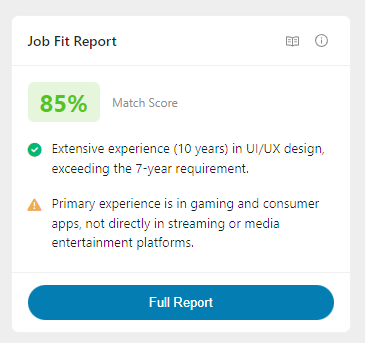
The Job Fit Report card in the Evaluate tab shows your match score and a preview of your key strength and gap. Click Full Report to access the complete analysis.
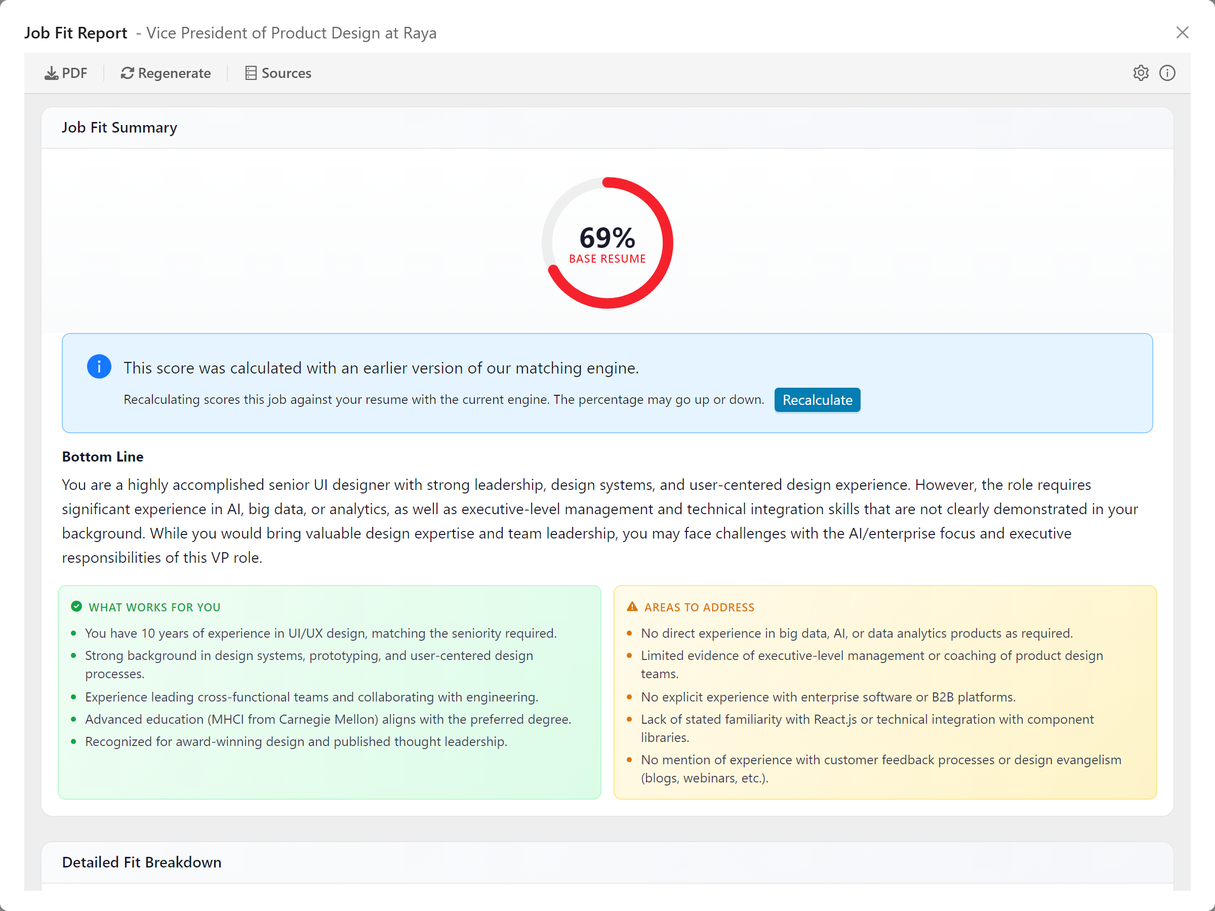
Job Fit Summary
The Job Fit Summary provides your overall matching score along with the pros and cons of your candidacy, helping you quickly assess whether to pursue an opportunity.
This overall matching score is calculated independently using AI analysis of your entire resume against the complete job description. It may differ from the individual aspect scores in the detailed assessment below, as it considers the holistic fit and job context in ways that individual metrics cannot capture.
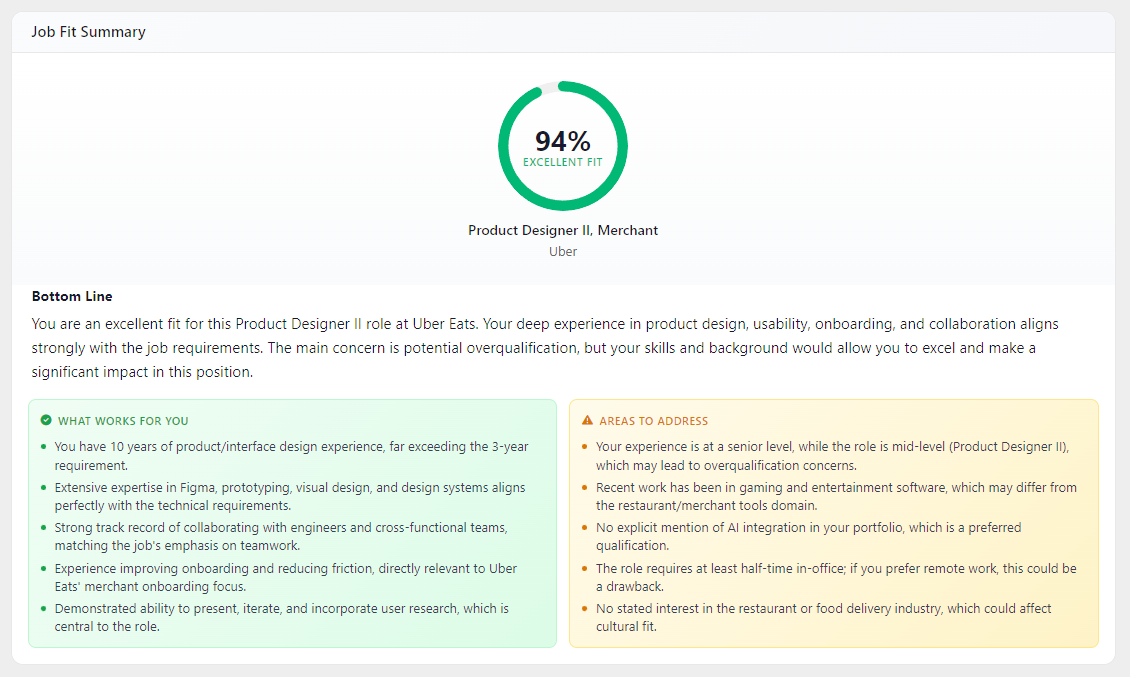
Overall Match Score
The match score is a 0-100 rating indicating how well your background aligns with the job. Your overall fit is calculated by analyzing your resume against the complete job description, considering factors like skills, experience, industry context, and career trajectory.
Score interpretation: - 🟢 Green (80-100%): Strong match - Apply with confidence - 🟠 Orange (70-79%): Good match - Qualified with some gaps to address - 🔴 Red (below 70%): Needs attention - Emphasize transferable skills or consider if the role is right for you
Important: The score is a starting point for your own evaluation, not a definitive verdict. AI analysis cannot capture all dimensions of your candidacy, such as personal connections, unique value you bring, or circumstantial factors. Your networking, customized materials, and interview performance can significantly influence outcomes.
Pros
Your key strengths for this specific role. The analysis identifies reasons you're a competitive candidate based on your resume and the job requirements:
- Direct experience - Relevant roles you've held
- Key skills - Technical and soft skills that match requirements
- Relevant achievements - Track record aligned with their goals
- Cultural fit indicators - Experience matching their environment
- Unique value - Background that differentiates you
How to use this section: - Lead with these strengths in your cover letter - Emphasize these points in networking conversations - Structure interview answers around these advantages
Cons
Potential gaps in your candidacy. The analysis identifies areas where you may not be a perfect match:
- Skill gaps - Required skills where your experience may be limited
- Experience differences - Years or depth of experience variations
- Industry transitions - Moving between different sectors
- Tool unfamiliarity - Specific technologies or platforms you haven't used
- Scope differences - Scale of responsibilities you've handled
How to use this section: - Determine if gaps are deal-breakers or manageable for you - Prepare explanations for how you'll address key gaps - Emphasize transferable skills and quick learning ability
Conclusion
A summary statement about your overall fit for the role. This provides a brief synthesis of your pros and cons, giving you context to make your own decision about whether to pursue the opportunity.
Use your own judgment alongside this analysis - you may have insights about the role, company, or your own experience that the AI cannot fully assess.
Detailed Fit Assessment
The Detailed Fit Assessment breaks down your match across specific job requirements, providing granular insights into different aspects of your fit.
These scores assess specific job requirements independently. They provide detailed insights into different aspects of your fit, but are calculated separately from the overall matching score above.
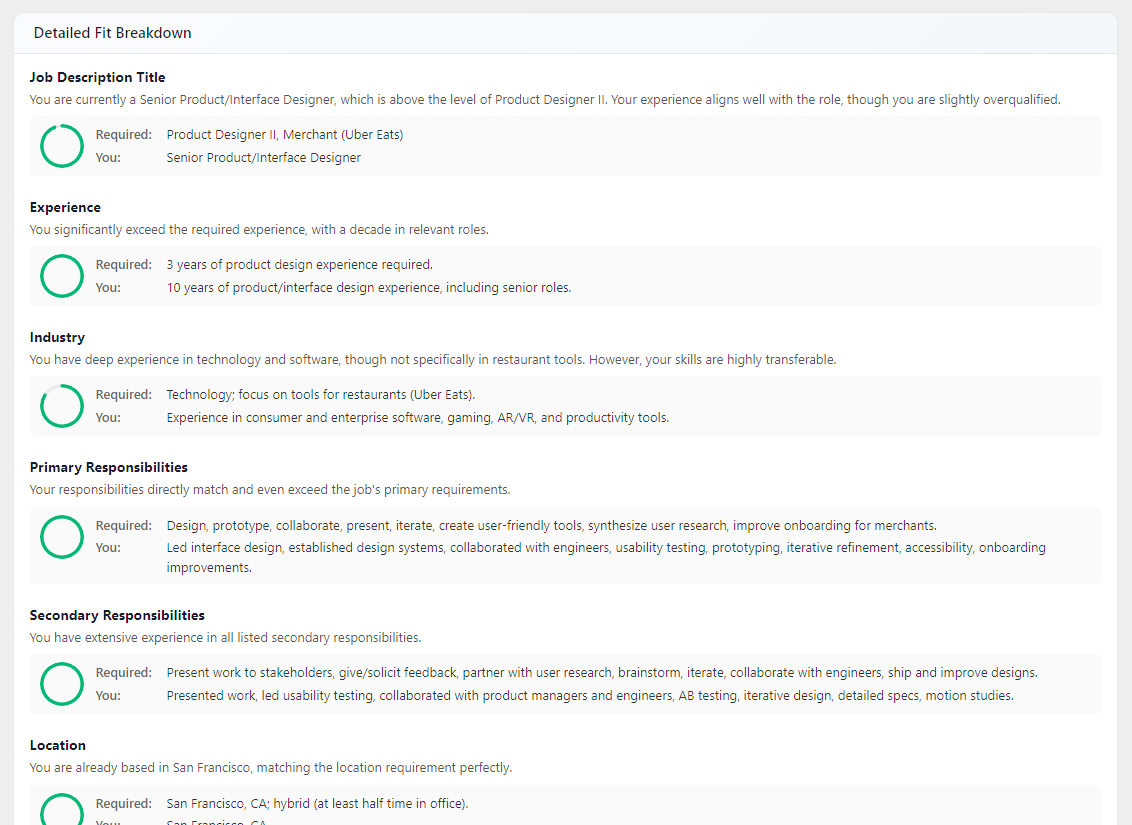
Understanding the Assessment Table
Each row in the detailed table evaluates a specific criterion:
| Column | Description |
|---|---|
| Score | Color-coded percentage showing your match on this specific criterion |
| Criteria | The evaluation dimension (e.g., Experience, Industry, Skills, Location) |
| Job Description | What the employer is looking for |
| You | Your relevant qualifications from your Base Resume |
| Explanation | AI analysis of how well you match and why |
Score Color Coding: - 🟢 Green (80%+) - Strong match, well-aligned - 🟠 Orange (70-79%) - Good match with some gaps - 🔴 Red (below 70%) - Significant gap to address
Common Criteria Evaluated
- Job Title - Does your current/past title align with the role?
- Experience - Years and depth of relevant experience
- Industry - Background in similar sectors
- Primary Responsibilities - Experience with core job duties
- Secondary Responsibilities - Supporting skills and tasks
- Location - Geographic fit and work arrangement
- Type of Job - Full-time, contract, employment type match
- Salary - Alignment with compensation expectations
- Qualifications - Degrees, certifications, credentials
- Skills - Technical and soft skills match
Use this detailed view to understand exactly where you're strong and where you may need to address gaps in your application materials.
Scoring with a Custom Resume
When you have a custom resume for a job, the Job Fit Report shows both your Base Resume score and your Custom Resume score side by side, so you can see exactly how tailoring your resume improved your fit.
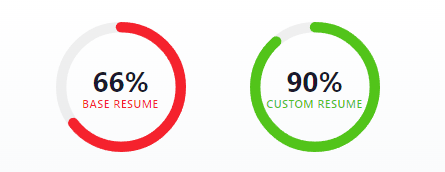
- Base Resume - Your match score calculated using your primary resume
- Custom Resume - Your match score calculated using the custom resume you created for this specific job
If no custom resume exists for the job, only the Base Resume score is displayed.
Regenerating with a Custom Resume
You can regenerate the entire Job Fit Report using your custom resume as the reference instead of your base resume. This recalculates the summary, pros/cons, and detailed assessment based on how your tailored resume matches the job.
To regenerate with a custom resume:
- Open the Job Fit Report modal from the Evaluate tab
- Click the Regenerate button in the toolbar
- In the regeneration dialog, expand the Advanced Options
- Under Resume, select Custom Resume (tailored for this job)
- Click Regenerate
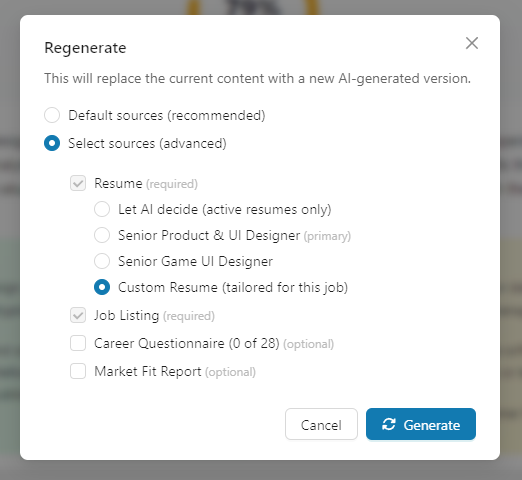
The report will be regenerated using your custom resume, and the scores will update to reflect the tailored content. This is useful for:
- Seeing how much your custom resume improved your fit
- Getting pros/cons analysis based on your tailored materials
- Verifying that your custom resume addresses the gaps identified in the original report
How to Use This Tool
Rapid Screening
When you're evaluating many opportunities:
- Check the match score first
- Use the color coding as a quick indicator
-
Review the Pros and Cons to understand the context behind the score
-
Skim Pros and Cons sections
- Do the pros excite you?
- Are the cons deal-breakers or manageable?
-
Consider factors the AI may not fully capture
-
Read the Conclusion
- Use it as additional context for your decision
-
Factor in your own knowledge about the role and company
-
Make your own decision based on all available information
- Your personal connections, motivation, and unique circumstances matter
- The AI provides data - you make the call
Application Preparation
For jobs you're pursuing:
- Study the Pros section thoroughly
- These become your cover letter talking points
- Structure your resume to highlight these strengths
-
Prepare examples that demonstrate these advantages
-
Develop gap-mitigation strategies
- For each significant Con, plan how you'll address it
- Identify transferable skills that compensate
-
Prepare 1-2 sentences explaining how you'll bridge gaps
-
Use the Detailed Fit Assessment for customization
- Review individual criteria scores to identify focus areas
- Use the "Job Description" column for keywords
-
Address specific gaps in your application materials
-
Cross-reference with other tools:
- Job Description - Verify AI interpretation matches your reading
- Company Report - Add cultural fit context
- Custom Resume - Generate materials emphasizing your strengths
Interview Preparation
Before interviews, revisit the Fit Report:
- Anticipate questions based on Cons
- Prepare confident explanations for gaps
- Have examples ready that show adjacent experience
-
Practice addressing weaknesses without defensiveness
-
Lead with strengths from Pros
- Open with your strongest fit areas
- Reference these advantages in answer examples
-
Reinforce what makes you a strong candidate
-
Review the Detailed Assessment
- Know exactly where you're strongest
- Be ready to discuss any areas with lower scores
- Have specific examples for each criterion
Tips & Best Practices
Understand What the Score Means
The match score provides one perspective on your fit - it's data for your decision-making, not a verdict:
- High scores don't guarantee interviews - Competition, timing, and luck matter
- Moderate scores can still lead to offers - Many successful hires come from the 60-75% range
- Lower scores aren't definitive - Personal connections and unique value can matter more
The score helps you: - Gain perspective on how your resume aligns with the job - Identify specific strengths and gaps to address - Prioritize where to invest your application time - Prepare more targeted application materials
AI Has Limitations
Keep in mind what AI analysis cannot fully capture:
- Personal connections - A referral can change everything
- Unique combinations - Rare experience mixes the AI may not recognize
- Cultural alignment - Your personality and work style fit
- Motivation and passion - Your genuine interest in the mission
- Circumstantial factors - Relocation willingness, timing, salary flexibility
- Growth potential - Your ability to learn and adapt quickly
Trust your own judgment when: - The role excites you despite a moderate score - You have insights the AI can't access - Your career goals make this role strategically important
Don't Let Gaps Paralyze You
Most successful candidates don't check every box:
Common misconceptions: - "I need to meet 100% of requirements" → 70% is often sufficient - "Missing one key skill disqualifies me" → Transferable skills and willingness to learn matter - "They want 10 years; I have 7" → Experience requirements are often flexible - "I've never used that exact tool" → Similar tools often transfer quickly
When gaps ARE serious: - Legal/certification requirements (can't be a doctor without medical license) - Core technical skills for specialized roles (can't be a data scientist without statistics knowledge) - Fundamental misalignment with role scope (entry-level candidate for C-suite role)
Use the Report to Improve Your Profile
As you review multiple Fit Reports, patterns emerge:
Skills that keep appearing: - Add them to your learning roadmap - Consider certifications or courses - Update your base resume to emphasize related experience
Experience gaps consistently noted: - Seek projects at current job to fill gaps - Highlight transferable experience more prominently - Adjust your target roles to better match your background
Responsibilities you lack: - Volunteer for relevant projects - Take on stretch assignments - Consider lateral moves to build needed experience
Compare Across Multiple Jobs
The Fit Report becomes more valuable when you have several:
Identify patterns: - Which types of roles consistently score higher for you? - What requirements appear in your top matches? - Where do you have the strongest alignment?
Refine your approach: - Focus on companies posting roles that fit you well - Adjust your Ideal Job criteria based on patterns - Learn from consistent gaps across multiple reports
Track your progress: - As you update your base resume, observe how scores change - Note which gaps you're addressing over time - See how your profile evolves
Update Your Base Resume Based on Insights
As you learn from Fit Reports:
- Add missing keywords that appear across target roles
- Emphasize experiences that consistently show up as Pros
- Reframe descriptions to address common Cons
- Quantify achievements in areas where you're strong
- Remove or de-emphasize irrelevant experience creating noise
Each improvement to your Base Resume makes future Fit Reports more favorable.
Frequently Asked Questions
Q: My match score is 82%, but I still feel underqualified. Should I apply?
A: An 82% score indicates strong alignment between your resume and the job requirements. Imposter syndrome is common - the data suggests you're well-qualified for the role.
Q: I scored 55% but I have a referral from someone on the team. Does that change things?
A: Referrals are a significant factor that AI cannot measure. Personal connections often matter more than match scores in hiring decisions.
Q: The report says I lack a required skill, but I have a very similar one. What should I know?
A: The AI analyzes based on your resume text. If you have related skills, emphasize them clearly in your application materials and highlight your ability to quickly learn adjacent tools.
Q: My score improved from 65% to 75% after updating my resume. Should I re-generate my custom materials?
A: Yes. The improved score reflects better alignment that the AI now recognizes. Regenerating your Custom Resume and Cover Letter will leverage this improved positioning.
Q: I disagree with the AI's assessment. What should I do?
A: Trust your own judgment. The AI works from your resume text - if your resume doesn't clearly convey something, consider updating it. You can also add notes to jobs explaining your perspective.
Q: Can I see how my score compares to other applicants?
A: No - the score is based on job requirements analysis, not comparison to other candidates. It reflects alignment between your resume and the job description.
Q: How often does the match score change?
A: The score is calculated once when the job is added to your tracker. It does not automatically recalculate when you update your resume or the job description changes. To get an updated analysis, use the Regenerate button in the Job Fit Report to manually recalculate the scores. If you have a custom resume, both the Base Resume and Custom Resume scores are displayed.
Q: What is the difference between the Base Resume and Custom Resume scores?
A: The Base Resume score reflects how your primary resume matches the job. The Custom Resume score uses the tailored resume you created for that specific job. The custom score is typically higher because the resume was written to address the job requirements directly.
Q: The Pros list is short but the Cons list is long. What does that mean?
A: List lengths vary based on the job and your background. Focus on the overall score and conclusion - sometimes a few strong pros outweigh multiple minor cons.
Related Topics
- Evaluate Overview - Overview of the Evaluate tab
- Job Description - View the original requirements analyzed by this report
- Company Report - Understand the employer's culture and values
- Custom Resume - Create materials highlighting your Pros
- Custom Cover Letter - Address gaps and emphasize fit
- Networking Targets - Build relationships to offset moderate scores
- My Base Resume - Update your profile to improve future scores
The Job Fit Report provides data and insights to support your job search decisions. Use it alongside your own judgment, knowledge of the company, and personal circumstances to determine which opportunities deserve your time and energy.