Company Report
The Company Report provides employer intelligence including company overview, employee ratings and reviews, recent news, and similar companies. Before you apply or interview, you can quickly understand the company's culture, employee sentiment, and recent developments - helping you make informed decisions and prepare better for conversations.
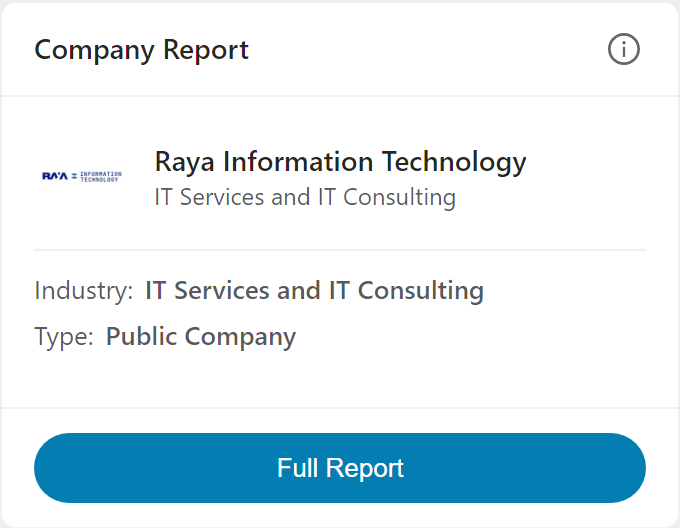
The Company Report card in the Evaluate tab shows the company name, logo, industry, introduction, and employee ratings at a glance. Click Full Report to access comprehensive employer information.
What You'll See
Company Overview
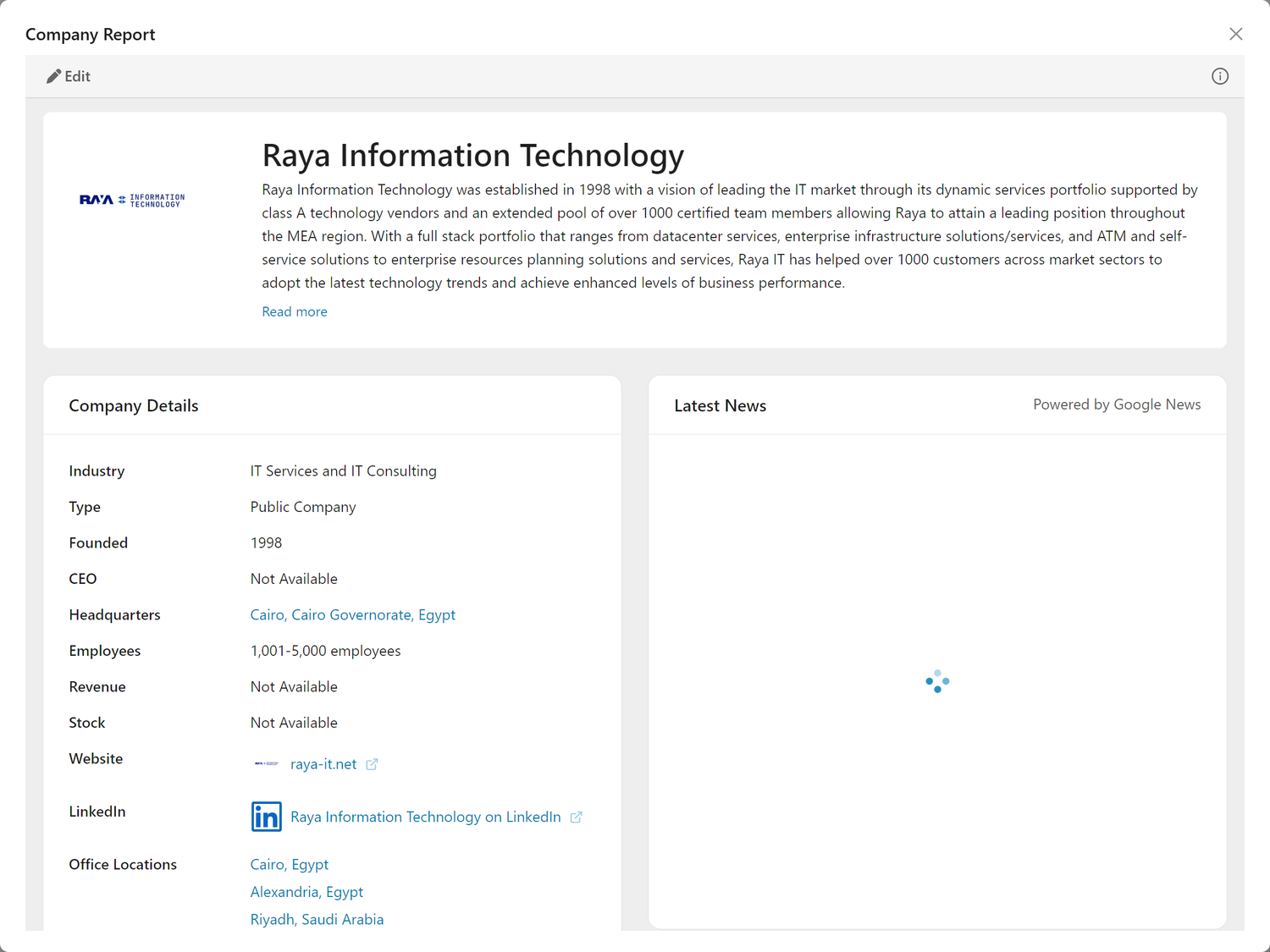
The Company Overview displays essential facts about the employer including company name, industry, description, headquarters location, employee count, founding date, and links to their website and LinkedIn.
The overview section includes:
- Company Name & Logo - Visual identification and branding
- Slogan - The company's tagline or positioning statement
- About Us - Description of what the company does
- Industry - The sector they operate in
- Specialties - Specific areas of focus or expertise
- Headquarters - Location with link to Google Maps
- Website - Direct link to company website
- LinkedIn - Link to company LinkedIn profile
- Founded - Year the company was established
- Type - Company structure (public, private, etc.)
- Employees - Estimated employee count
Note: Company details may not be available for all employers, particularly smaller companies, startups, or organizations with limited public information.
Employee Ratings
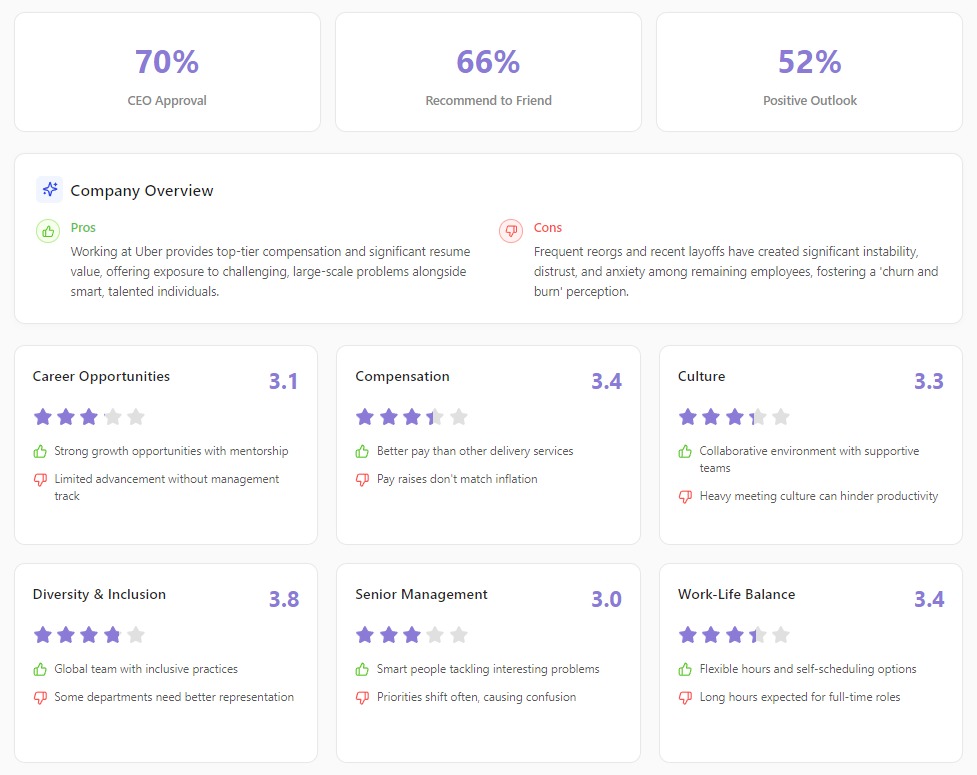
The Employee Ratings section displays aggregated employee ratings and review summaries, showing how current and former employees rate the company across multiple dimensions, enhanced with AI-generated pros and cons summaries.
Important: These ratings and summaries are aggregated from public review sources and are intended as a general indication of employee sentiment only. For more detailed, nuanced feedback (including reviews filtered by location, department, role type, and time period), we recommend visiting dedicated review platforms like Glassdoor, Indeed, Trustpilot, or similar sites directly.
Key Metrics: - Recommend to Friend - Percentage who would recommend working there - Positive Outlook - Percentage with positive business outlook
Company Overview: At the top, you'll see a high-level summary of what it's like to work at this company: - Pros - Key advantages of working at this employer, synthesized from employee reviews - Cons - Notable drawbacks or challenges employees have mentioned
Category Ratings with Pros & Cons: Each category shows a 1-5 star rating with the exact score, plus AI-generated summaries highlighting specifics:
- Career Opportunities - Growth and advancement potential
- Pro example: "Strong growth opportunities with mentorship"
-
Con example: "Limited advancement without management track"
-
Compensation - Pay and benefits satisfaction
- Pro example: "Competitive salary with excellent benefits"
-
Con example: "Pay raises don't match inflation"
-
Culture - Company culture and values
- Pro example: "Collaborative environment with supportive teams"
-
Con example: "Corporate structure slows decision making"
-
Diversity & Inclusion - DEI practices and environment
- Pro example: "Global team with inclusive practices"
-
Con example: "Some departments need better representation"
-
Senior Management - Leadership quality
- Pro example: "Clear vision with structured systems"
-
Con example: "More listening to technical staff needed"
-
Work-Life Balance - Balance between work and personal life
- Pro example: "Flexible hybrid schedule with good PTO"
- Con example: "Demanding workload during peak periods"
Why this matters: The pros and cons give you specific talking points for interviews and help you understand what current and former employees actually experience. Instead of just seeing a "3.5" work-life balance score, you'll know why employees rated it that way.
Important: Review sites can skew negative since unhappy employees are more likely to write reviews. Look for patterns across many reviews rather than focusing on individual scores. Use these summaries as one data point among many in your research, and consult the original review platforms for detailed context.
Latest News
The Latest News section shows recent news articles about the company, powered by Google News, helping you stay informed about developments that may affect your application or interview.
Each news article displays: - Article title - Clickable link to the full article - Thumbnail image - When available - Snippet - Brief excerpt from the article - Source and date - News outlet and publication time
Types of news to look for:
Positive signals: - Funding announcements - Product launches - Expansion news - Awards and recognition - Leadership hires
Potential concerns: - Layoff announcements - Legal issues - Executive departures - Negative press coverage
Use recent news to: - Mention positive developments in your cover letter - Prepare informed questions for interviews - Assess company stability and trajectory
Note: News results may not always be available for all companies. Additionally, you may occasionally see news articles that are not directly related to the company. This can happen when companies have similar names or when a company name contains common words - the news search may return articles mentioning those words in a different context. Always verify that news articles are actually about the employer you're researching.
Similar Companies
The Similar Companies section shows related organizations in the same industry or space, helping you discover other potential employers and understand the competitive landscape.
Each similar company displays: - Company name - Company logo (when available) - Industry - Location
This helps you: - Discover other companies to research - Understand who the employer competes with - Expand your job search to related organizations
Note: Similar companies may not be available for all employers, particularly for niche industries or companies with unique business models.
How to Use This Tool
Quick Research
When first evaluating a job:
- Review the Overview - Understand basic facts
- Company size and industry
- Location and whether it works for you
-
How long they've been around
-
Check the Ratings - Get a sense of employee sentiment
- Overall rating as a quick indicator
- Read the Company Overview pros and cons for a quick summary
- Category ratings for areas you care about (work-life balance, career opportunities, etc.)
- Pros and cons for each category explain why employees rated it that way
-
Percentage metrics for recommendations and outlook
-
Scan the News - Any recent developments?
- Positive news like funding or product launches
- Concerning news like layoffs or controversies
-
Recent activity suggests an active, growing company
-
Explore Similar Companies - Expand your search
- Discover related employers in the same space
- Consider adding similar companies to your job search
Application Preparation
Before customizing your cover letter:
- Find talking points from the news
- Recent company achievements to mention
- Product launches or milestones
-
Industry recognition
-
Reference in your cover letter
- "I was excited to see your recent [news item]"
-
"Your work in [specialty area] aligns with my experience in..."
-
Prepare for "Why this company?"
- Use specific facts from the overview
- Reference recent news or developments
- Show you understand their industry and specialties
Interview Preparation
Before interviews:
- Know the basics
- Company size, founding date, headquarters
- Industry and specialties
-
Recent news to reference
-
Understand employee sentiment
- Overall rating and what it suggests
- Read the Company Overview pros and cons for quick context
- Strongest and weakest category ratings with their specific pros/cons
-
Prepare to ask about areas with lower scores or concerning cons
-
Prepare informed questions
- "I saw [news item] - how has that affected the team?"
- "The ratings mention [topic] - can you tell me more about that?"
- Reference their specialties and ask about specific projects
Tips & Best Practices
Cross-Reference Multiple Sources
The Company Report provides a high-level summary; always supplement with detailed research from primary sources:
- Review platforms - Visit Glassdoor, Indeed, Trustpilot, or Comparably to read full review text, filter by location, role, or date, and see detailed breakdowns
- LinkedIn - Check employee profiles, tenure patterns, growth trends
- Company website - Mission, values, recent blog posts
- News search - More recent articles beyond what's shown
- Social media - Company culture and engagement style
Interpreting Ratings
Understanding rating scores (1-5 scale): - 4.0+ - Generally positive sentiment - 3.5-3.9 - Mixed reviews, worth investigating specific concerns - 3.0-3.4 - Notable issues; research what's driving lower scores - Below 3.0 - Significant concerns; network to understand why
Category ratings matter: - Focus on categories that matter most to you - Read the pros and cons to understand why a category scores high or low - A company with high work-life balance but low career opportunities may or may not fit your priorities - Low senior management scores often indicate organizational challenges - Use specific cons as interview questions (e.g., "I've heard work-life balance can be challenging during peak periods; how does the team manage that?")
Keep in mind: - Ratings reflect past and current employees' experiences - Recent changes (new leadership, layoffs, growth) may not yet be reflected - Unhappy employees are more likely to leave reviews
Using News Effectively
In your cover letter: - Reference recent positive news to show you've done research - Connect news to your relevant experience
In interviews: - Ask informed questions about recent developments - Show you understand the company's current context
For your decision: - Multiple negative news items over time may indicate patterns - Single negative events aren't necessarily disqualifying
Correcting the Company
Sometimes the Company Report shows the wrong company or is empty because the system couldn't identify the correct employer from the job listing. This can happen when: - The job posting uses a subsidiary name instead of the parent company - The company name is abbreviated or stylized differently - The listing was posted by a staffing agency - The company has a common name that matches multiple organizations
To fix this:
- Click Edit in the Company section
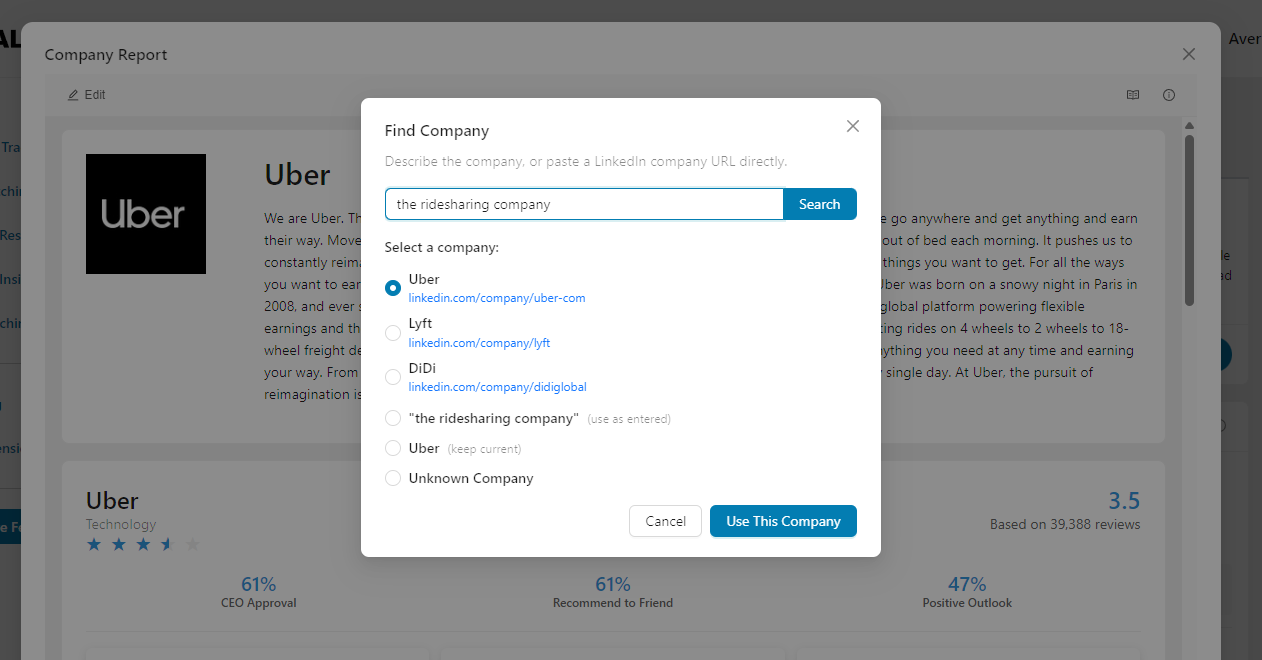
- The Find Company dialog opens with an AI-powered search
- Describe the company in the search field - you can enter:
- The company name (e.g., "Oracle")
- A domain (e.g., "stripe.com")
- A description (e.g., "fintech San Francisco")
- Click "Search" to find matching companies
- Select from the available options:
- LinkedIn matches - Companies found on LinkedIn with their profile URL displayed. Click the URL to verify it's the correct company before selecting.
- Use as entered - Use your search text directly as the company name (useful when no LinkedIn match exists)
- Keep current - Keep the existing company name (only shown if there's already a company assigned)
- Unknown Company - Mark the company as unknown if you can't identify it
- Click "Use This Company" to confirm your selection
- The report will regenerate with the correct company information
Tips for finding the right company: - Be as specific as possible - include location, industry, or what the company does - If you know the domain (e.g., "acme.com"), enter that directly - For common company names, add distinguishing details (e.g., "Apple the tech company" vs. "Apple Records") - If the first search doesn't find the right match, try adding more context - Always verify by clicking the LinkedIn URL before confirming your selection
Alternative method via Job Description: You can also update the company from the Job Description: 1. Click Edit in the Job Description section 2. Navigate to the Job Details tab 3. Click the Find button next to the Company field 4. Use the same AI-powered search to find and select the correct company
Frequently Asked Questions
Q: The Company section shows "Company info not available". What happened?
A: The system couldn't identify the company from the job listing. This can happen when:
- The company name in the job posting is misspelled or abbreviated
- The listing was posted by a staffing agency rather than the actual employer
- The company is very new or has limited online presence
To fix this, click Edit in the Company section and use the AI-powered search to find the correct company. See Correcting the Company for detailed instructions.
Q: The company has a 3.2 rating. Should I avoid it?
A: Not necessarily. A 3.2 rating suggests mixed reviews - some positive, some negative. Look at the category breakdowns to see which areas are strong and which are weak. For more context, check detailed reviews on Glassdoor, Indeed, or Trustpilot filtered by role and location, and network with current employees to get the real story beyond the numbers.
Q: I don't see any ratings for the company. What does that mean?
A: Ratings data isn't available for all companies. This is common for:
- Smaller companies with few employees
- Newer companies
- Companies that haven't been reviewed much on public platforms
Use other sources like LinkedIn, Glassdoor, Indeed, the company website, and networking to learn more.
Q: The news section is empty. Is that a problem?
A: Not necessarily. Smaller companies or those in less newsworthy industries may not have recent Google News coverage. You can search for news directly or check the company's own news/blog section on their website.
Q: The news articles don't seem related to the company. Why?
A: This is a known limitation. When a company has a common name or shares words with other organizations, the news search may return unrelated articles. For example, a company named "Summit Technologies" might show news about mountain summits or other "Summit" companies. Always verify that articles are actually about the employer you're researching before referencing them.
Q: How recent is the ratings data?
A: The ratings are aggregated from public review sources and reflect reviews submitted over time. The overall score is an aggregate of all reviews. Recent company changes (new leadership, layoffs, etc.) may take time to be reflected in the ratings. For the most current reviews, visit platforms like Glassdoor or Indeed directly and filter by date.
Q: The Company Report is showing the wrong company. How do I fix it?
A: Click Edit in the Company section. In the Find Company dialog, search for the correct company using its name, website domain, or description. Review the options presented: you can select a LinkedIn match, use your search text directly, keep the current company, or mark it as unknown. Click "Use This Company" to update the report. See Correcting the Company for more details.
Q: What are the pros and cons summaries in the ratings section?
A: Each rating category now includes AI-generated summaries that highlight the key positives and negatives employees mention. For example, a "Compensation" rating might show "Competitive salary with excellent benefits" as a pro and "Pay raises don't match inflation" as a con. These give you specific talking points for interviews and help you understand what's behind the numeric score.
Q: What do the percentage metrics mean (Recommend to Friend, Positive Outlook)?
A: These show what percentage of employees:
- Recommend to Friend - Would recommend the company as a place to work
- Positive Outlook - Have a positive view of the company's business direction
Higher percentages generally indicate better employee sentiment.
Q: How should I use the Similar Companies section?
A: Similar Companies helps you:
- Discover other employers in the same space to research
- Expand your job search to related organizations
- Understand the competitive landscape before interviews
Consider adding similar companies to your job tracker if they're hiring for roles that match your interests.
Q: Can I see more details about the ratings?
A: The Company Report shows aggregated ratings and AI-generated summaries intended as a general indication of employee sentiment. For individual review text, detailed breakdowns by location or role, and more nuanced feedback, visit review platforms like Glassdoor, Indeed, Trustpilot, or Comparably directly by searching for the company name.
Q: How do I bring up negative news in interviews?
A: Frame it professionally:
- "I noticed [news item] - can you help me understand how that's affecting the team?"
- "I saw some changes recently - what's the vision for the path forward?"
Show informed curiosity rather than being accusatory.
Related Topics
- Evaluate Overview - Overview of the Evaluate tab
- Job Description - Understand the specific role context
- Job Fit Report - Assess your match for this role
- Job Insights - AI-extracted job details
The Company Report helps you avoid surprises, demonstrate genuine interest, and make informed decisions about where to invest your career energy. Use it to research thoroughly, but validate through networking conversations to get the full picture.