Job Insights Overview
Job Insights displays comprehensive job details extracted and organized by AI, giving you a structured view of the role's key attributes (from compensation and work arrangement to required skills and benefits) so you can quickly understand what the opportunity entails.
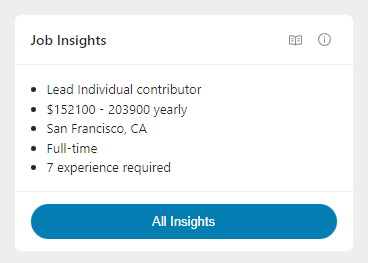
The Job Insights card in the Evaluate tab shows a summary of the most important job attributes. Click All Insights to access the full modal with comprehensive details.
What You'll See
Summary Card
The Job Insights card displays up to five key insights as bullet points:
- Role and Level - e.g., "Senior Product Designer"
- Compensation - Salary range when available
- Work Arrangement - e.g., "Hybrid in San Francisco, CA"
- Employment Type - e.g., "Full-time"
- Experience Required - e.g., "5+ years experience required"
Click All Insights to see the complete breakdown.
Full Insights Modal
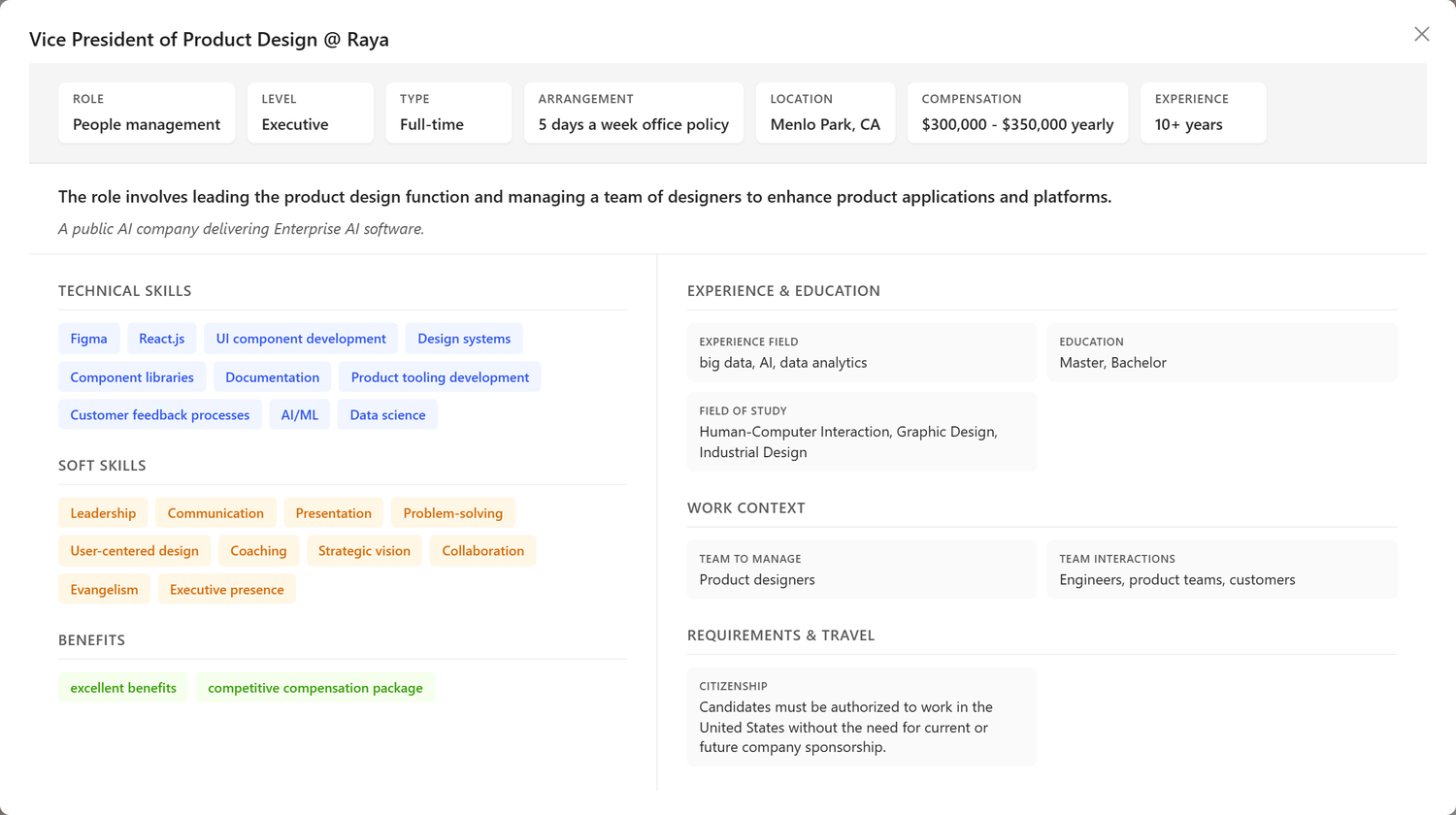
The full modal provides a comprehensive view organized into sections:
Key Details (Top Section)
Essential job attributes displayed as easy-to-scan badges:
| Attribute | Description |
|---|---|
| Role | The type of role (e.g., Individual Contributor, Manager) |
| Level | Seniority level (e.g., Senior, Lead, Principal) |
| Type | Employment type (e.g., Full-time, Contract) |
| Arrangement | Work arrangement (e.g., Remote, Hybrid, On-Site) |
| Flexibility | Any flexibility mentioned (e.g., "Flexible hours") |
| Location | Where the role is based |
| Compensation | Salary range with period (yearly, monthly, hourly) |
| Experience | Required years of experience |
| Listed | When the job was posted |
| Apply Before | Application deadline (if specified) |
Job Summary
A brief AI-generated description of what the role involves and a short overview of the hiring organization.
Skills & Requirements (Left Column)
Key Responsibilities - Main duties and tasks extracted from the job posting.
Technical Skills - Required technical skills, tools, and technologies.
Soft Skills - Required soft skills and interpersonal abilities.
Personality Traits - Desired personality characteristics or work style attributes.
Certifications - Required or preferred certifications.
Languages Required - Language requirements for the role.
Benefits - Benefits mentioned in the job posting (health, retirement, PTO, etc.).
Context & Details (Right Column)
Experience & Education: - Experience field - Domain or industry experience required - Education - Preferred degree level - Field of Study - Preferred educational background
Work Context: - Team to Manage - Size of team you'd manage (if applicable) - Team Interactions - Who you'll work with - Working Hours - Expected hours per week - Schedule - Work schedule details - Remote Timezone - Timezone requirements for remote work - Preferred Language - Communication language preference
Requirements & Travel: - Citizenship - Citizenship requirements (if any) - Security Clearance - Clearance requirements (if any) - Visa Sponsorship - Whether visa sponsorship is available - Driver's License - Whether a driver's license is required - Travel Required - Whether the role requires travel - Travel Frequency - How often travel is expected - Travel % - Percentage of time spent traveling
Application Info: - How to Apply - Instructions for applying - Contact - Point of contact for the position
How to Use This Tool
Quick Assessment
When first evaluating a job:
- Review the summary card for key attributes
- Does the compensation match your expectations?
- Is the work arrangement acceptable?
-
Does the experience level fit your background?
-
Click All Insights to see the full breakdown
- Scan the skills lists for alignment with your background
- Check requirements you must meet (citizenship, certifications)
-
Review benefits to understand the full compensation picture
-
Use for quick go/no-go decisions
- Deal-breakers become obvious quickly
- Important requirements are highlighted
- No need to re-read the entire job description
Application Preparation
Before customizing your resume and cover letter:
- Mine the skills sections for keywords
- Technical skills should appear in your resume
- Soft skills can guide your cover letter tone
-
Responsibilities help you highlight relevant experience
-
Address special requirements proactively
- If security clearance is required, mention your status
- If travel is expected, confirm your availability
-
If specific certifications are listed, highlight yours
-
Use benefits in your decision-making
- Evaluate the full compensation package
- Consider work-life balance factors
- Factor in growth opportunities mentioned
Interview Preparation
Before interviews:
- Review responsibilities thoroughly
- These become the basis for behavioral questions
- Prepare examples for each key responsibility
-
Understand the scope of what you'd do day-to-day
-
Understand the work context
- Who will you work with? Prepare questions about the team
- What's the schedule like? Clarify expectations
-
Is there travel? Know your flexibility
-
Prepare questions from the details
- Ask about benefits not fully explained
- Clarify work arrangement specifics
- Inquire about growth opportunities
Tips & Best Practices
Use Insights for Comparison
When evaluating multiple opportunities:
- Compare compensation across similar roles
- Compare requirements to see which roles fit best
- Compare benefits as part of total compensation
- Track patterns in what employers want
Not All Fields Will Be Populated
Job postings vary in completeness:
- Some fields may show "N/A" - The information wasn't in the posting
- Sparse postings are common - Especially from smaller companies
- Missing information isn't a red flag - But may warrant questions in interviews
Cross-Reference with the Job Description
The Job Insights are extracted from the posting, but:
- Read the full description for context and nuance
- Verify important details by checking the source
- AI extraction isn't perfect - Use your judgment
Use Alongside Other Tools
Job Insights works best with:
- Job Description - Full posting with profile match highlighting
- Job Fit Report - How well you match the requirements
- Company Report - Context about the employer
Frequently Asked Questions
Q: Where does this information come from?
A: Job Insights are extracted by AI from the original job posting. The AI analyzes the text to identify and categorize key details like compensation, requirements, and benefits.
Q: Why is some information missing or showing "N/A"?
A: Not all job postings include every detail. If information wasn't in the original posting, it will show as "N/A" or be omitted. This is common: many employers don't include salary ranges or detailed benefits in postings.
Q: Can I edit the Job Insights?
A: Job Insights are automatically extracted and cannot be directly edited. However, you can edit the job description itself through the Job Description editor, which may affect what the AI extracts.
Q: Why doesn't the compensation match what I see elsewhere?
A: The AI extracts compensation from the job posting text. If the posting is vague or uses unusual formatting, the extraction may not be accurate. Always verify compensation through the original posting or during the interview process.
Q: Some skills listed seem inaccurate. What should I do?
A: AI extraction isn't perfect. Use the skills as a starting point, but always refer to the full job description for accuracy. Focus on the skills you can clearly verify from the posting.
Q: How is this different from the Job Fit Report?
A: Job Insights shows what the job requires (extracted from the posting). The Job Fit Report shows how well you match those requirements (analyzed against your resume). Use both together for a complete picture.
Q: Is the compensation shown the final offer I should expect?
A: No. Posted compensation is typically a range, and actual offers depend on your experience, negotiation, and other factors. Use this as a reference point, not a guarantee.
Q: Why do I see different information here than in the job posting?
A: The AI normalizes and categorizes information from free-text postings. Some interpretation is involved. If something seems off, check the original job description for the authoritative text.
Related Topics
- Evaluate Overview - Overview of the Evaluate tab
- Job Description - Full job posting with profile match highlighting
- Job Fit Report - Your match analysis
- Company Report - Employer research
Job Insights transforms unstructured job postings into organized, scannable information, helping you quickly understand what each opportunity offers and requires so you can make informed decisions about where to invest your time.