Speculative Roles
A speculative role is a hypothetical job position that you create at a company. It's a role that isn't publicly posted but that you believe should exist based on the company's needs and your capabilities. Instead of waiting for the perfect job listing to appear, you define the position yourself and approach the company with a concrete proposal.
This is one of the most powerful strategies for accessing the hidden job market, the 70–85% of roles that are never publicly advertised. Many companies hire for positions that were never formally posted, especially when a strong candidate presents a compelling case.
How to Access
Speculative roles are created from within Target Companies:
- Navigate to Target Companies in the left sidebar
- Select a company from your list
- Click "Create a Speculative Role" in the company detail header
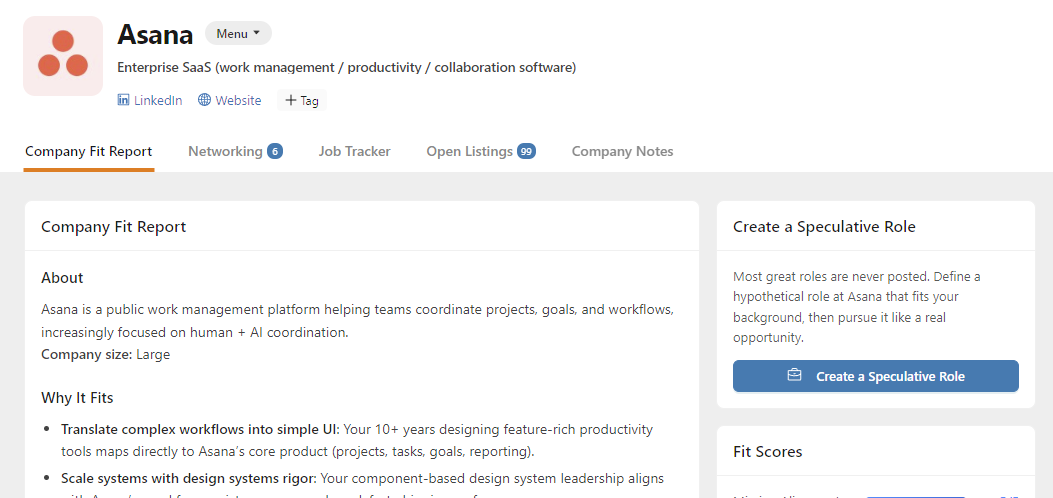
Prerequisite: The company must be enriched with AI insights before you can create a speculative role. If the button is disabled, wait for enrichment to complete.
Subscription required: Creating speculative roles requires an active subscription.
The Creation Process
Creating a speculative role is a guided, AI-assisted process with three main steps.
Step 1: Choose a Role Direction
When you click "Create a Speculative Role," AI analyzes your resume, career goals, and the company's profile to suggest 3 role options. Each option includes a title and a brief description.
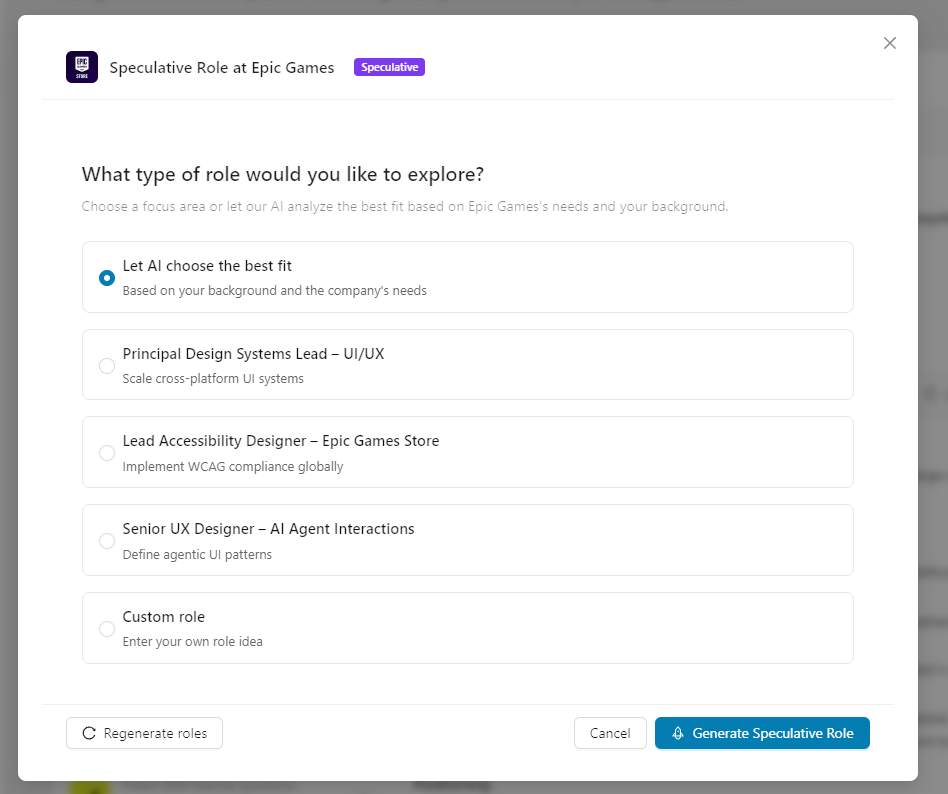
You have four choices:
- Let AI choose the best fit: AI selects the role it considers strongest for your profile
- Pick one of the 3 suggestions: Choose the option that resonates most with you
- Enter a custom role: Type your own role title if you have something specific in mind
- Regenerate: Click "Regenerate roles" to get a fresh set of 3 suggestions
Step 2: AI Generates the Full Role Document
After you select a direction, AI creates a comprehensive role document. This takes about 15–30 seconds. A progress indicator shows the generation stages:
- Analyzing company insights
- Generating role description
- Personalizing for your profile
Step 3: Review and Edit
The generated document appears in a rich text editor where you can review and refine it before saving.
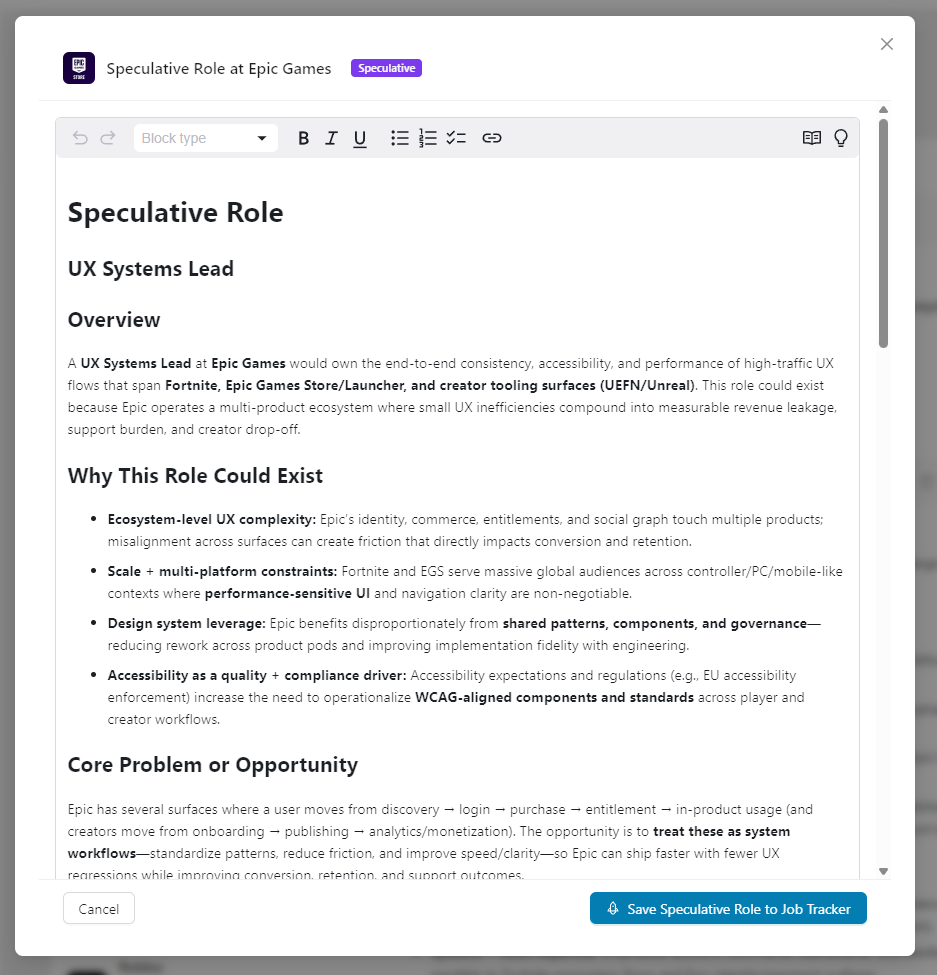
The document includes these sections:
| Section | What It Covers |
|---|---|
| Role Title | A concise 2–5 word title for the position |
| Overview | A brief summary of the role and its purpose |
| Why This Role Could Exist | Evidence-based reasons the company might need this position |
| Core Problem or Opportunity | The business challenge or opportunity the role would address |
| What Success Might Look Like | Concrete outcomes for the first 6–12 months |
| Scope and Responsibilities | Key areas of ownership and day-to-day focus |
| Why This Role Aligns With My Background | How your specific experience maps to the role's needs |
| Relevant Stakeholders to Engage | Specific titles and departments to connect with |
| Suggested Next Steps | Actionable steps to pursue this opportunity |
You can edit any part of the document using the formatting toolbar (headings, bold, italic, lists, etc.). Take time to refine the content, as this document will inform your Custom Resume, Cover Letter, and Interview Prep.
Saving to Job Tracker
When you're satisfied with the document, click "Save Speculative Role to Job Tracker." The role is saved as a job opportunity in your Job Tracker and placed in the Not Started stage.
Once saved, several things happen automatically:
- Cover Letter generation begins: Tailored to the speculative role
- Contact discovery starts: AI searches for relevant stakeholders and decision-makers at the company (not generic peers, but the specific people who could champion this type of role)
- Company data is linked: The role connects back to the source company in Target Companies
Speculative Roles in the Job Tracker
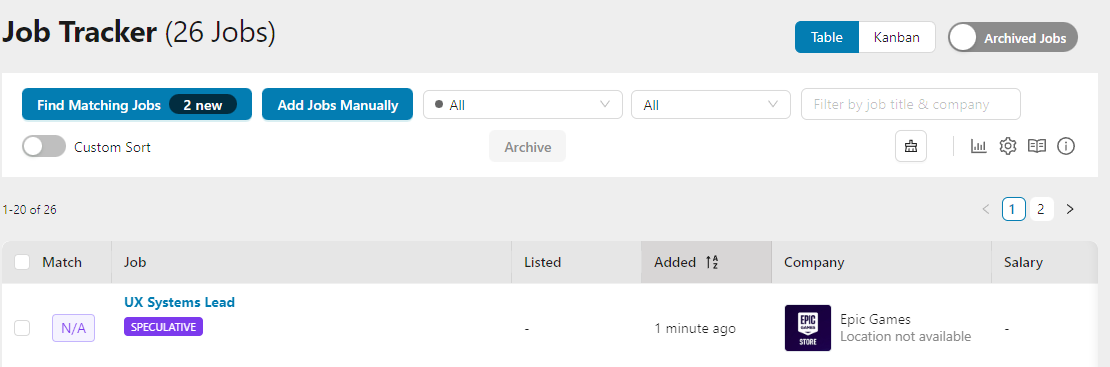
Speculative roles appear alongside your regular job listings in all Job Tracker views (Table, Kanban, and Split View) with a few visual distinctions:
Visual Differences
- Purple "SPECULATIVE" tag: Clearly marks the role as hypothetical, not a real posting
- Match score shows "N/A": Since there's no real job description to compare against, the match percentage is replaced with "N/A" in purple
Available Tools
Once a speculative role is in your Job Tracker, you can use all the standard job tools. Each tool automatically adapts its output based on the exploratory nature of the opportunity:
| Tool | How It Adapts for Speculative Roles |
|---|---|
| Custom Resume | Emphasizes transferable skills, versatility, and breadth of experience rather than keyword-matching. Positions you for exploratory conversations instead of formal applications. |
| Cover Letter | Generates an exploratory outreach letter with tone like "I'm exploring opportunities" instead of "I'm applying for." Focuses on starting a conversation and expressing genuine professional interest. |
| Interview Prep | Generates an "Exploratory Conversation Guide" instead of interview prep. Lists people to reach out to (not interviewers), and frames questions around curiosity and discovery rather than proving qualifications. |
| Networking Targets | Prioritizes stakeholders and decision-makers who could validate or champion this type of role. Extracts contacts from the "Relevant Stakeholders to Engage" section of your role document. |
| Custom Outreach | Uses a relationship-building tone focused on genuine curiosity. Suggests coffee chats and brief conversations rather than job referral requests. |
| Notes | Track your progress, conversations, and next steps |
What's Different
- No fit score: Speculative roles don't receive an AI fit score since there's no posted job description to compare against
- Contact discovery is tailored: Instead of finding peers and seniors, AI searches for domain experts and gatekeepers who would be involved in creating or approving a role like this
- Cover letter tone: Generated cover letters are framed as proactive proposals rather than applications
- Interview prep becomes exploration prep: The entire framing shifts from "proving fit" to "learning and discovery"
When to Use Speculative Roles
Speculative roles are most effective in these situations:
- The company isn't actively hiring: You've identified a company you'd love to work for, but they have no open positions that match your skills
- No posted roles fit your profile: The company is hiring, but none of their current openings align with what you offer
- You want to pitch yourself proactively: Instead of a vague "I'm interested in your company" message, you approach with a concrete role proposal
- During informational interviews: Having a specific role concept to discuss makes conversations more focused and productive
- After networking events: You met someone from a target company and want to follow up with a substantive proposal
- When a company is growing: Fast-growing companies often need roles they haven't defined yet
Tips for Success
Crafting a Strong Speculative Role
- Be specific: "VP of AI-Powered Customer Experience" is stronger than "Senior Manager"
- Solve a real problem: Ground the role in observable business needs (hiring trends, product launches, market expansion)
- Edit the AI output: The generated document is a strong starting point; personalize it with your knowledge of the company
- Research the company: The more you know about their challenges, the more compelling your proposal
Pitching to the Company
- Lead with value: Frame the conversation around what you can do for them, not what you want
- Use the Suggested Next Steps: The generated document includes specific people to contact and ways to approach them
- Prepare supporting materials: Generate a Custom Resume and Cover Letter specifically tailored to the speculative role before reaching out
- Start with networking: Don't lead with your pitch on the first outreach; build rapport first
Making the Most of the Feature
- Create multiple roles at different companies: Don't put all your effort into one speculative role; explore several options
- Revisit and refine: If initial outreach doesn't land, edit the role based on what you learned from conversations
- Combine with Target Companies insights: Use the Networking Strategy from your company insights to identify who to approach
Frequently Asked Questions
Q: How many speculative roles can I create?
A: There's no limit. You can create multiple speculative roles across different companies.
Q: Can I create more than one speculative role at the same company?
A: Yes. You might identify multiple positions that could exist at the same company. Each one is saved as a separate entry in your Job Tracker.
Q: What information does AI use to generate the role?
A: AI considers your resume, career goals, the company's industry and size, the AI-generated company insights (why you fit, positioning advice, networking strategy), and current market trends.
Q: Can I edit the generated document after saving?
A: You can fully edit the document in the rich text editor before saving. After saving to the Job Tracker, the role description is stored as the job description for that opportunity.
Q: Why is the "Create a Speculative Role" button disabled?
A: The company must be enriched with AI insights first. This happens automatically when you add a company. If enrichment hasn't completed yet, wait a moment and refresh.
Q: How is a speculative role different from Manual Entry?
A: Manual Entry is for adding a real job you already know about (from a career fair, a referral, etc.) where you enter the details yourself. Speculative Roles are AI-generated hypothetical positions created for companies where no suitable role is currently posted. The AI crafts a complete role document based on your skills and the company context.
Q: Do speculative roles affect my Job Tracker statistics?
A: Speculative roles appear in your Job Tracker and count in your pipeline, but they show "N/A" for match scores and don't factor into average fit score calculations.
Q: What's the best way to approach a company with a speculative role?
A: Start by identifying the right contacts using the Networking Targets tool (which adapts to find stakeholders relevant to your proposed role). Build rapport through networking before pitching. When ready, use your Custom Resume and Cover Letter, both tailored to the speculative role, as supporting materials.
Q: Is this feature free?
A: Creating speculative roles requires an active subscription. Saving and managing companies in Target Companies is free for all users.
Q: Can I convert a speculative role into a real job if the company actually posts the position?
A: The speculative role stays as-is in your Job Tracker. If the company posts a real position, add it separately through normal channels (AI Job Search, Chrome Extension, or Manual Entry). You'll have a head start since you've already prepared materials for a similar role at that company.
Related Topics
- Target Companies: Discover and manage target companies (entry point for speculative roles)
- Market Fit Report: Generate sector intelligence that helps identify the right companies
- Custom Resume: Create a resume tailored to your speculative role
- Cover Letter: Generate a cover letter framed as a proactive pitch
- Networking Targets: Find stakeholders and decision-makers at target companies
- Manual Entry: Add a known job opportunity manually