Preparation Overview
The Preparation Overview is Callings.ai's AI-generated interview preparation guide that analyzes the job description, your resume, and your career goals to create a personalized 7-section guide including a pep talk and strategy, who you'll likely interview with, key topics to prepare, interview questions with suggested answers, behavioral questions using the STAR method from your actual experience, questions you should ask based on your goals, and relevant resources, all generated in about 40 seconds.
It is the role-level half of the Interview workspace: the Preparation Overview covers the job itself, while the interviewer list next to it covers the specific people you will meet.
Each Preparation Overview is unique to the specific job opportunity, pulling from the job requirements, company context, your background, and the goals you've defined in My Insights. You can edit any section to customize it further, and download the complete guide as a PDF for reference during your interview.
Guide Sections
The Preparation Overview contains 7 distinct sections, each designed to prepare you for a different aspect of the interview process:
1. Interview Overview
The Interview Overview provides a personalized pep talk, interview strategy tailored to your strengths and the role, and an honest assessment of potential pitfalls to address.
This opening section sets the stage for your preparation with three key components:
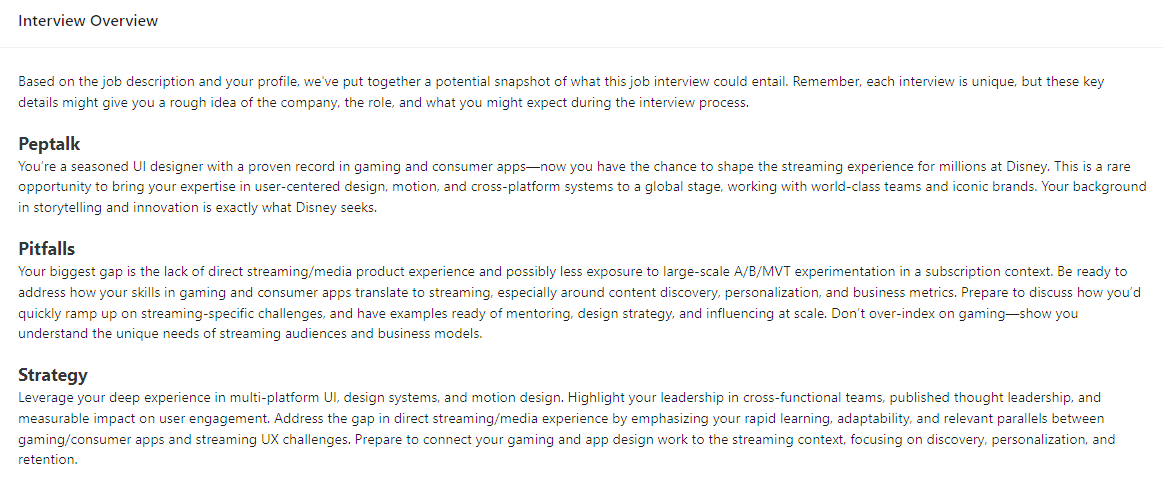
The Pep Talk provides personalized encouragement based on why you're a strong candidate for this specific role, helping you approach the interview with confidence.
The Strategy section offers a tailored approach that leverages your strengths from your resume while addressing how to position yourself against the job requirements. This is particularly valuable because it analyzes both your resume and the job description to identify exactly where you're strong and where you may need to compensate.
The Pitfalls section gives an honest, specific, and relevant assessment of areas where your background may not perfectly align with the role, so you can prepare to address them proactively.
2. Interviewers
The Interviewers section identifies up to 6 people you're likely to meet during the interview process, what each one focuses on, and what they expect from you.
Understanding the kinds of people you'll talk to helps you tailor your preparation before you know who they actually are. The guide always includes a Recruiter (Phone Pre-screen) and HR Manager (Wrap-up) as the first two entries, with additional interviewers tailored to the specific role, company, and industry. Once you learn the real names, add them to your interviewer roster for preparation tailored to each individual.
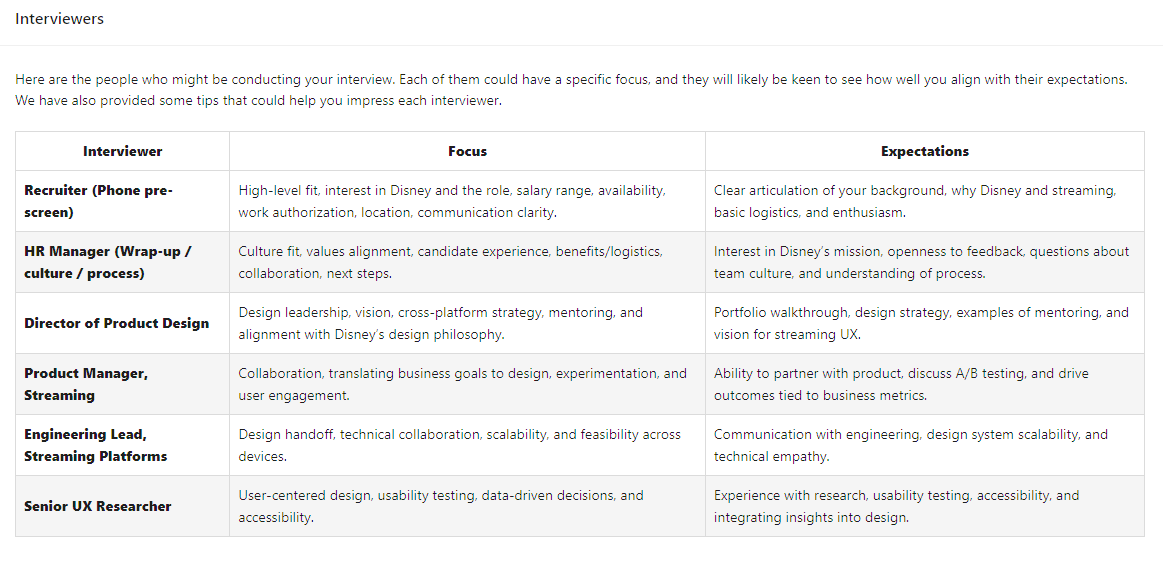
For each interviewer, you'll see: - Interviewer role/title: Who they are in the organization - Focus: What they specifically evaluate for this job and company - Expectations: What they need to see from you to move forward
3. Interview Topics
The Interview Topics section lists 5 key subjects the interviewers will want to discuss, why each topic matters for this role, and specific preparation guidance.
These topics are derived from the job description, company context, and industry norms:
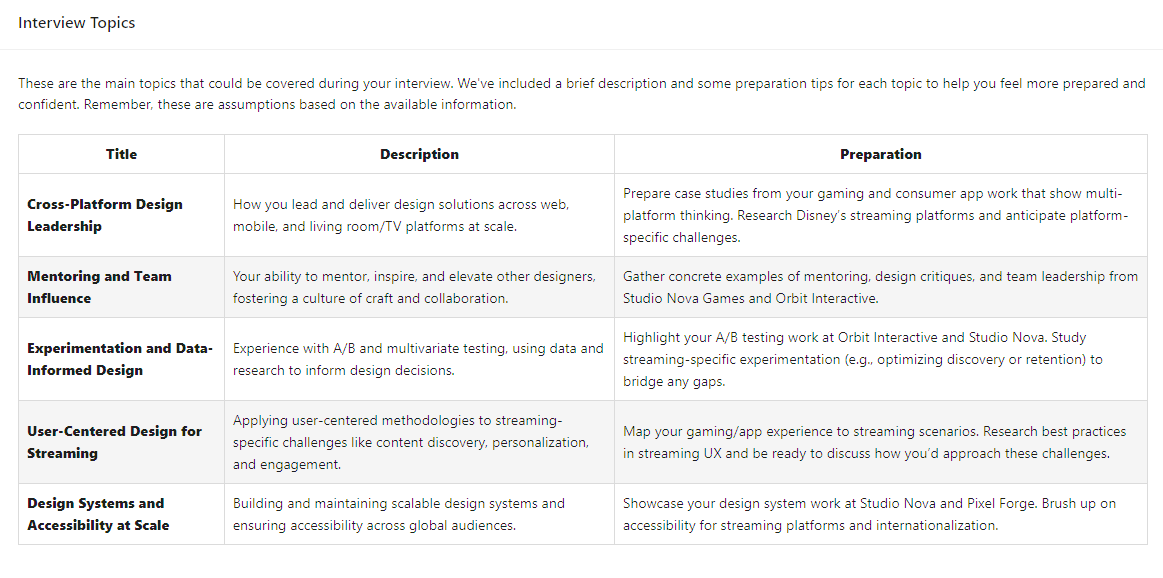
For each topic, you'll see: - Title: The topic name (e.g., "Cross-functional Leadership," "Technical Architecture") - Description: Why this topic is expected for this specific role and company - Preparation: How to prepare, especially valuable if your resume doesn't explicitly mention this topic
The preparation guidance is particularly useful because it suggests how to demonstrate relevant experience even when you don't have direct background in a topic.
4. Interview Questions
The Interview Questions section provides 5 likely questions interviewers will ask to assess your fit, along with suggested answers customized to your background.
These questions are specifically generated based on the job description requirements, the company and industry context, and your resume and experience gaps.
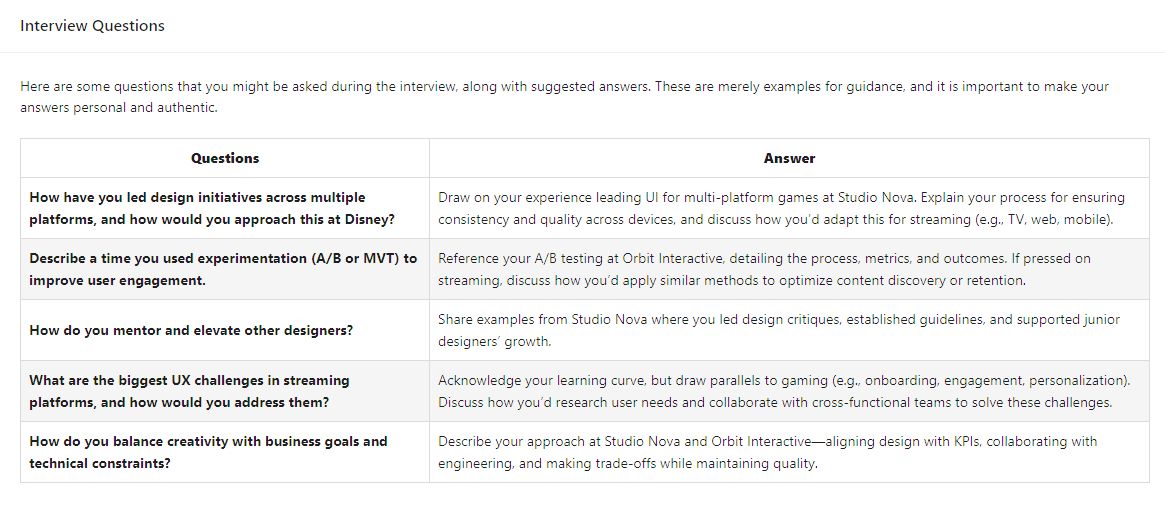
For each question, you'll see: - Question: A specific question you should expect - Suggested Answer: How to answer, with guidance on addressing gaps if your resume doesn't show relevant experience
These aren't generic interview questions; they're tailored to what this particular company and role will likely assess.
5. Behavioral Questions
The Behavioral Questions section provides 5 behavioral questions you should expect, with suggested STAR-format answers drawn directly from experiences listed in your resume.
Behavioral questions reveal how you've handled situations in the past. The STAR method structures your answers:
- Situation: The context and challenge you faced
- Task: Your specific responsibility
- Action: What you actually did (your actions, not the team's)
- Result: The quantifiable outcome and impact
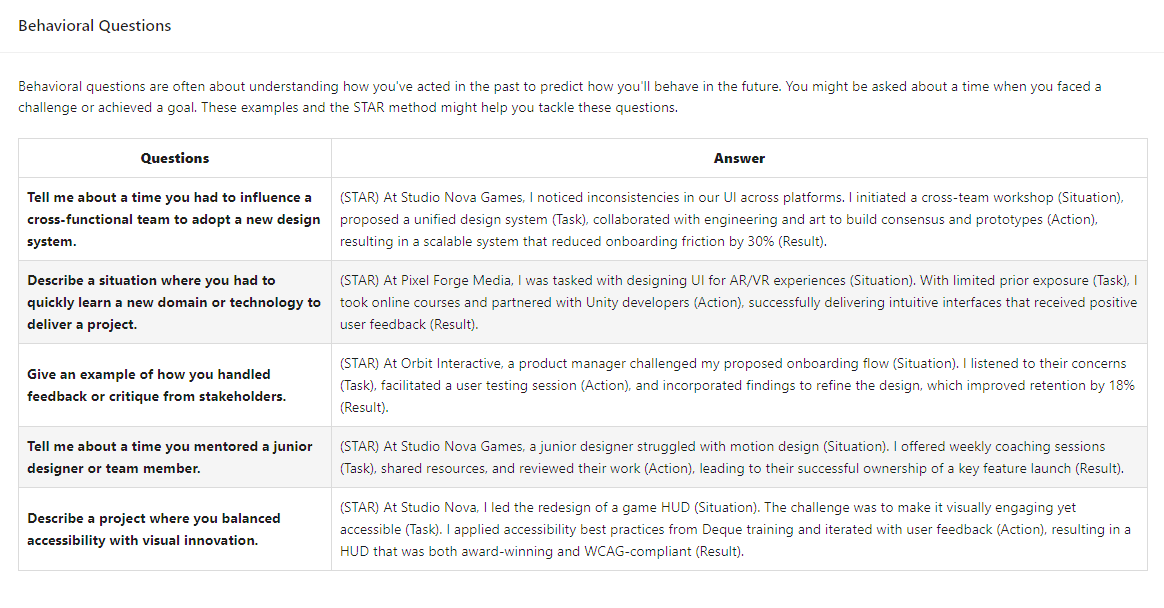
For each question, you'll see: - Question: A behavioral question based on the job description (e.g., "Tell me about a time you...") - Suggested Answer: A STAR-formatted response using a specific experience and company from your resume
Each answer pulls from your actual background, so the examples are authentic and defensible. This is one of the most valuable sections because crafting STAR answers from scratch is time-consuming.
6. My Questions
The My Questions section suggests 5 questions you should ask the interviewers, specifically tied to the career goals you've defined in My Insights.
An interview is a two-way evaluation. These questions help you assess whether the opportunity aligns with what you actually want:
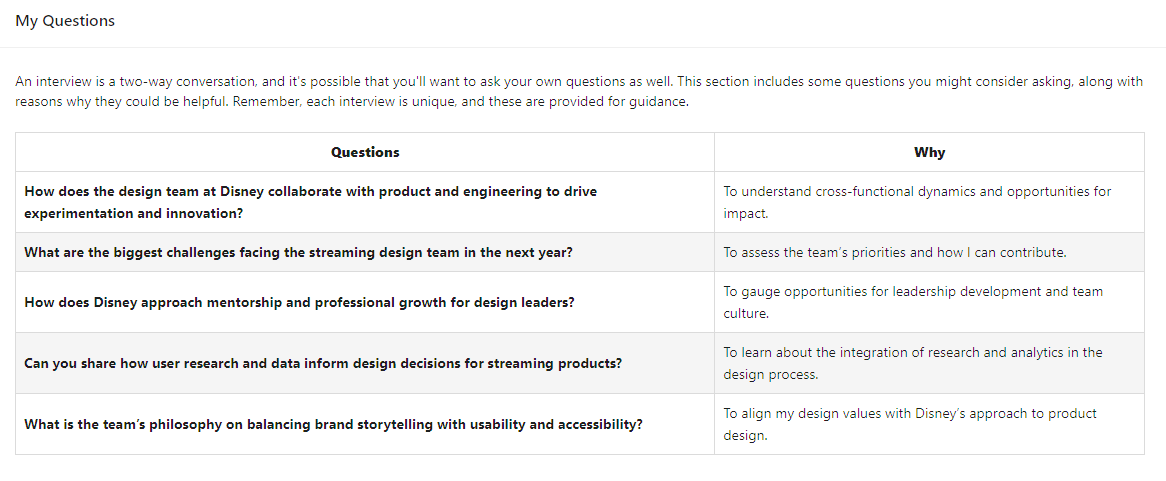
For each question, you'll see: - Question: A question to ask the interviewer - Why Ask This: How this question relates to your specific goals from My Insights
By linking questions to your goals, this section ensures you're gathering information that matters for your decision, not just asking generic questions to seem engaged.
7. Resources
The Resources section provides relevant materials to help you prepare, with emphasis on addressing your specific weaknesses for this role and industry.
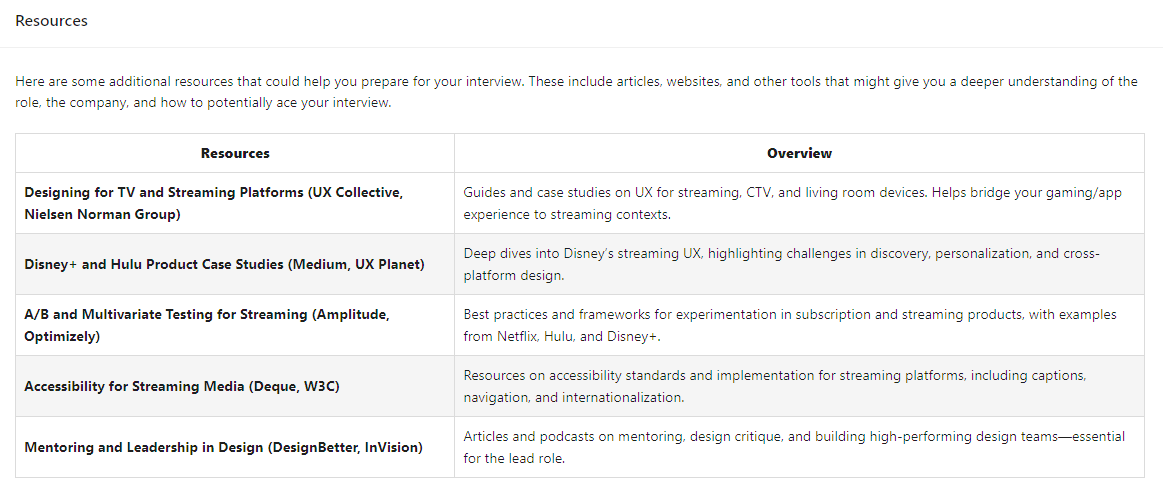
For each resource, you'll see: - Resource Name: The name of a book, article, course, or tool - Overview: What the resource covers and why it's relevant to your preparation
Resources are selected based on the gaps between your background and the job requirements, helping you shore up weak areas before the interview.
How to Generate
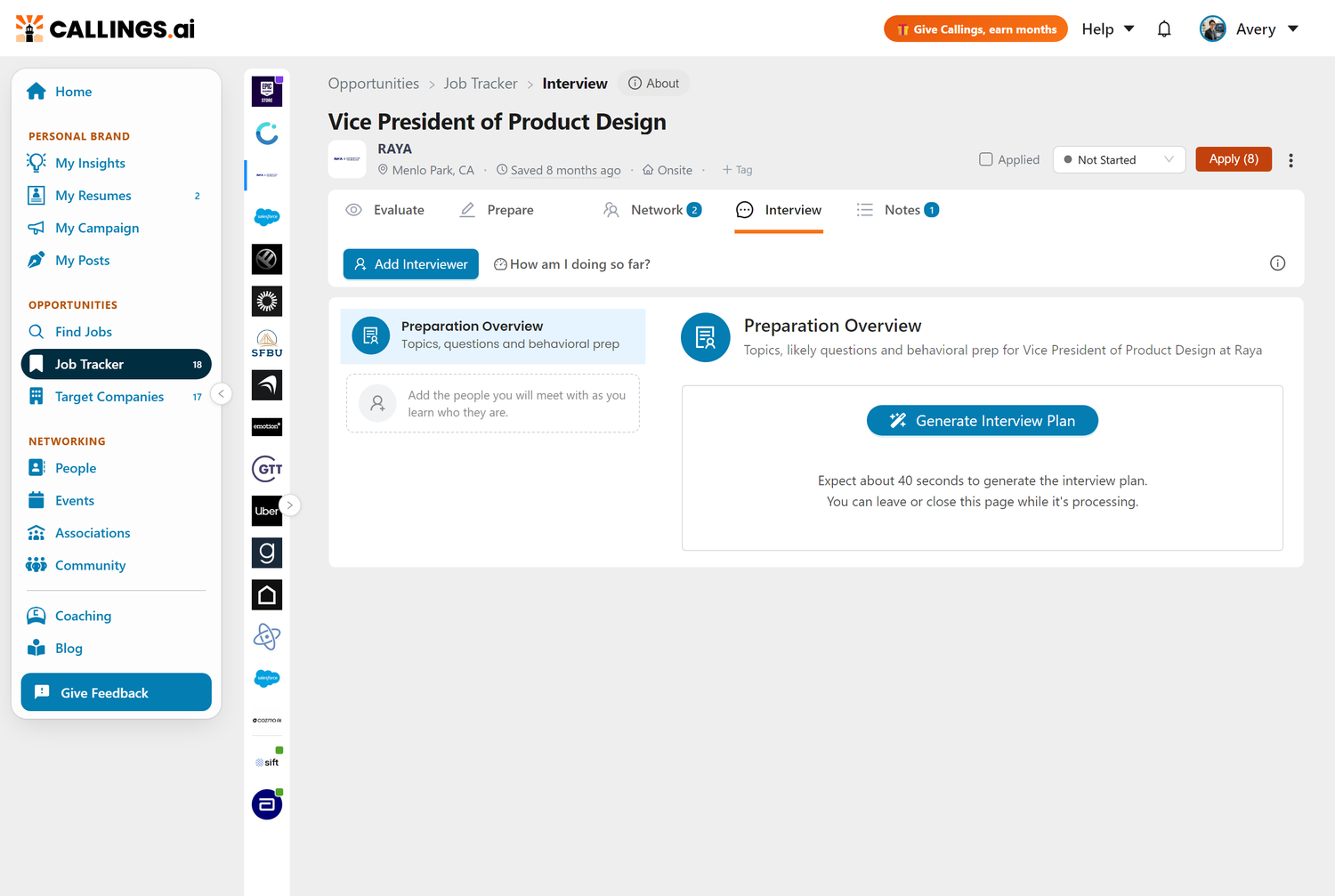
Open the Interview tab of any job in your tracker, select Preparation Overview, and click "Generate Interview Plan". Generation takes approximately 40 seconds.
Requirements
To generate a Preparation Overview, you need: 1. A resume uploaded: The AI uses your background to personalize the guide 2. A job saved to your tracker: The guide is generated for a specific opportunity 3. An active subscription: Interview preparation is a premium feature
Process
- Navigate to a job in your Job Tracker
- Click the Interview tab
- Select Preparation Overview in the left list
- Click Generate Interview Plan
- Wait approximately 40 seconds (you can navigate away; it processes in the background)
- Return to view your completed guide
The guide remains attached to that job opportunity, so you can reference it anytime, even weeks later when you finally get the interview scheduled.
Editing Your Guide
Every section of the Preparation Overview is editable. Click the edit button on any section to customize the content.
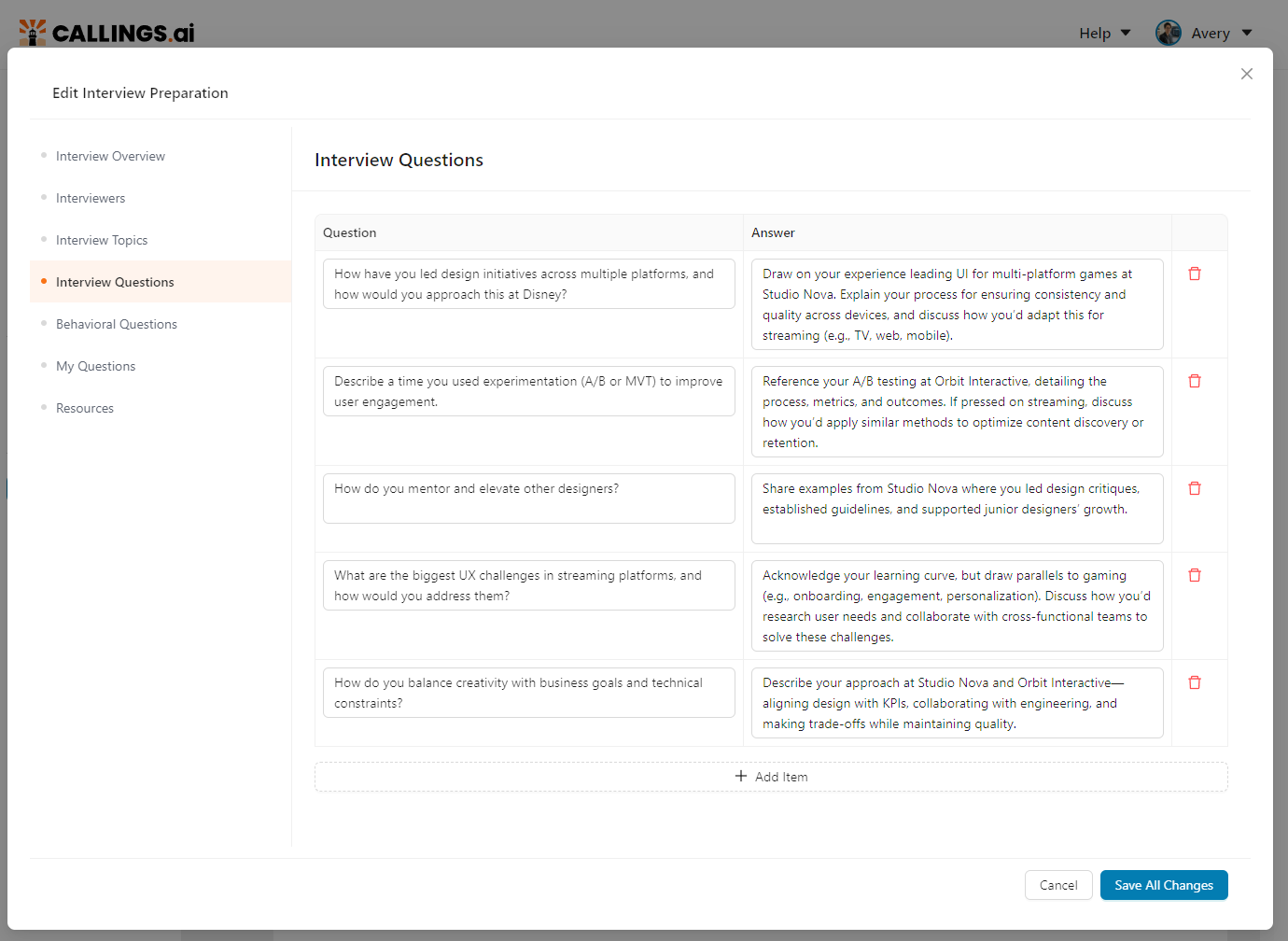
You might edit sections to: - Add specific examples you want to remember - Refine suggested answers to sound more like you - Add interviewers you've learned about through research - Include additional questions based on your research - Remove topics that aren't relevant - Adjust the strategy based on information you've gathered
Edits are saved automatically and persist when you download the PDF.
Downloading as PDF
Download your complete Preparation Overview as a PDF to reference during your interview preparation or to print.
Click the PDF button and choose your paper size: - US Letter (8.5" × 11") - A4 (210mm × 297mm)
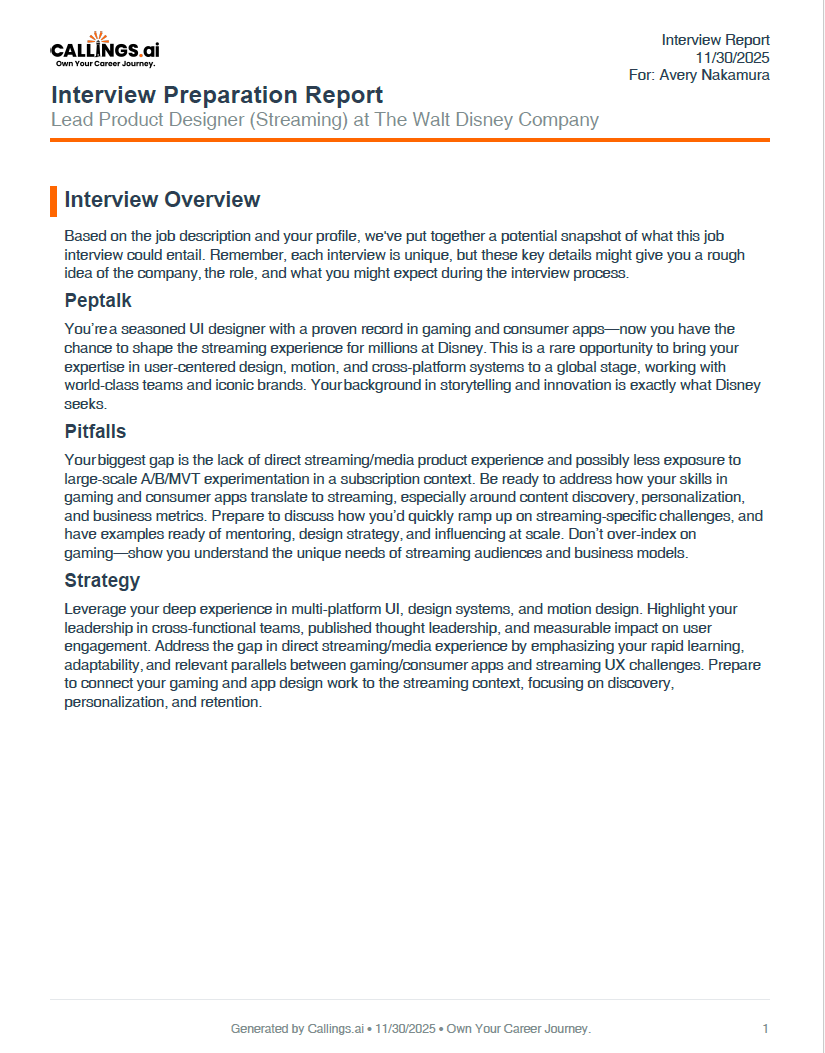
The PDF includes all 7 sections with your edits, formatted for easy reference.
Tips & Best Practices
Use the Guide as a Starting Point
The AI provides a strong foundation, but you should: - Read every section critically - Add your own specific examples and stories - Customize answers to sound like your voice - Validate that suggested experiences actually happened as described
Prepare Your STAR Stories in Advance
The Behavioral Questions section gives you suggested answers, but practice them: - Say the answers out loud (they read differently than they sound) - Time yourself (aim for 2-3 minutes per answer) - Be ready for follow-up questions on any detail
Cross-Reference with My Goals
The "My Questions" section links to your goals. Make sure your goals in My Insights are up-to-date before generating, so the questions are actually relevant to what you want to learn.
Regenerate If the Job Changes
If you learn new information about the role (different responsibilities, additional interviewers, changed requirements), you can generate a fresh guide. The new generation will overwrite the previous one.
Print the PDF for Reference
Many candidates find it helpful to have a printed copy during virtual interviews (off-camera) to reference key points, questions to ask, and STAR examples.
Frequently Asked Questions
Q: How long does the Preparation Overview take to generate?
A: Approximately 40 seconds. You can navigate away while it processes; it will be ready when you return.
Q: Can I generate the Preparation Overview more than once for the same job?
A: Yes, but generating a new one replaces the previous one. If you've made edits you want to keep, download the PDF first.
Q: Why are "Recruiter" and "HR Manager" always the first two interviewers?
A: These roles appear in virtually every hiring process. The Recruiter conducts initial phone screens, and HR typically handles the wrap-up conversation about culture, benefits, and offer logistics.
Q: How is the Interviewers section different from my interviewer list?
A: The Interviewers section describes the kinds of people a process like this usually involves, so you can prepare before you know who you will meet. The interviewer list next to it holds the real, named people once you learn them, each with a preparation plan tailored to that person. Use the section for general preparation and the list for specific preparation.
Q: What if I don't have goals set in My Insights?
A: It will still generate, but the "My Questions" section will be less personalized. For best results, complete My Goals and Ideal Jobs before generating.
Q: Can I edit the guide after downloading the PDF?
A: The PDF is a snapshot. To make edits, modify the guide in the app and download a new PDF.
Q: Do edits affect future regenerations?
A: No. If you regenerate, it creates fresh content based on the current job description and your profile. Previous edits are replaced.
Q: How is the Preparation Overview different from the Company Report?
A: The Company Report focuses on company research: history, culture, news, employer ratings. The Preparation Overview focuses on interview preparation: questions, answers, and strategy. Use both together for comprehensive preparation.
Q: How does the Preparation Overview adapt for speculative roles?
A: When the job is a speculative role (a hypothetical position you created, not an actual job posting), the AI generates an Exploratory Conversation Guide instead of a traditional Interview Preparation Plan. The entire framing shifts from "interview prep" to "discovery conversations." Instead of interviewers, you get people to reach out to at the company. Instead of proving your qualifications, the focus is on genuine curiosity, learning about the company, and validating whether the opportunity might exist. Topics are framed around exploration and relationship-building, and suggested questions help you assess whether this type of role could be real, not rehearse answers for a formal interview.
Q: What if the suggested answers don't match my experience accurately?
A: The AI works from your resume, but may occasionally misattribute or embellish. Always verify that suggested examples reflect your actual experience, and edit to correct any inaccuracies.
Q: Should I memorize the suggested answers?
A: No. Memorized answers sound robotic. Use the suggestions as frameworks: internalize the key points and data, then deliver them conversationally.
Q: How should I use this guide during the actual interview?
A: Have it open (on a second screen or printed) for reference. Don't read from it; use it as a guide. Check off questions as they're answered. Jot notes on responses for your follow-up.
Related Topics
- Interview Management - The workspace this guide lives in: interviewers, statuses, notes, thank-you notes
- Job Fit Report - Know your strengths and gaps going in
- Company Report - Deep research for company-specific questions
- Custom Resume - Have a tailored copy ready to reference
- My Goals - Ensure goals are current for personalized questions
- Notes & To-Dos - Document interview insights and follow-ups
Interview preparation is the difference between hoping for the best and knowing you'll perform well. The Preparation Overview gives you structure, personalized content, and comprehensive readiness, all generated in under a minute. Use it to walk into every interview knowing what to expect, ready with answers drawn from your real experience, and armed with questions that help you evaluate whether this opportunity truly fits your goals.