Interview Management
The Interview workspace is where you manage the entire interview process for a job in one place: a general Preparation Overview for the role, a preparation plan tailored to each specific interviewer, the status and schedule of every round, your debrief notes, one-click thank-you notes, and an AI coach that reads where you stand and tells you what to do next.
Instead of a single static report, the Interview workspace tracks the people you will meet and adapts as your process unfolds. Add each interviewer as you learn who they are, set their round and status, capture notes after each conversation, and let the "How am I doing so far?" coach turn all of it into a clear read on your progress and the smartest next moves.
The Interview Workspace
The workspace has two parts:
- Left rail: a pinned Preparation Overview entry (the general, role-level prep) followed by the list of Interviewers you have added. Each interviewer row shows their round and status at a glance.
- Right detail: opens whatever you select on the left, either the Preparation Overview or a specific interviewer's tabs.
A toolbar at the top holds Add Interviewer, a filter box, and the How am I doing so far? button.
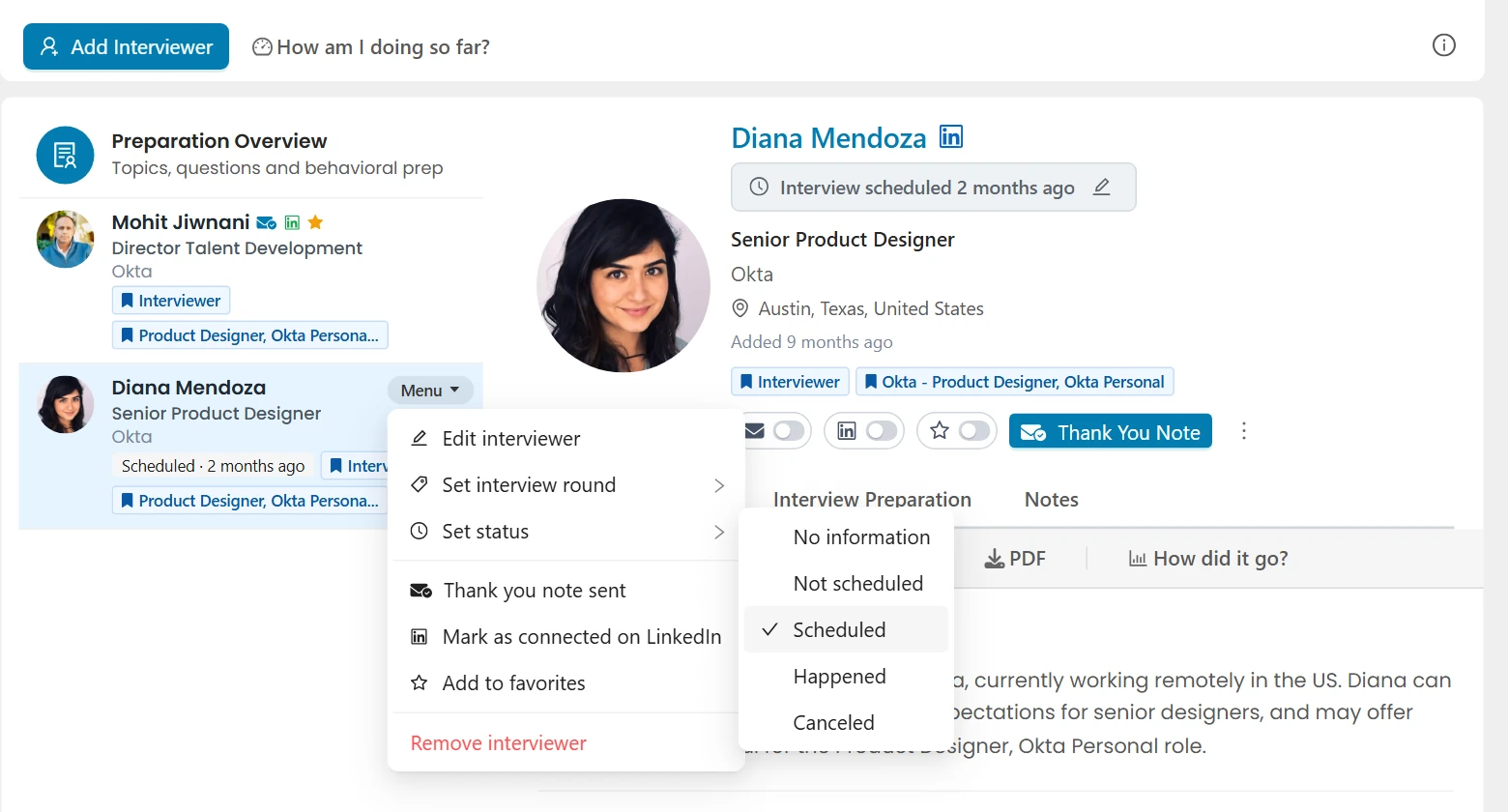
The pinned Preparation Overview entry is your personalized, role-level prep for the job: a pep talk and strategy, the topics and questions you are likely to face, STAR behavioral answers drawn from your real experience, questions to ask, and resources. It has its own guide, Preparation Overview, which walks through every section, how to generate it, editing, and PDF download.
Adding and Managing Interviewers
Click Add Interviewer to build your roster of the people you will meet, then set each one's round, status, and schedule as your process moves along.
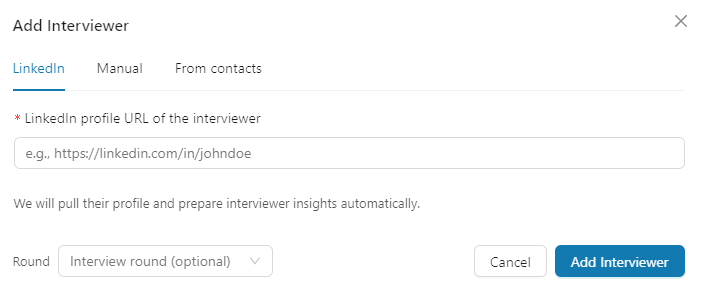
You can add an interviewer three ways:
- By LinkedIn URL: we enrich their profile in the background so you get insights and a tailored plan.
- Manually: enter the name, title, and company yourself.
- From your existing contacts: promote someone you already have on this job.
Interviewers are shared with your Network for this job, so a person added here also appears in your networking for the company, and vice versa.
Interview Rounds
Each interviewer can be tagged with the round they belong to: Recruiter Screen, Phone Screen, Technical, Hiring Manager, Panel, Onsite, Final Round, or Other. Set it from the interviewer's row menu ("Set interview round") or the insights toolbar. The round appears as a small tag on the interviewer's row.
Interview Status
Mark where each round stands so your roster reflects reality and the coach can reason about your progress.
Statuses are:
- No information (the default, nothing set yet)
- Not scheduled (a round you expect but have not booked)
- Scheduled (a date and time is set, see below)
- Happened (the conversation took place)
- Canceled
Set status from the interviewer's row menu ("Set status") or from the Set status control in the interviewer insights toolbar. The status shows as a color-coded pill on the row (blue for scheduled, green for happened, red for canceled).
Scheduling a Date and Time
When you mark a round Scheduled, a picker captures the interview's date and time. You pick it in your local timezone; it is stored and compared in a consistent way behind the scenes, so a scheduled interview shows the right local time wherever you are. The scheduled date appears on the interviewer's row (for example, "Scheduled - Jul 25"), and the coach uses it to gauge urgency ("your Technical round is in two days").
Preparing for Each Interviewer
Selecting an interviewer opens their detail with several tabs:
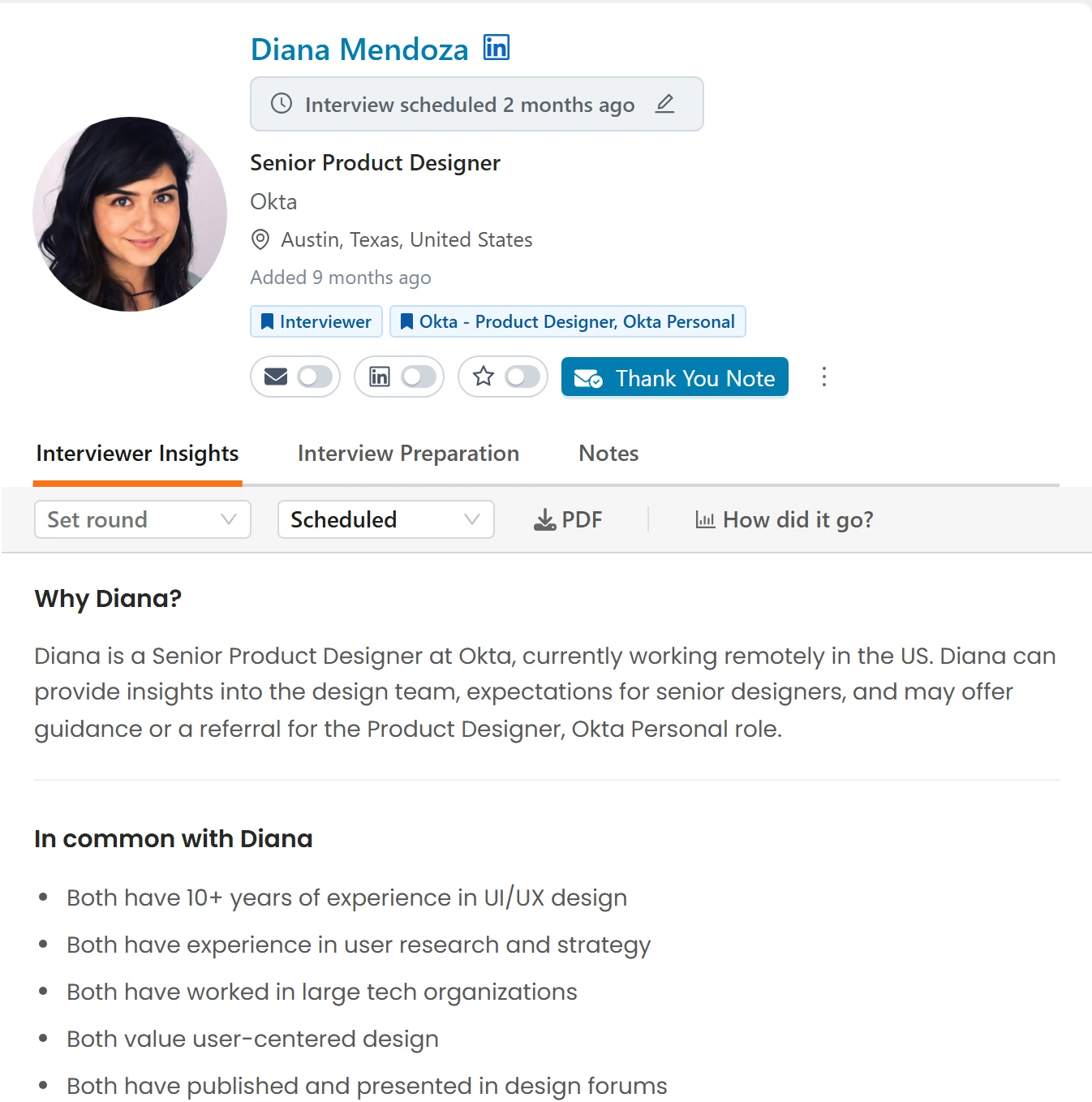
Interviewer Insights
A read on who this person is and why they matter for your interview: their background, what they likely care about, and genuine points of connection between you and them.
Interview Preparation
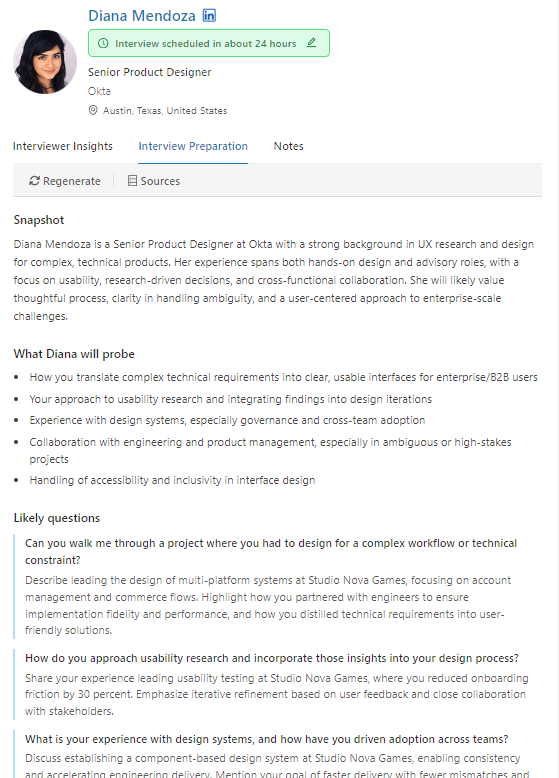
A preparation plan tailored to this specific person and their round, including what they are likely to probe, questions they may ask with angles drawn from your resume, common ground, strong questions for you to ask, and risks to manage.
This plan is loop-aware: it takes your overall strategy into account. It reads the current "How am I doing so far?" report and your notes from earlier rounds, so a plan for a later interviewer builds on what already went well and addresses concerns that surfaced earlier, rather than repeating advice. This is exactly why keeping your notes current matters: your past interview notes are what a later interviewer's prep learns from.
Notes
Your notes are the single most valuable thing you feed the workspace. After each conversation, capture what was discussed, your impressions, the questions you were asked, concerns that came up, and follow-ups. You can also attach documents (for example, your own notes or a take-home prompt).
If you recorded the conversation, hand the transcript over instead of typing it up. Click Transcript in the note toolbar and either paste from your clipboard or choose a downloaded file. It works with whatever your meeting tool produces (Granola, Fathom, Otter, Fireflies, Zoom and others), and writes the debrief for you: what the interviewer probed, how your answers landed, anything left unresolved, what you committed to, and the specific lines worth referencing in your thank you note. The full transcript is kept as an attachment on the note. Follow-ups you promised become action items, with the reminder set when you mentioned a date. Only add recordings you had permission to make. See Notes & To-Dos for the full details.
Notes do double duty, which is why they matter so much:
- They power the "How am I doing so far?" coach. The coach reads your notes as real feedback, how a round actually went, recurring themes, and concerns raised, and turns that into an honest read on where you stand and what to do next.
- They shape the prep for your next interviewer. Each interviewer's preparation plan is loop-aware: it reads your notes from earlier rounds, so a later plan builds on what already went well and gets ahead of concerns that surfaced before, instead of repeating advice.
The more you jot down after each round, the sharper everything downstream gets. A round with no notes is a round the coach and the next interviewer's plan cannot learn from.
Thank You Note
After a conversation, generate a grounded thank-you note to that interviewer. It is built from your own notes on the meeting, the interviewer's role and background, the job, and your fit, so it references what was actually discussed rather than generic filler. Review and edit before you send.
How Did It Go?
After a round has happened, the "How did it go?" button gives you an honest read on that one conversation and what you can still repair before the next interviewer.
It is deliberately different from "How am I doing so far?" below. That one is strategic and covers your whole loop for the job. This one is tactical and covers a single round: how specific answers landed, and what is still fixable in writing.
The report has four parts:
- How it landed - the three or four things this round actually tested, each given a band (Strong, Solid, Shaky or Weak) with one line of evidence from your notes. Bands rather than a score, because the useful question is what to act on, not what number you earned. Even in a round that went well, the weakest aspect is named.
- What they are probably still unsure about - the single thing the interviewer most likely left the conversation wondering, and why. No interviewer walks away fully convinced, so this is answerable even after a great round, and it is usually the most useful line in the report.
- What you can still fix - two to four things you can do after the fact: a point to address in your thank-you note, a document to send, a proof point to prepare for the next interviewer. Nothing that required being said in the room.
- What you learned about the role - the interview runs both ways. What the conversation told you about the job, team, or company, including anything that should give you pause.
It reads your notes and transcript for that round alongside the job description, your resume, the interviewer's role and background, and where this round sits in your process, so an answer is judged against what this role actually needs rather than in the abstract. You need notes on the round first. Without them the button explains what is missing rather than guessing, and pasting in the transcript is the fastest way to fill the gap.
Your read on the round is stored separately from your own notes. It never feeds back into your thank-you note, so self-critical assessments cannot leak into a message you send an interviewer.
How Am I Doing So Far?
The "How am I doing so far?" button opens a short, AI-coached read on your whole interview process for the job, with two sections: where things stand ("So far") and what to do next ("Suggestions moving forward").
The report is grounded in everything in your workspace: every interviewer with their round, status, and scheduled time; what you have already done (reached out, connected on LinkedIn, generated prep, drafted a thank-you note); your debrief notes and any attached documents; whether your Preparation Overview is generated; and a summary of your networking contacts for the company.
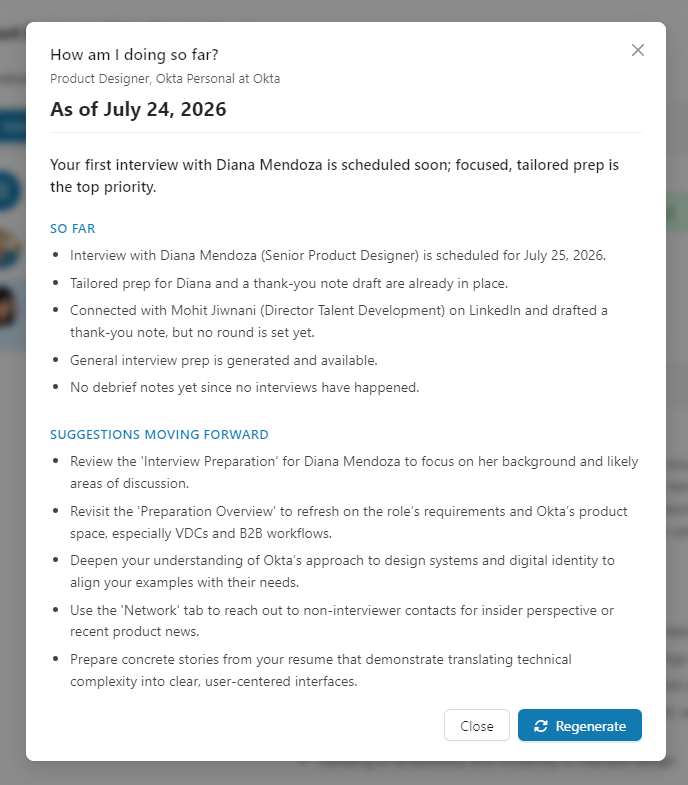
It works as a real coach across the whole lifecycle, not just before you start:
- Early on, it tells you the process is just beginning and points you to first steps (add the interviewers you know, generate the Preparation Overview).
- Mid-loop, it reads your notes as feedback (how a round went, concerns raised, recurring themes), gauges urgency from your scheduled times, and adapts its suggestions to prep the exact topics that came up.
- Throughout, it acknowledges what you have already done instead of repeating it, and points you to the specific tool or section for each next step.
The report is dated ("As of ...") and saved, so it opens instantly next time. Hit Regenerate after you add interviewers or write new notes to refresh it.
A Note on Etiquette
The coach follows standard interview etiquette: it never tells you to contact or schedule with your interviewers directly, because scheduling is owned by the company's recruiter or coordinator. Instead it steers you toward what is yours to do: preparing, sending thank-you notes after each conversation, staying in touch with your recruiter or point of contact about timing, and using the Network tab to reach out to non-interviewer contacts for referrals or insight.
Requirements
To use the Interview workspace you need:
- A resume uploaded so the AI can personalize your prep and reports.
- A job saved to your tracker (the workspace is per-job).
- An active subscription (interview tools are a premium feature).
For the most personalized questions and coaching, complete your My Goals and Ideal Jobs in My Insights first.
Tips & Best Practices
Build Your Roster Early
Add interviewers as soon as you learn their names, even before rounds are scheduled. Insights and tailored prep are most useful with lead time.
Set Status and Schedule as You Go
Keeping statuses and dates current is what lets the coach reason about urgency and progress. A quick "Scheduled" with a time turns the report into a timeline.
Debrief Right After Each Round
Jot notes while the conversation is fresh, or paste the transcript if it was an online interview you had permission to record. These notes pay off three times over: they power your thank-you note, they become the feedback the coach reflects back to you, and they feed the preparation for your next interviewer. A quick debrief after every round is the highest-leverage habit in the whole workspace.
Regenerate the Report After New Notes
The report reads your last saved version. After a round and a fresh debrief, regenerate "How am I doing so far?" before generating the next interviewer's prep, so the strategy stays current.
Frequently Asked Questions
Q: How is this different from the older Interview Report?
A: The Interview Report was a single static prep document. The Interview workspace keeps that prep as the Preparation Overview and adds per-interviewer management: a roster with rounds, statuses, and schedules, tailored prep for each person, notes, thank-you notes, and an AI coach that reads your progress and adapts.
Q: What do the interview statuses mean?
A: No information (unset), Not scheduled (expected but not booked), Scheduled (a date and time is set), Happened (it took place), and Canceled. Set them from the row menu or the insights toolbar.
Q: How does scheduling handle time zones?
A: You pick the date and time in your local timezone. It is stored consistently so it always displays as the correct local time, and the coach uses it to judge how soon a round is.
Q: What does the thank-you note use?
A: Your own debrief notes for that interviewer on that job, plus their role and background, the job, and your fit. It only uses your manual notes, not AI-generated content, so it stays grounded in what actually happened.
Q: Should I reach out to my interviewers to schedule or introduce myself?
A: No. Scheduling is the recruiter's or coordinator's job. Focus on preparing, sending thank-you notes after each round, and networking with non-interviewer contacts. The coach is built to respect this.
Q: Does the "How am I doing so far?" report update automatically?
A: It saves the last version you generated and shows its date. Regenerate it after you add interviewers, change statuses, or write new notes to get a fresh read.
Q: Is my per-interviewer prep aware of my other rounds?
A: Yes. It reads your current strategy report and your notes from earlier rounds, so a later interviewer's plan builds on what went well and addresses concerns from earlier conversations. This is why capturing notes after each round matters: they are what the next plan learns from.
Q: Can I use an interview transcript in my notes?
A: Yes, and it is the fastest way to capture a round. Click Transcript in the note toolbar, then paste from your clipboard or choose a downloaded file. You get a written debrief in the note, the full transcript kept as an attachment, and your promised follow-ups turned into action items. The coach and your next interviewer's prep then read the whole conversation rather than what you remembered to type. Only add recordings you had permission to make. Without a recording, jot down the key questions, concerns, and impressions while they are fresh.
Q: What is the difference between "How did it go?" and "How am I doing so far?"
A: "How did it go?" is about one round: how your answers landed with that interviewer and what you can still repair. "How am I doing so far?" is about the whole loop for that job: where you stand across every interviewer and what to prioritize next. Use the first after a conversation, the second when you want the bigger picture.
Q: Why is "How did it go?" asking me for notes?
A: It reads what actually happened in that round. With no notes there is nothing to judge, and a made up read would be worse than none. Paste in the transcript or jot down the questions and reactions, then generate it.
Q: Could my own critical feedback end up in a thank-you note?
A: No. The round feedback is stored apart from your personal notes and is never used when drafting messages to an interviewer.
Q: Why do my notes matter so much?
A: Notes are the connective tissue of the workspace. They ground your thank-you note, they are read as feedback by the "How am I doing so far?" coach, and they feed the preparation plan for your next interviewer. A round you never wrote notes on is a round nothing downstream can learn from.
Related Topics
- Preparation Overview - The role-level prep guide that lives in this workspace
- Job Fit Report - Know your strengths and gaps going in
- Company Report - Deep research for company-specific questions
- Networking Targets - Reach out to non-interviewer contacts for referrals and insight
- Custom Resume - Have a tailored copy ready to reference
- My Goals - Keep goals current for personalized questions
- Notes & To-Dos - Document interview insights and follow-ups
Great interviewing is a process, not a single moment. The Interview workspace helps you run that process end to end: know who you are meeting, prepare for each of them, keep track of where every round stands, capture what you learn, and let an AI coach turn it all into a clear, honest read on how you are doing and what to do next.