Quick Start Guide
Set up Callings.ai in 5 minutes: create an account, upload your resume, and start pursuing opportunities, both listed jobs and hidden ones. Welcome to Callings.ai! By the end of this guide, you'll have your profile set up and know how to pursue opportunities through both traditional applications and proactive company targeting.

Step 1: Create Your Account & Set Up Your Profile
Everything in Callings.ai starts with understanding you.
- Go to the Sign Up page.
- Create an account using your email or social login.
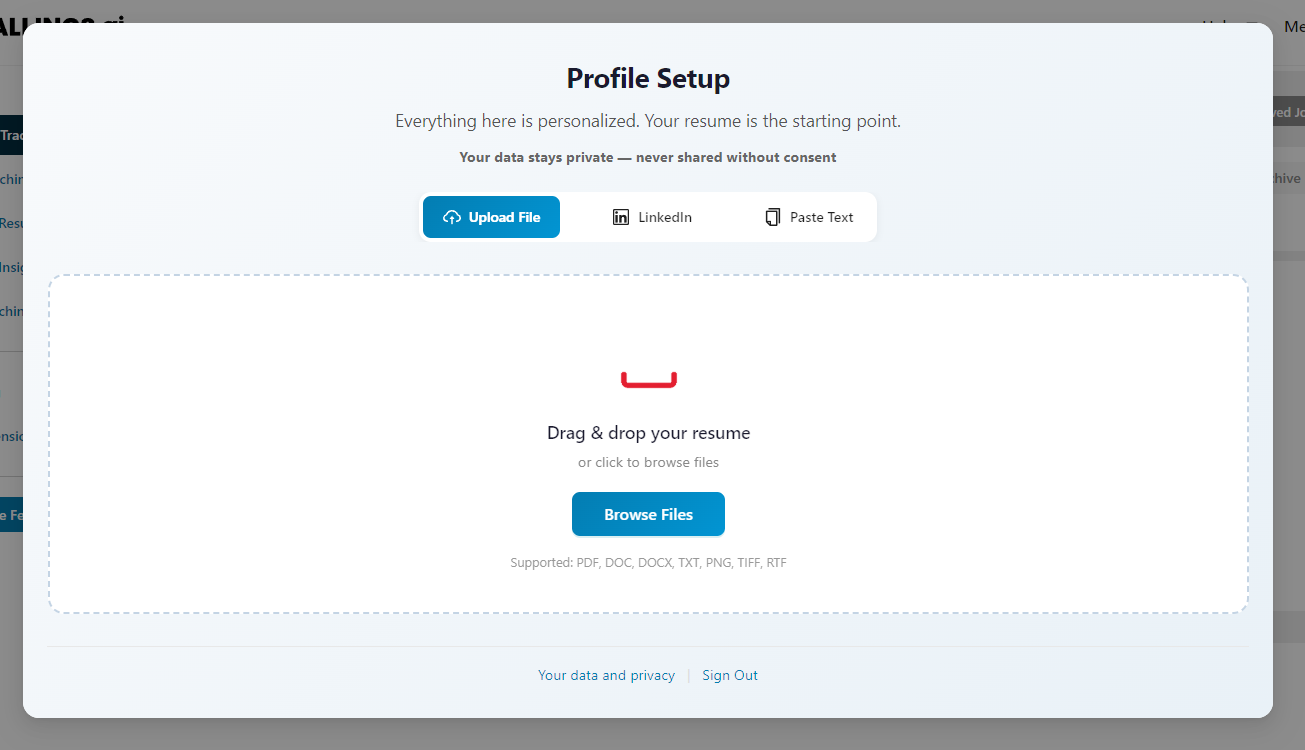
- When prompted, set up your profile using one of three options:
Profile Setup Options
The Profile Setup modal offers three convenient tabs to import your resume:
| Tab | Description |
|---|---|
| Upload File | Drag & drop or browse to upload your resume file. Supports PDF, DOC, DOCX, TXT, PNG, TIFF, RTF, and more. You can even upload a photo of your resume taken with your phone! |
Paste your LinkedIn profile URL (e.g., https://www.linkedin.com/in/your-profile) to automatically import your professional experience. |
|
| Paste Text | Copy and paste your resume content directly from any source (minimum 50 characters required). |
Tips: - Don't have your final resume? That's okay! Upload an older version or draft. You can update it anytime: job matching picks up changes automatically, and you can regenerate your insights whenever you are ready. - All three methods work equally well. The AI uses your content to build your profile regardless of the source. - Important: Your resume is only used to set up your profile and power all the AI features, personalized job matching, and custom content generation. Nothing will be shared or submitted without your consent.
Step 2: Review Your Insights
Once your resume is uploaded, our AI immediately analyzes it to create your "My Insights" profile.
- Navigate to My Profile > My Insights.
- Review the My Goals section.
- The AI has inferred your career goals based on your experience.
- Action: Edit any goals that don't feel right. This helps the AI find better job matches for you.
Track A: Applying to Listed Jobs
This is the traditional path. Find posted jobs, apply with tailored materials, and track your progress.
Step 3A: Find Your First Job Opportunity
- Go to Find Jobs > Matching Jobs.
- Browse the list of AI-recommended roles.
- Click on a job card to see a quick summary.
- Click the + Add to Tracker button on a job that looks interesting.
Alternatively, if you have a specific job URL from LinkedIn, a company career page, or another job board, go to Job Tracker and click Add Jobs Manually to paste the URL.
Step 4A: Analyze the Opportunity
Let's see if this job is actually a good fit.
- Navigate to your Job Tracker.
- Click on the job you just added to open the Job Details section.
- In the Evaluate section, click on Job Fit Report.
- Read the report to understand your strengths, potential gaps, and match score for this specific role.
Step 5A: Generate a Custom Resume
Ready to apply? Let's tailor your resume.
- In the same Job Detail, scroll to the Prepare section.
- Click Custom Resume.
- The AI will draft a version of your resume specifically highlighted for this job description.
- Review the changes, make any edits, and click Download PDF.
Congratulations! You've just gone from a raw resume to a tailored application in minutes.
Track B: Going After the Hidden Market
Research consistently shows that 70-85% of jobs are filled through networking, referrals, and internal promotions, not through public postings. Callings.ai gives you a structured way to pursue these hidden opportunities. Here's how.
Step 3B: Read Your Market Fit Report
Your Market Fit Report is a comprehensive career intelligence report the AI generated from your profile. It shows where you fit in today's market and where you should focus your search.
- Navigate to My Profile > My Insights > Market Fit Report.
- Review the key sections:
- Market Fit - how your profile aligns with current and emerging demand.
- Marketable Skills - your top skills ranked by market demand.
- Target Sectors - five industries where your skills are valued, with example companies you can add to your Target Companies with one click.
- Action: Click the + button next to any example companies that interest you. They'll be added to your Target Companies list and automatically enriched with AI insights.
Learn more about the Market Fit Report
Step 4B: Discover and Research Target Companies
Now let's build your company target list.
- Navigate to Target Companies in the left sidebar.
- Click Find Companies to open the company search.
- The AI searches across your target sectors from the Market Fit Report to find real companies that match your profile.
- You can also type a custom query (e.g., "fintech startups in Austin" or "healthcare AI companies").
- Save the companies that interest you. Each company is automatically enriched with:
- Why It Fits - a personalized analysis based on your resume and career goals.
- Fit Scores - ratings for Mission Alignment, Culture Fit, Growth Potential, and Skill Match.
- Networking Strategy - suggestions for how to approach the company.
Learn more about Target Companies
Step 5B: Create a Speculative Role
Found a company you love but they have no relevant openings? Create a speculative role - a hypothetical position tailored to their needs and your capabilities.
- Select a company from your Target Companies list.
- Click Create a Speculative Role in the company detail header.
- The AI suggests three role options based on the company's profile and your skills. Pick one, or enter your own idea.
- Review the AI-generated role document (title, overview, scope, why it aligns with your background, next steps).
- Click Save to Job Tracker. The role is added to your pipeline with a purple "SPECULATIVE" tag.
Once saved, all job tools adapt: Custom Resume emphasizes transferable skills, Cover Letter becomes an exploratory outreach pitch, and Networking Targets focuses on decision-makers and stakeholders.
Learn more about Speculative Roles
Step 6B: Rally Your Network with My Campaign
Amplify your search by turning your network into active participants.
- Navigate to My Campaign in the left sidebar.
- Click to generate your calling card. The AI creates everything from your profile: headline, banner, action figure visual, and your campaign story.
- Review and customize the content to your liking.
- Share your campaign link with supporters. Visitors can:
- Generate introduction emails to connect you with people they know.
- Share your profile on LinkedIn, X, and other platforms.
- Click "Encourage" to show their support.
- Track engagement in real time: views, introductions, shoutouts, and more.
Putting It All Together
Tracks A and B are not either-or. The most effective job searches combine both approaches:
| Listed Jobs (Track A) | Hidden Market (Track B) |
|---|---|
| Apply to posted openings with tailored materials | Identify target companies proactively |
| Use AI matching to find roles that fit your story | Create speculative roles for companies with no relevant postings |
| Track applications through your pipeline | Activate your network through My Campaign |
All opportunities, whether from job boards or your own speculative pitches, live in the same Job Tracker and use the same suite of job tools.
Frequently Asked Questions
Q: I uploaded my resume but don't see any job matches. What's wrong?
A: It may take a couple of days to get a good feed of matching jobs. Let the agent work behind the scenes. If you still don't see matches, check your Search Preferences to make sure they are not too restrictive.
Q: Can I skip the My Insights step and go straight to applying?
A: You can, but we don't recommend it. The 5 minutes you spend reviewing your goals dramatically improves the quality of your job matches and custom resumes throughout your search.
Q: Should I start with listed jobs or the hidden market?
A: Both! Start by applying to any listed jobs that catch your eye (Track A) while you build out your target company list and campaign (Track B). The proactive track takes a bit longer to set up but often produces higher-quality opportunities.
Q: What if I don't like the AI-generated resume?
A: All AI-generated content is fully editable. You can modify any section, add new content, or use it as inspiration while keeping your original resume.
Q: How many jobs should I add to my tracker?
A: Quality over quantity. Start with 5-10 strong matches. It's better to deeply work 10 opportunities than to superficially apply to 100.
Q: Can I use this on my phone?
A: The application is currently not optimized to run on small screens.
What's Next?
- Market Fit Report: Understand your market positioning and discover target sectors.
- Target Companies: Build your company target list with AI-powered insights.
- Speculative Roles: Create roles at companies with no relevant postings.
- My Campaign: Rally your network around your job search.
- Deep Dive into My Resumes: Learn how to optimize your resumes.
- Master the Job Tracker: Organize your entire search.
- Explore Job Tools: Learn about Cover Letters, Networking, and Interview Prep.
You're now equipped with two powerful approaches to your job search. Whether you're applying to listed positions or proactively targeting companies in the hidden market, Callings.ai gives you the tools to pursue every opportunity with confidence. The tools are at your fingertips. Go land that next role.