Recruiters
Recruiters turns "talk to a headhunter" into a matched shortlist of external recruiters and search firms that place people in your field, each with the context you need and a tailored outreach message ready to send. It helps you get on the radar of the people who fill roles before they are ever posted.
A large share of jobs, especially at mid and senior levels, are filled through recruiters rather than public listings. Recruiters helps you find the external headhunters who specialize in your industry and level, so you can build relationships that surface roles you would never see on a job board.
Find it on the Recruiters tab of People, under Networking > People. Recruiters are contacts like everyone else you are in touch with, so they share the same list, the same record, and the same notes; this tab is where you find them and what they place.
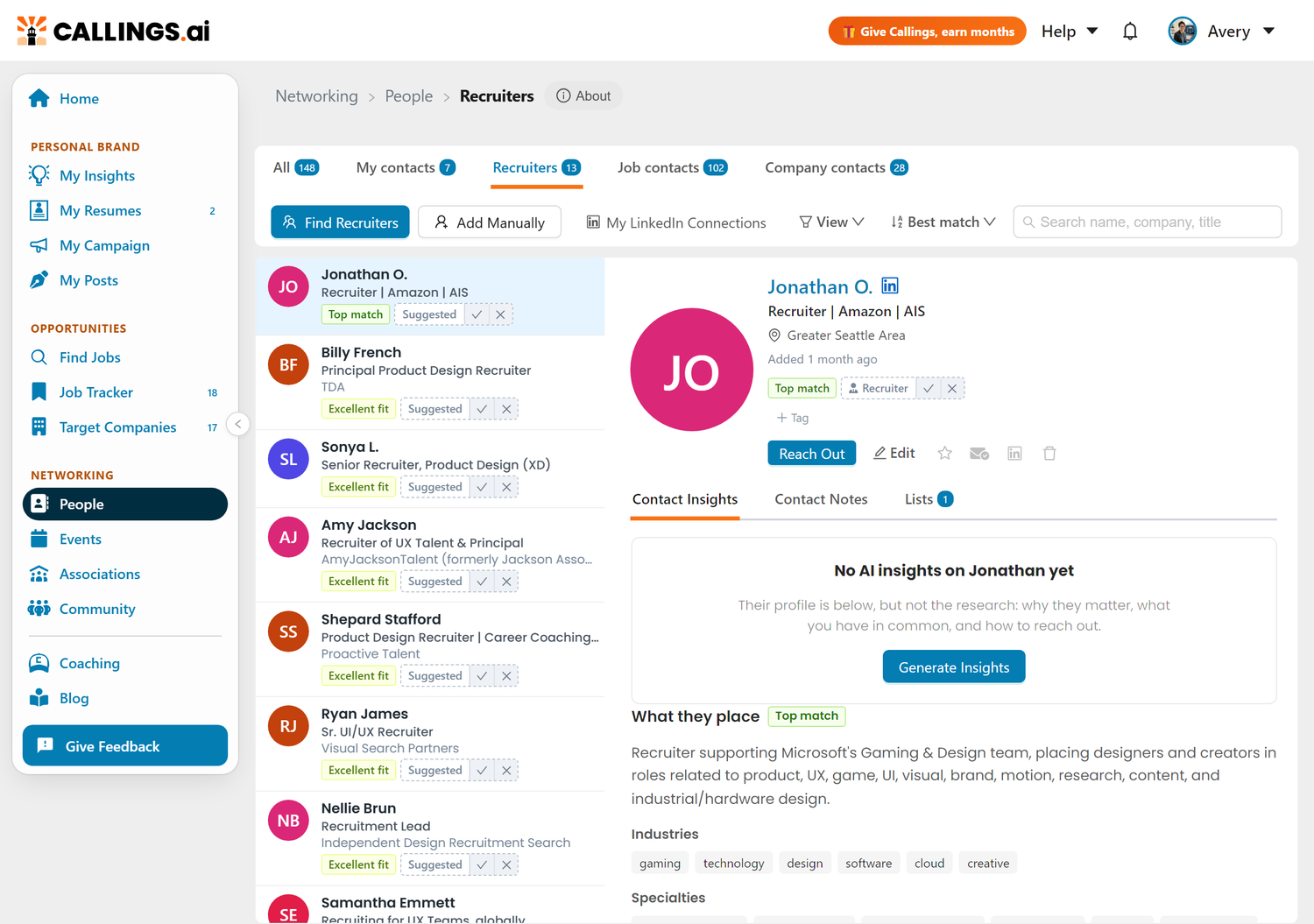
External Recruiters, Not In-House
Recruiters focuses on external recruiters and search firms, the headhunters who work across many companies in your field. They are the people worth a relationship because they place candidates again and again, often into roles that are never advertised.
In-house company recruiters are covered separately. When you are working a specific job in your tracker, the Networking tools there help you find and reach the recruiter at that company. Use this tab for the independent headhunters who can open doors across your whole search.
Finding Recruiters
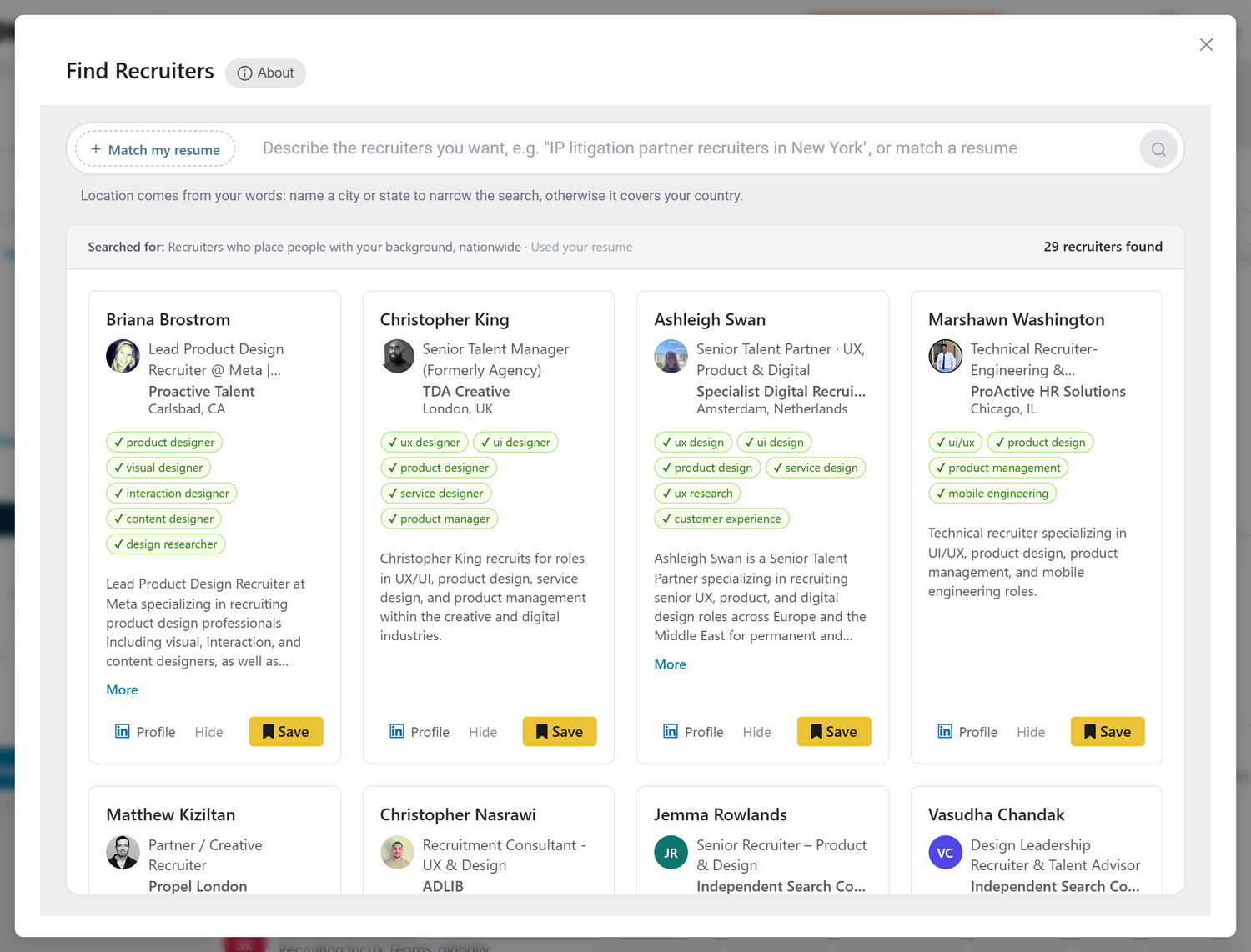
Click Find Recruiters to open the search, then search from your resume, from your own words, or both. Discovery can take up to a minute, and matches appear as cards under the search box that you can save to your list or hide. Your last search is kept, so reopening the window comes back to where you left off.
Match a Resume
The search opens with your primary resume attached, shown as a pill at the left of the search box. Callings reads your background, identifies your occupation and level, and surfaces external recruiters and search firms that specialize in your field. Click the pill to pick a different resume: matching is tied to the resume you attach, so switching resumes explores recruiters for a different target role. The x on the pill takes the resume off.
Steer It With Words
With the resume attached, type what should narrow the search: an industry, a place, a firm, or all three in one line, for example "healthcare recruiters in Chicago" or "at Robert Half." Callings reads the words the way it reads a free-form search, then keeps the resume match but limits it to that industry, place, or firm. This is the fastest way to chase a specific kind of headhunter that a resume match alone might not prioritize.
Naming an industry is a real filter, not a hint. A recruiter is only kept when the industry looks like theirs: their own headline says so, several of their listed industries sit in it, or it leads a short list. Large staffing agencies list every vertical they touch, so a recruiter who covers healthcare as one of a dozen sectors is left out rather than presented as a healthcare specialist.
Words Alone
Take the resume off with the x on the pill and the words become the whole search, for example "IP litigation partner recruiters in New York." To go back to a resume, click Search by resume and pick one.
Location
With a resume attached, Extend nationwide sits under the search box and is on by default. Most recruiters place candidates nationally, so searching across the country surfaces far more matches than limiting to your area. Untick it to keep the search local. A place in your words takes over either way. When you search with words alone, the location comes from them: name a city or state to narrow the search, and it otherwise covers your country.
Places are matched at the state or country level, so "in Sunnyvale" searches all of California. The band above the results says how far the search reached.
Working the Results
The band above the results says what was searched for, including how your words were read, and how many recruiters were found. Each match shows up as a card with the recruiter's name, title, firm, location, their background, and a link to their LinkedIn profile.
Above the background sits a row of green checks: what this recruiter covers, read from their profile. When you narrow a search to a field, that field leads the row in the recruiter's own words, so you can see at a glance whether they work in digital health, medical devices or life sciences rather than just healthcare in general. The rest of the row is the kind of roles they place.
The background runs to five lines, and More opens the rest in place. It is worth reading before you save, since it is where seniority, the kind of mandates they take, and the companies they place into usually appear. Photos and backgrounds fill in as enrichment completes, so a card may briefly show "Loading details." Save the recruiters worth pursuing to add them to your list, or choose Hide to dismiss a card so it does not come back.
You can also add a recruiter yourself with Add Manually, and pull in headhunters already in your LinkedIn connections.
Exploring a Recruiter
The page is a list on the left and the record on the right, the same two panes every person on the People page uses. Selecting a recruiter opens their full context: their LinkedIn background (about, experience, and education), and a What they place section with the firm they work for, the industries and specialties they recruit in, and the levels they place at.
The record also tracks where you stand with each recruiter. Mark them as a favorite to keep them on your shortlist, flag when you are connected on LinkedIn, and flag when you have reached out, so you always know who still needs a follow-up. You can also archive a recruiter to tuck them out of the way without deleting them.
Each recruiter has a Contact Notes tab, so you can record what you discussed, set follow-up reminders, and keep every touchpoint in one place. Those are the same notes the rest of the product shows for that person: a recruiter who also sits on a tracked job carries one set of notes, not two.
Match grades
A recruiter the search surfaced carries a grade for how well they fit your background: Top match, Excellent fit, Strong fit or Good fit, shown on the row and on the record. Where the pool is thin for your field we also show recruiters who matched on one axis only, labelled Industry match or Role match so you can see why they are there. Sort by > Best match puts the list in that order; a recruiter you added by hand has no grade, because there is no resume comparison behind them, and stays at the top.
Reaching Out
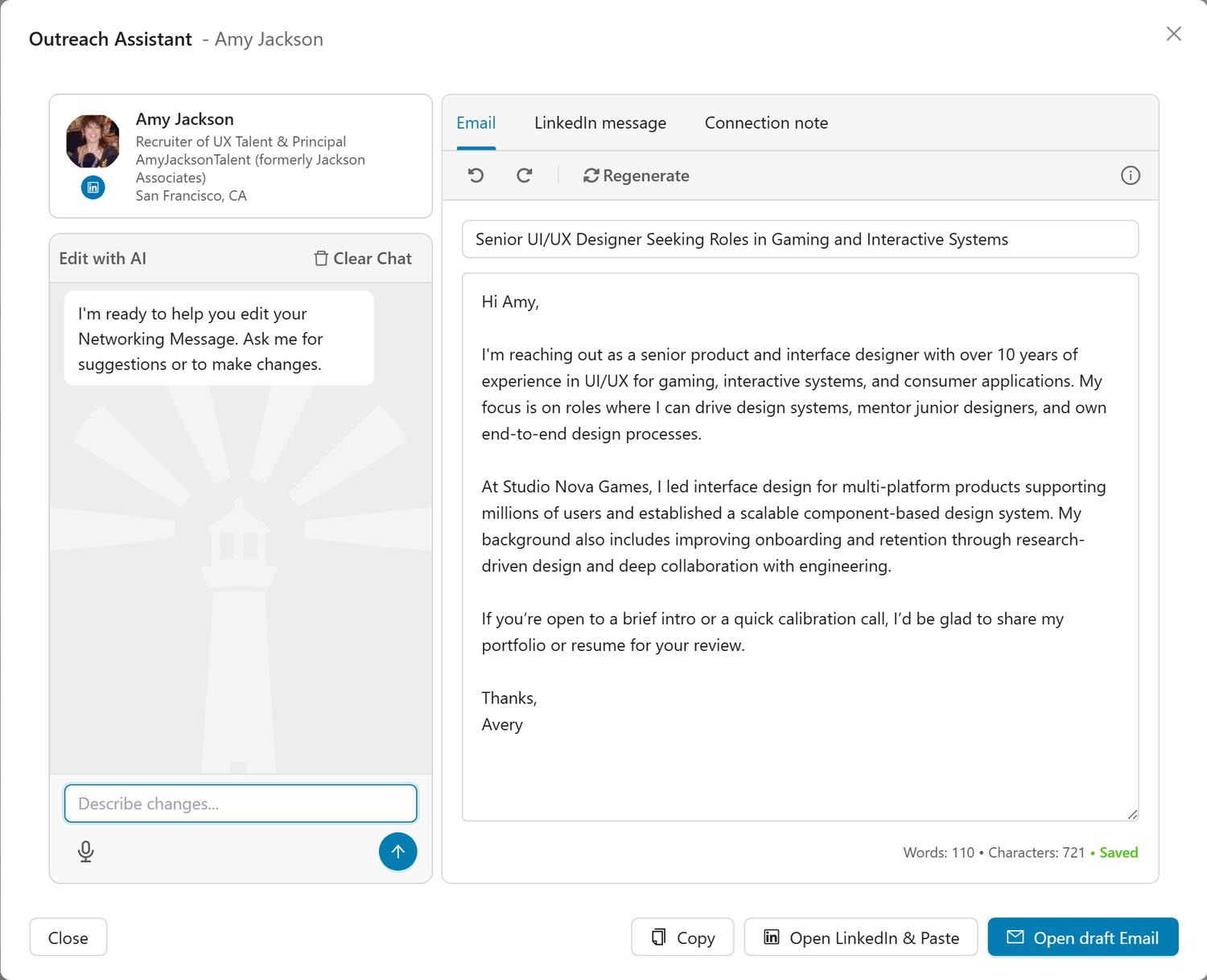
Reach out generates a tailored, ready-to-send message drawn from your background. Open a recruiter and choose to reach out, and Callings drafts an outreach email, a LinkedIn message, and a short connection note, each personalized to your experience and the recruiter's focus. Review, copy, and send: the email opens in Gmail, Outlook on the web or your default email app (see Opening a Draft Email), and every address the lookup finds has a copy icon so you can send from any mailbox. The email's Links menu adds your LinkedIn profile, Calling Card or scheduling link in one sentence above the sign-off (see Links).
A warm, specific first message is far more effective than a generic "are you hiring." Because the draft is built from your resume and the recruiter's specialty, it gives you a credible, relevant opening that is easy to personalize further.
Organizing Your List
The toolbar keeps things focused:
- Find Recruiters runs a fresh search for headhunters in your field, from a resume or from your own words.
- Add Manually lets you add a recruiter you already know or found elsewhere.
- My LinkedIn Connections surfaces recruiters already in your network.
- Sort by orders the tab: Best match first, or by name or date added.
- The search box narrows it. Type a name or a firm, or add a chip for Favorites, Reached out, Not yet reached out or Connected on LinkedIn.
- Favorite a recruiter to save them to your shortlist, and remove any recruiter you are not interested in.
- Archive a recruiter to hide them without losing their details, notes, or outreach history. The Show menu's Include archived switch brings them back.
A recruiter the search proposed and you have not answered yet wears a dashed Suggested recruiter tag with Keep and Ignore on it, so your own shortlist stays readable next to new matches. Keep turns it into a plain Recruiter tag; Ignore takes them off the tab, and removes them altogether unless they are also in your contacts or on one of your jobs.
Tips and Best Practices
- Build the relationship before you need it. Connect with recruiters in your field early, so you are already on their radar when the right role opens.
- Personalize the generated message. The draft gives you a strong, relevant starting point; add a specific detail about the recruiter or firm to stand out.
- Track your outreach. Use the connected and reached-out flags so you know who to follow up with and when.
- Try more than one resume. If you are targeting two kinds of roles, switching resumes surfaces a different set of specialist recruiters.
Frequently Asked Questions
Q: How are recruiters matched to me?
A: With a resume attached they are matched from that resume: Callings reads your occupation, field, and level and surfaces external recruiters and search firms that specialize in your area. Switch resumes to see different matches.
Q: Can I narrow a resume search to an industry or a city?
A: Yes. Keep the resume attached and type the narrowing in the search box, for example "healthcare" or "in Chicago" or "healthcare recruiters at Robert Half." The search keeps matching your background and limits itself to what you typed.
Q: Can I search without using a resume?
A: Yes. Take the resume off with the x on its pill and type what you want, for example "IP litigation partner recruiters in New York." The search then runs from your words alone.
Q: Why is my search nationwide by default?
A: Most recruiters place candidates nationally, so an Extend nationwide search surfaces far more relevant matches than a city-only one. Untick Extend nationwide, under the search box while a resume is attached, to keep results local, or name a place in your words to search there.
Q: What is the difference between these recruiters and a company's recruiter?
A: This page is for external recruiters and search firms who place candidates across many companies. In-house recruiters tied to a specific job are covered by the Networking tools on each job in your tracker.
Q: What does Reach out give me?
A: A tailored outreach email, a LinkedIn message, and a short connection note, each drawn from your background and the recruiter's focus, ready to copy and send.
Q: Can I add a recruiter I already know?
A: Yes. Use Add Manually to add any recruiter yourself, or pull in recruiters who are already among your LinkedIn connections.
Q: How do I hide a recruiter without deleting them?
A: Archive them from the row menu. Archived recruiters disappear from the list but keep all their details and notes; turn on Include archived in the Show menu to see them again and unarchive them. Removing a recruiter, by contrast, deletes them from your list permanently.
Q: What happened to the Recruiters page?
A: It is the Recruiters tab of People now. Everything came with it: your recruiters, your notes, your favorites, who you had reached out to, the match grades, the search, and the recruiter outreach drafts. Recruiters were always stored as contacts, so the two lists were one all along.
Related Topics
- People - The page this tab lives on, and everyone else in your search
- My Community Overview - See how all the networking tools fit together
- Associations - Discover professional associations matched to your field
- Events - Find local and virtual events worth attending
- Networking Targets - Find specific people connected to a job
Recruiters are one of the most direct paths to roles that never get posted. Find the headhunters who work in your field, get on their radar with a message that fits, and let those relationships bring opportunities to you.