Professional Associations
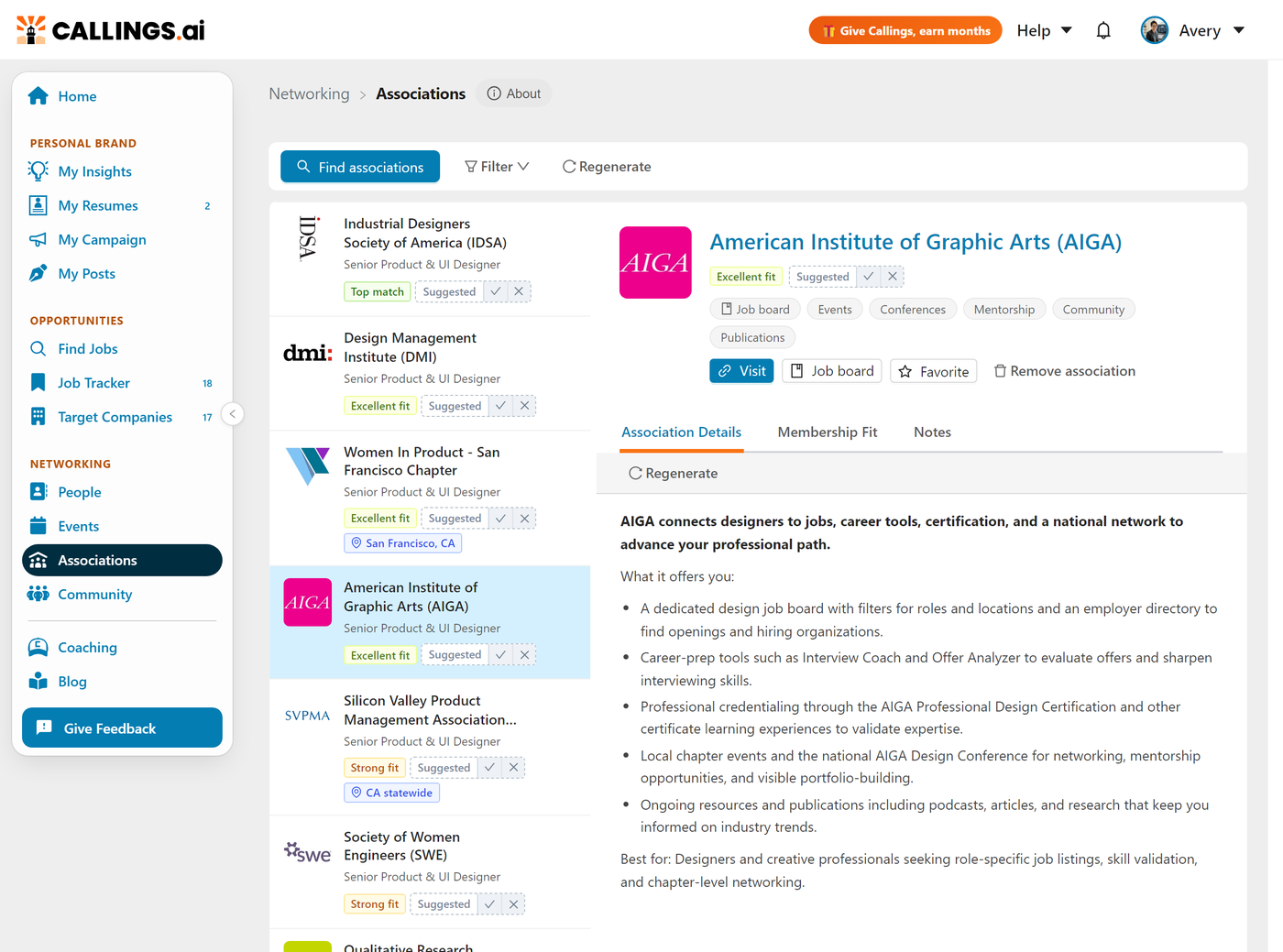
Associations is a personalized list of professional organizations matched to your background, each with an honest AI Membership Fit Report, badges for groups that run job boards or certifications, and space to take notes on your outreach. It turns "I should probably join something" into a focused shortlist of organizations actually worth your time and money.
Professional associations are one of the most underused networking channels in a job search. They run events, host niche job boards, offer certifications, and gather exactly the people you want to meet. Associations helps you find the right ones for your field and decide which are worth joining.
How Matching Works
Associations are matched from your background, not a generic list. Callings reads all of your active resumes, identifies your occupations and fields, and ranks organizations that fit, from broad national bodies to niche groups in your specialty. There is nothing to set up: the first time you open the tab, matching runs automatically so you always have a starting list.
Because your resumes are combined into one view, associations for every field you have a resume in show up in the same list. To shift the matches, add or update an active resume in your resume settings.
Adding Associations from the Directory
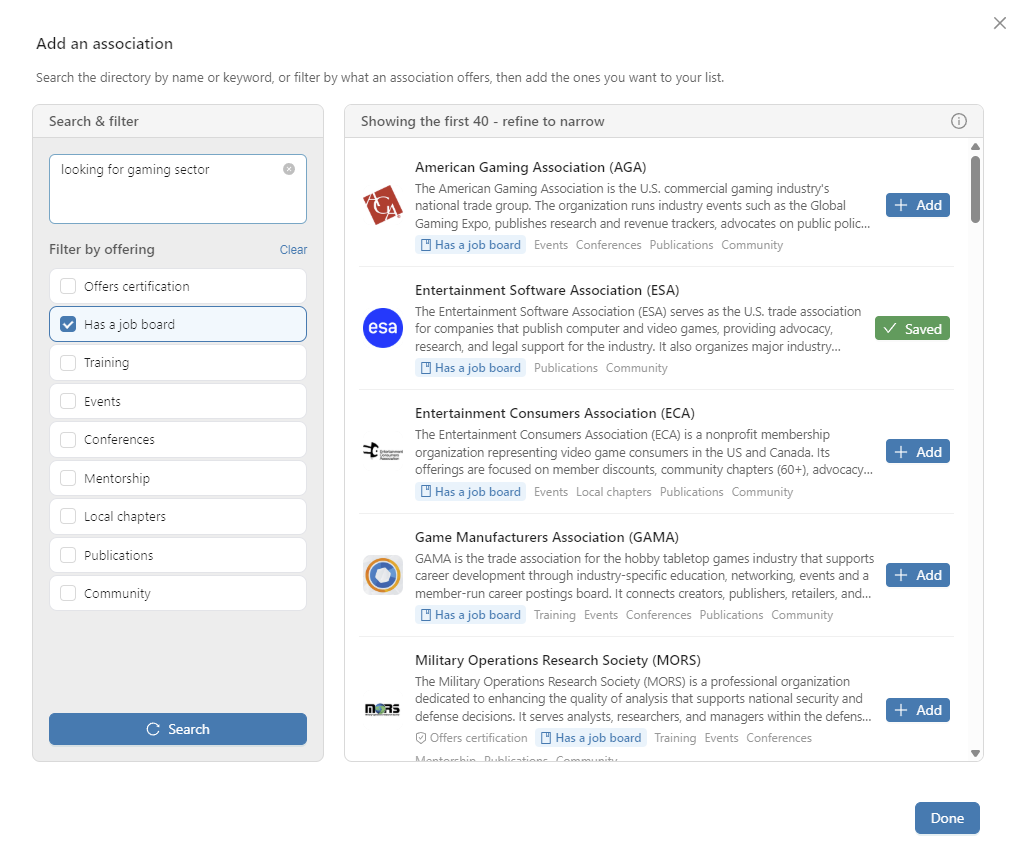
Beyond your matched list, you can browse the full directory of US-based professional associations and add any of them to your list. Click Find associations to open the directory, where you can search by name, by keyword, or by describing what you are looking for in plain language.
Search the way you think
The search understands meaning, not just exact words, so you do not need to guess the right keyword. You can type any of these and get relevant results:
- A name or acronym, like
ASIDorAmerican Marketing Association - A keyword, like
nursingorwelding - A community, alone or with a field, like
Black professionals,Latina leaders,women in tech, orLGBTQ+ engineers - A full sentence describing your field or goal, like
I grow corn and other cropsorlooking for an organization for professionals who design user interfaces
Describing your work in a sentence often gives the best results, because the search matches the idea behind your words to what each association actually does. Words in an association's name and description count too, and different words for the same community are searched together, so African American also finds associations that call themselves Black. Type your search, then press Search (or hit Enter). Results are ranked by how closely they fit, and up to 40 are shown. When few associations fit, you see only those, and when none does, the directory says so instead of showing unrelated ones.
Filter by what an association offers
Under Offers any of you can check things an association provides: a job board, certification, training, events, conferences, mentorship, local chapters, publications, or community. An association that offers any of the ones you checked stays in the results, and those offering more of them rank a little higher. In each result, the offerings you filtered on are highlighted so you can see at a glance why that organization matched.
Offerings are read from each association's website, so a site that does not mention one can be left out. When your checked offerings leave out close matches to your search, a note above the results says how many, and Search without filters shows them.
Add to your list
Every result shows the organization's logo, a short summary of what it is, and its offerings. When one looks right, click Add to save it to your Associations list, where it gets the same detail view, Membership Fit Report, and notes as your matched associations. Click again to remove it. Close the directory with Done when you are finished.
Exploring an Association
The page is a list on the left and a detail panel on the right. Selecting an association opens three tabs.
Association Details
The detail view shows what the organization is and what it offers: a description, the kinds of value it provides (events, conferences, training, mentorship, community, publications, local chapters, advocacy), and quick badges when it offers a Certification or runs a Job board. A Visit button takes you to the association's website, and a Job board button jumps straight to its careers page when one exists.
Regenerate on this tab rewrites the description for your background, grounded in what the association actually offers. It takes under a minute, and Restore brings the original description back.
Membership Fit
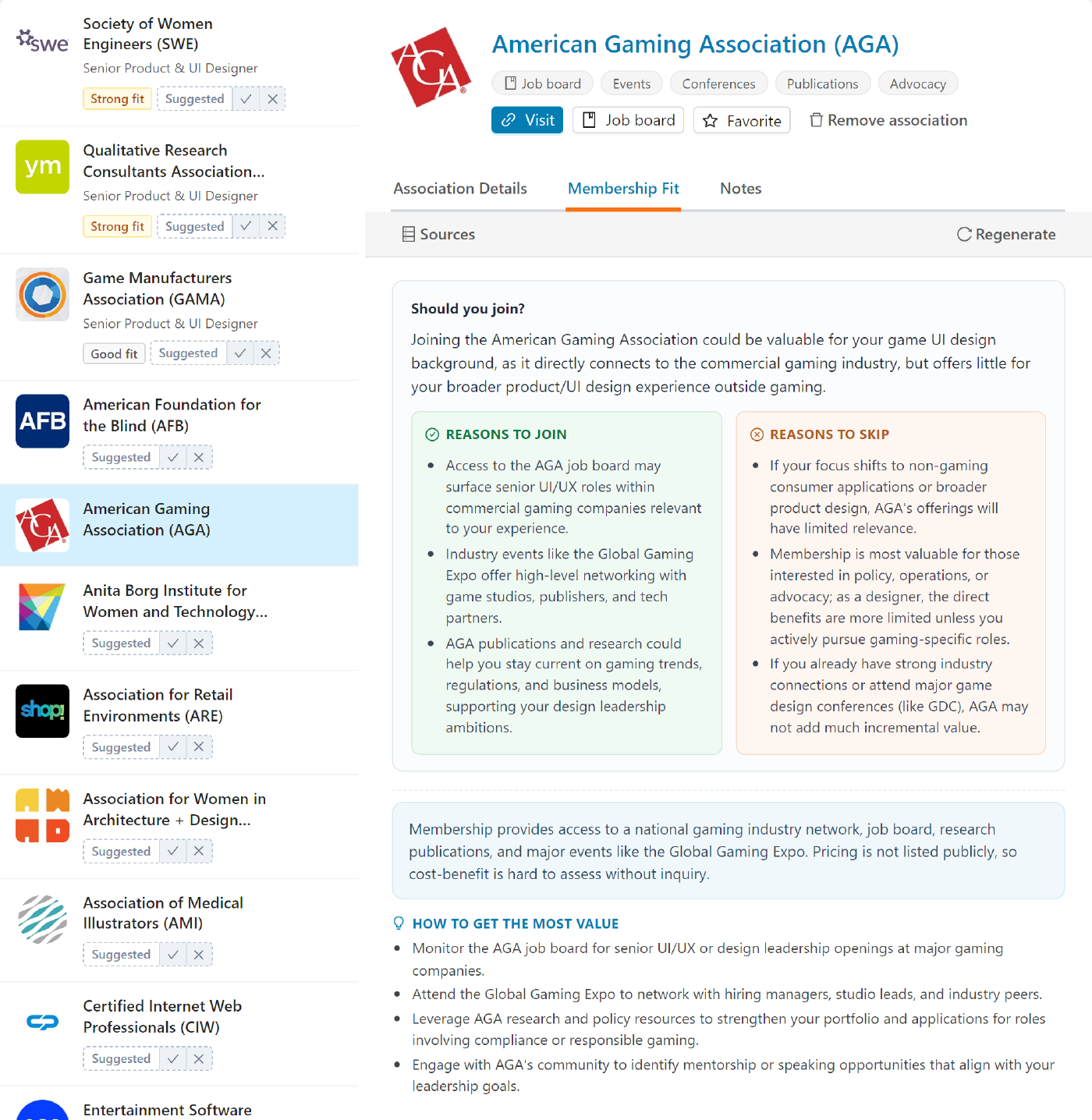
The Membership Fit Report is an honest, AI-generated take on whether joining is worth it for someone with your background. Open the Membership Fit tab, click Generate my fit report, and Callings researches the association and weighs it against your background, then answers one question plainly: should you join?
The report leads with a one-line verdict, then lays out Reasons to join and Reasons to skip side by side, so you see the case both ways. When the membership price is known it is shown as a Membership cost, and a How to get the most value list points you to the specific programs, certifications, chapters, or job board worth using if you do join. The point is not to sell you on every association, but to help you spend your membership budget where it counts. The report takes up to a minute to build, and you can switch tabs and come back; it is saved for you.
Notes
Track your engagement with each association: chapters to contact, application deadlines, people you met, and follow-ups. Notes support to-do status and file attachments, so an association can double as a small project workspace.
Job Boards and Certifications
Associations highlights organizations that run dedicated job boards. Many association job boards are niche and far less crowded than the big public sites, which makes them some of the best places to find roles in your field. Look for the Job board badge, and use the toolbar filter to see only associations that offer one.
The same is true for certifications. The Certification badge and filter help you find groups that offer credentials worth adding to your resume.
Organizing Your List
The toolbar and each row's Menu give you simple ways to keep the list focused:
- Favorite an association (open its row Menu and choose Add to favorites, or turn on the Favorite switch in its detail header) to save it to your shortlist, then use the My favorites filter to see only your saved ones. A favorite shows a star next to its name.
- Regenerate in the toolbar refreshes your suggested associations, matched to the resume you chose. Associations you saved stay where they are.
- A suggestion you have not answered yet carries a Suggested tag with a tick and a cross on it: keep it in your list, or dismiss it.
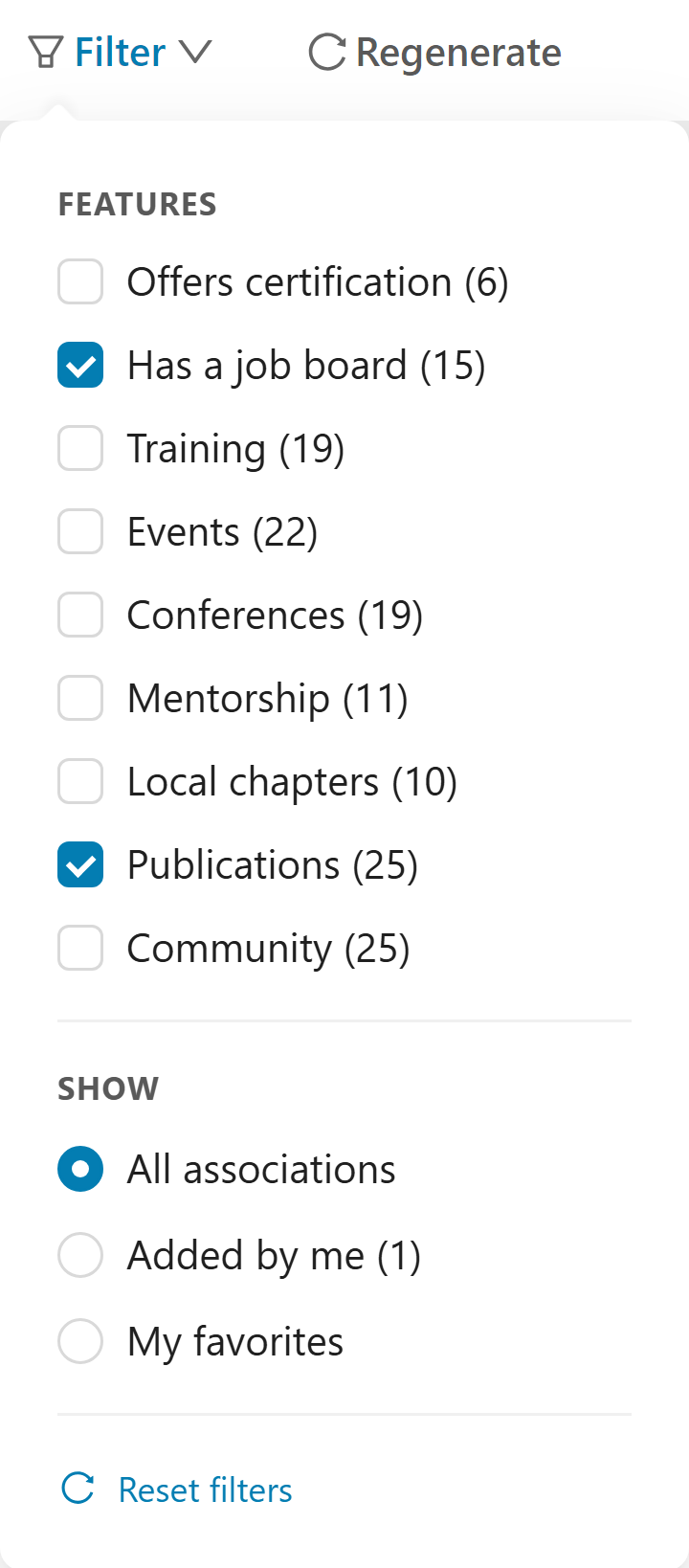
- The Filter menu narrows the list by what an association offers (certification, job board, training, events, conferences, mentorship, local chapters, publications, community) and by view (All associations, Added by me, My favorites).
- Remove an association you are not interested in (from its row Menu or its detail pane) to take it off your list. You can add it back anytime from Find associations.
Tips and Best Practices
- Generate the Fit Report before paying for membership. It is built to give you an honest read, including when an association is not worth it for you.
- Prioritize associations with job boards in your field. Niche boards are less crowded and often higher quality than the major public sites.
- Use notes as a tracker. Log local chapters to contact and events to attend so your association involvement turns into real conversations.
- Keep your resumes current. Your list is matched from all of your active resumes, so adding a resume for a new target field surfaces associations for that field too.
Frequently Asked Questions
Q: How are associations matched to me?
A: They are matched from your active resumes, combined into one list. Callings reads your occupations, fields, and keywords and ranks organizations that fit, from broad national bodies to niche groups. Add or update an active resume to change what shows up.
Q: How do I add an association that was not matched to me?
A: Click Find associations to open the directory of US-based professional associations. Search by name, by keyword, or by describing your field in a sentence (the search understands meaning, so plain language works well), optionally filter by what an association offers, then click Add on any result to save it to your list.
Q: How do I find associations for a specific community, like Black, Hispanic, Asian American, women, veteran, or LGBTQ+ professionals?
A: Open Find associations and type the community, alone or with your field, such as Black professionals, Black engineers, or Hispanic nurses. Different words for the same community are searched together, so African American and Black find the same associations. If you checked offerings, clear them first or use Search without filters, since an association's website may not list every offering.
Q: What is in the Membership Fit Report?
A: A one-line verdict on whether to join, then Reasons to join and Reasons to skip side by side, the membership cost when it is known, and a short list of how to get the most value if you join. It is designed to help you decide, not to sell you on joining.
Q: How do I find associations with job boards?
A: Look for the Job board badge on an association, or use the Job board filter in the toolbar to show only organizations that run one. Niche association job boards are often less crowded than public sites.
Q: Can I save associations to come back to?
A: Yes. Favorite any association from its row Menu or its detail pane to add it to your shortlist, then use the My favorites filter to see just your saved ones. You can also remove associations you are not interested in and add them back later from Find associations.
Related Topics
- My Community Overview - See how all the community tools fit together
- Events - Find local and virtual events worth attending
- Community Support - Ask members for introductions and advice
- Networking Targets - Find specific people connected to a job
The right association puts you in the room with the people and opportunities in your field. Find the ones that fit, join with confidence, and let your involvement turn into the conversations that move your search forward.