Events
Events is a personalized list and calendar of career-relevant events near you, matched from your resume and location, with an AI Fit Report that tells you whether each event is worth your time and how to make the most of it. It tells you where to show up and exactly what to do once you are there.
Conferences, meetups, and industry events are where opportunities and relationships start, but finding the right ones, and knowing which to skip, is the hard part. Events finds real gatherings, reads each one, matches them to your field, and turns the ones worth attending into a concrete plan.
How Matching Works
Events are matched from your selected resume and your location. Pick an active resume and Callings reads your background, then gathers events for your area and your field: local event listings for your area, the professional association meetings, industry conferences and field meetups that fit your role, and a selection of online events. The list loads automatically and is kept fresh in the background, so there is no button to press.
What makes the matching specific:
- Your area is the nearest major city. If you live within about 60 miles of a major city, your list draws on that city's events (and any other major city within about 100 miles), where there are far more professional events than in a single town.
- Events are found for your field, not just your city. Besides general event listings, Callings looks specifically for events for your profession, such as local chapter meetings of professional associations and industry conferences near you.
- Events are read, not just listed. When an event reaches your list, Callings opens its own page and uses the full details (not a one-line blurb) to understand what it really is and who it is for.
- Every event is classified. Consumer and social events (concerts, dining, festivals, kids and family classes, fitness clubs) are filtered out as not career-relevant, and so are courses, classes, certifications and paid trainings, since they are not places to meet people. The rest are labeled as an Industry Event (specific to a profession or field) or a general Career Event (a networking mixer or a job and recruiting event open to everyone).
- Industry events are matched to your field and level. A field-specific event is shown only when it actually fits your profession, so a litigation networking night does not land in a chef's list, and events aimed well above or below your experience level rank lower. General networking events and career fairs fill a smaller part of the list, nearest first.
- Each event says why it is there. A short line such as "Matches your role" or "Open networking for any field", with the distance, tells you why an event made your list.
- Events hosted by Callings come first. Callings runs its own live sessions on job search and networking. The next ones are listed at the top of everyone's list, marked Hosted by Callings, whatever your field.
The first time your area or field is needed, Callings gathers its events in the background, so the list fills in as events are read and classified (you will see "Finding events near you" while this happens, usually a few minutes). If you have not added a city to your profile, Callings can still show online events; add your location to unlock local ones.
Browsing Events
Events is a ranked list, with a calendar you can open above it.
List View
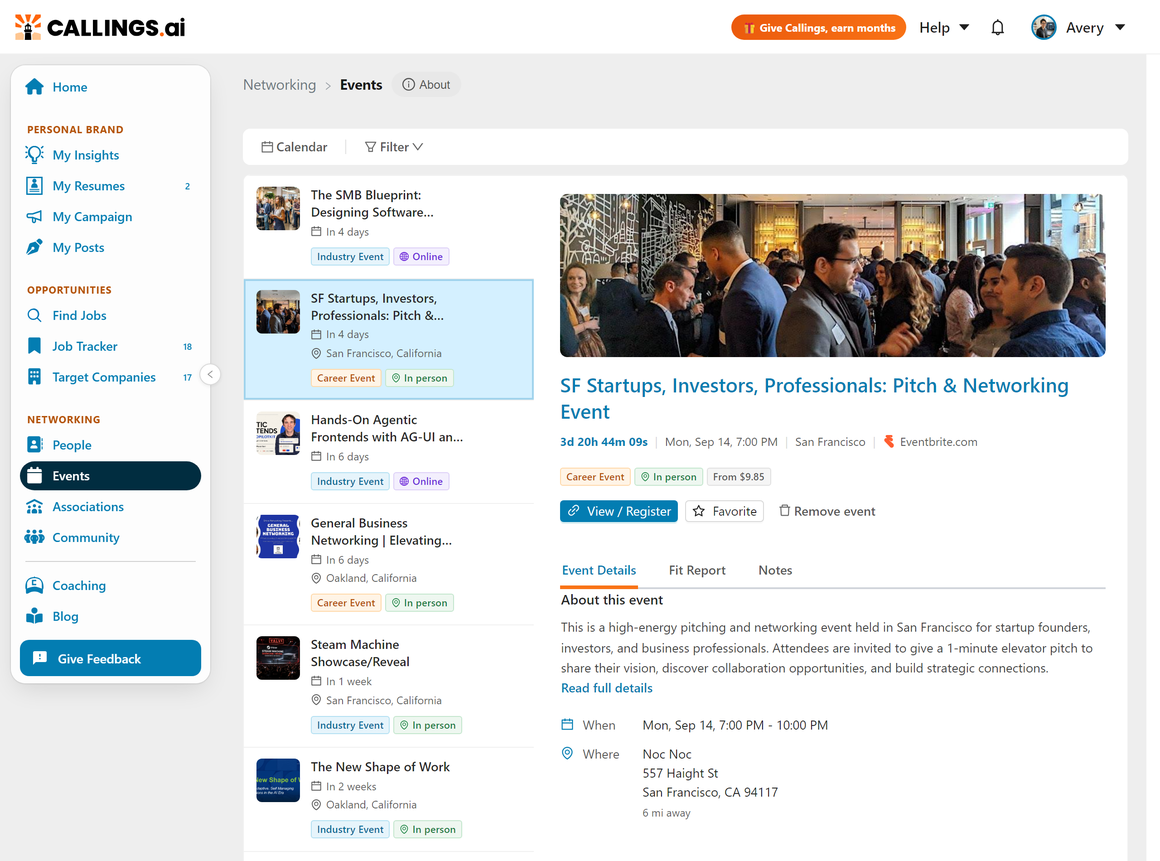
A ranked list on the left with a detail panel on the right. Each event shows its title, date and time, location, a lead image when available, and a tag for its type: Industry Event or Career Event. Click an event to open its detail panel. Its header shows the date, the place and the site the event is listed on, its tags (type, In person, Online or Hybrid, and Free or the ticket price when the event's page states one), why it is on your list, and a View / Register button that opens the event page. The Event Details tab leads with a plain-language About this event summary built from the event's real page, followed by when and where, with the distance for in-person events. Turn on the Favorite switch to save an event, or choose Remove event from the menu to drop one you are not interested in and keep your list focused.
Open Filter in the toolbar to shape the list: Attendance narrows it to In person or Online events, Event type to Industry events or Career events, and Show switches between Upcoming events, My favorites, and Past events with notes, so you can return to events you have already attended.
Calendar View
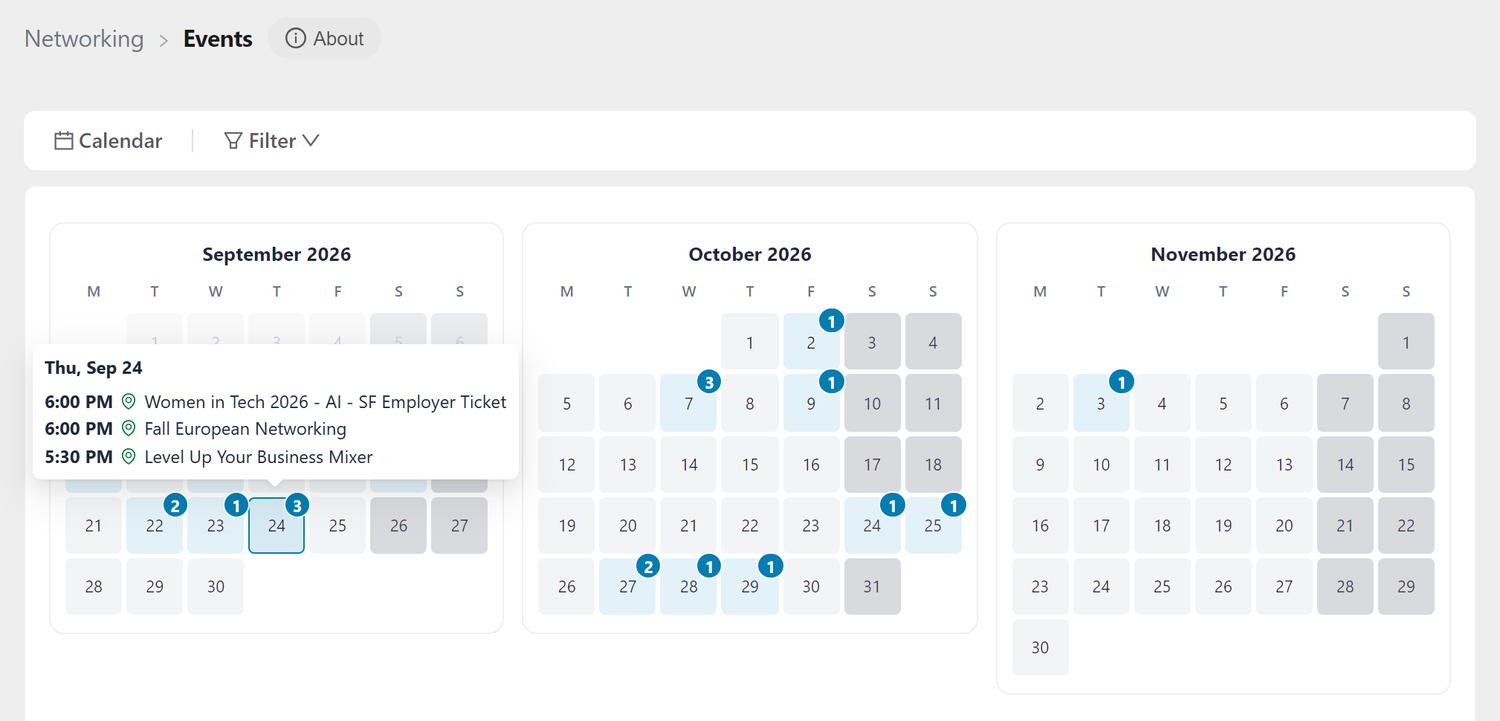
Click Calendar in the toolbar to open a rolling three-month calendar above the list, and click it again to hide it. It lays your matched events out by date. Days with events show a count, and saved events are marked with a star, so you can plan which weeks to be active. Click any day to see the events on it and open one in the detail panel.
The Fit Report
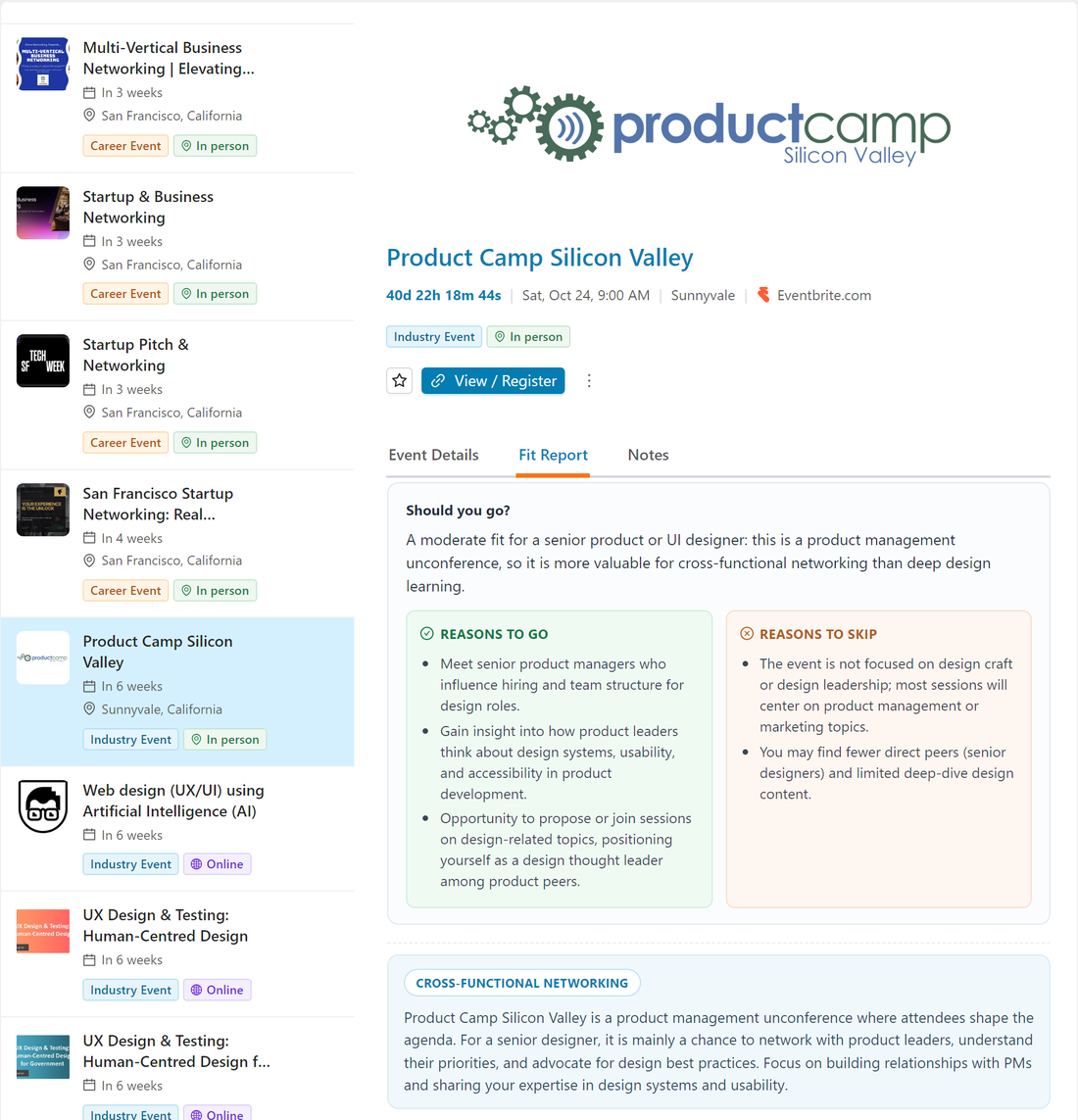
The Fit Report is an AI assessment of whether a specific event is worth your time, plus a plan for attending it. Open the Fit Report tab for any event and click Generate Fit Report. Callings weighs the event against your background and returns:
- Should you go - an honest verdict for your field and goals, with reasons to go and reasons to skip so you can decide quickly
- A short summary of what the event means for you, tagged with its main focus
- What to expect from the format and the room
- Your goal, the single most valuable reason for you to attend
- Who to meet, with a concrete target (for example, three real conversations with restaurant operators)
- An opener, a ready-to-use line to introduce yourself
- Prepare, a short checklist to handle before you go
- Tips for making the conversations count
Keep your own notes on the event in its Notes tab. The report itself takes up to a minute to generate. If an event is still being prepared, the Generate button waits and enables itself the moment the event's details are ready.
Note-Taking
Every event has a Notes tab for tracking your plan, the people you want to find, and your follow-ups afterward. Notes support to-do status and file attachments, so an event can become a small workspace from "planning to go" through "people I met and need to follow up with." Your notes stay attached to the event even after it has passed: open Filter and, under Show, pick Past events with notes to find any event you took notes on and pick your follow-ups back up.
Tips and Best Practices
- Read the Fit Report before any event you commit to. Knowing whether to go, and walking in with a goal and an opener, is the difference between collecting cards and starting real relationships.
- Trust the labels. An Industry Event is matched to your field; a Career Event is broadly useful networking. Both have a place, but they tell you what kind of room to expect.
- Use the calendar to pace yourself. Spread events across weeks rather than overcommitting, and prioritize the ones that match your goals.
- Do not skip virtual events. They are easy to attend and often just as valuable for meeting people in your field.
- Capture follow-ups in notes the same day. A quick note about who you met and what you discussed makes your post-event outreach far stronger.
Frequently Asked Questions
Q: How are events matched to me?
A: From the resume you select plus your location. Callings gathers events for your area (the nearest major city) and for your field, reads each event's own page, filters out non-career events, consumer events and trainings, and matches field-specific events to your profession and level. Add your city to your profile to unlock local events; without it, you still see online ones.
Q: What is the difference between an Industry Event and a Career Event?
A: An Industry Event is specific to a profession or field and is shown only when it fits yours. A Career Event is general professional networking, or a job and recruiting event, that is useful across fields and shown to everyone.
Q: Why are there fewer events than I expected, or why did some disappear?
A: Events are held back until they have been read and classified, and anything that is not career-relevant or not in your field is filtered out. The list fills in as events finish processing, so it can start small and grow over the first few minutes. If we could not reach our event sources for your area, the list says so and we try again automatically.
Q: Why don't I see courses, webinars or certification programs?
A: Events is about the places where you meet people in your field. Courses, classes, certification and exam prep, and webinars that are essentially lessons are left out, even when they are on topic. The one exception is Callings' own live sessions, which are listed first for everyone and marked Hosted by Callings.
Q: What happens when I remove an event?
A: It leaves your list for good and the next best event takes its place.
Q: Can I get back to an event after it has happened?
A: Yes, if you took notes on it. The main list shows upcoming events, but picking Past events with notes under Show in the Filter menu brings back any event you saved notes on, so you can revisit your plan, the people you met, and your follow-ups.
Q: What does the Fit Report include?
A: A verdict on whether to go with reasons to go or skip, a short summary of what the event means for you, what to expect, your main goal, who to meet with a concrete target, a ready-to-use opener, a short prep checklist, and tips. Your own notes live on the event's Notes tab.
Q: What do I see on the free Basic plan?
A: Your top 3 matched events, plus Callings' own live sessions and every event you saved, registered for or took notes on. None of those count toward the 3. An Unlimited Membership shows your full list. The Fit Report works on every event you can see, on either plan.
Q: How far away are the events?
A: The list comes from your area and the other major cities within roughly a 100-mile range, since larger cities host far more professional events. In-person events show their distance so you can judge the trip, and online events are attendable from anywhere.
Q: Is there a calendar view?
A: Yes. A rolling three-month calendar shows your matched events by date, marks saved events with a star, and lets you click any day to see and open its events.
Related Topics
- My Community Overview - See how all the community tools fit together
- Associations - Discover professional associations matched to you
- Community Support - Ask members for introductions and advice
- Coffee Meetups - Get matched for one-on-one networking chats
Showing up is half of networking; showing up prepared is the other half. Find the events that fit your search, read the Fit Report to decide whether to go, and turn a room full of strangers into the start of your next opportunity.