Community Support
Community Support connects you one-on-one with other members to help and be helped on specific needs: a warm introduction, a resume review, interview practice, or advice. You post what you need support with, browse what other members need, and when an offer is accepted Callings introduces you both by email so you can connect directly. Both sides stay anonymous until then, so you can ask for and offer support without exposing your identity up front.
This is not a question-and-answer forum. It is real, one-on-one connections with people who are in the same search and can help with the specific thing you need, when you need it. Instead of guessing who might help, you post a clear request and let members who can actually help reach out, then take the conversation directly between the two of you.
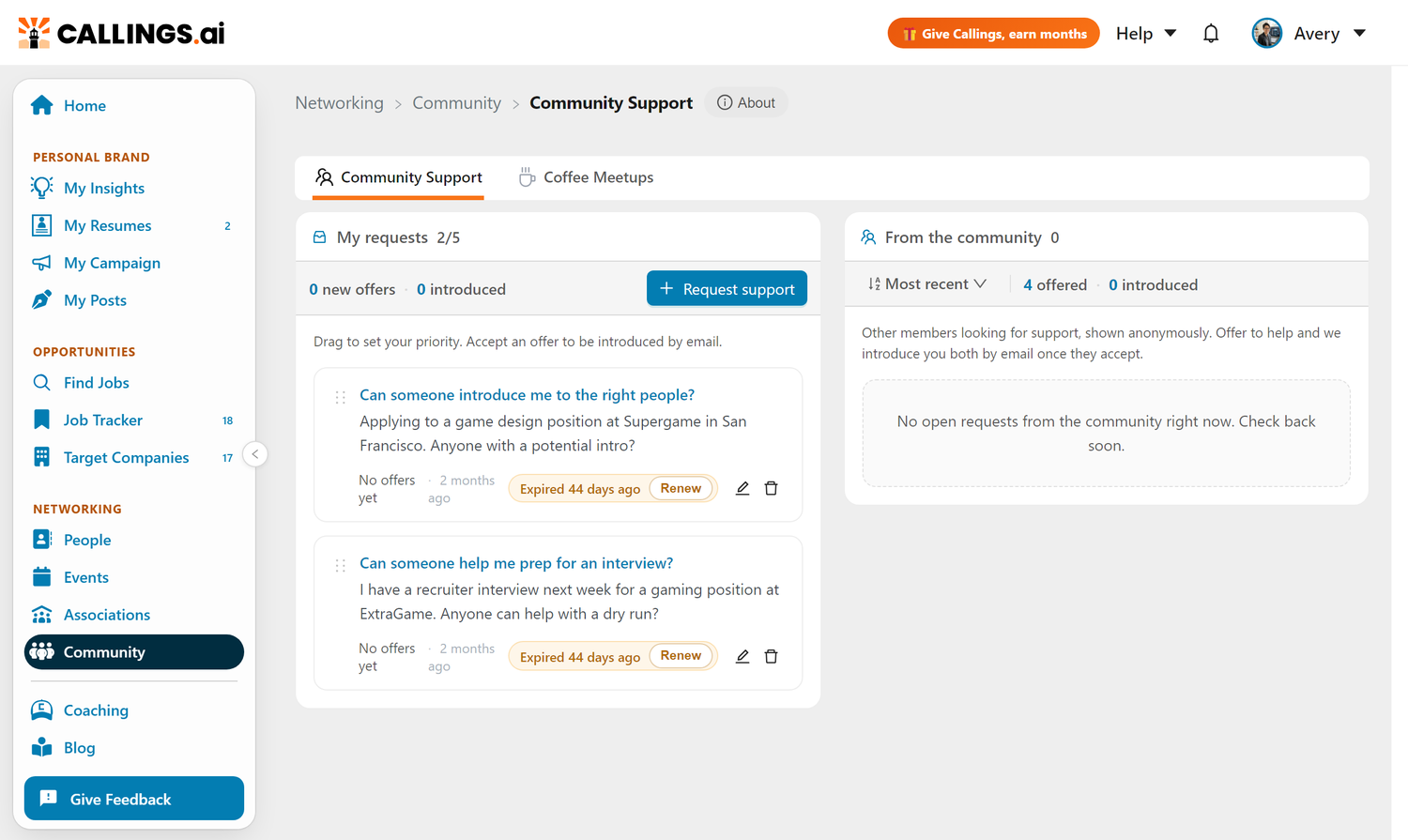
Open Community in the Networking section of the sidebar. Community Support is the first of its two tabs; the second is Coffee Meetups.
How It Works
Community Support is two columns side by side: My requests on the left and From the community on the right. You post what you need on your side, and you help others on theirs.
Your Side: Requesting Support
Post a request and let offers come to you. Click Request support, pick the topic that fits, describe what you need, and post it. Other members see your request anonymously and can offer to help. You review every offer before anyone learns who you are.
You start by choosing a topic, which frames your request and tailors the prompts so other members instantly see what kind of help you are after:
- Resume Review - a fresh set of eyes on your resume or LinkedIn profile
- Interview Prep - mock questions, help with your story, or practice for a specific stage
- Salary Negotiation - a sounding board for weighing or negotiating an offer
- Warm Introductions - an intro to someone at a target company or in your field
- Job Search Strategy - help when your current approach feels stuck
- Career Change - guidance on navigating a pivot to a new role or industry
- Other - anything else a fellow member could help with one-on-one
Then you write the details in your own words. The more specific you are, the better the offers you will get.
When you post, you will see the disclosure that your name and email stay private until you accept an offer. You can edit a request, reorder your requests by priority by dragging them, or remove one at any time.
The Community Side: Offering Help
Browse anonymous requests and offer to help when you can. On the right, you see open requests from other members. When one is in your wheelhouse, click I can help, write a short message explaining how you can help and why, and send your offer. The member sees your message first, with no name attached, and decides whether to accept.
You can sort the community list by Most recent or Oldest first, and hide any request you do not want to see again.
The Introduction Workflow
The heart of Community Support is the introduction. It follows a simple, privacy-first path:
- A request is posted. It appears anonymously to the rest of the community.
- A member offers to help. Their message reaches the requester by email and in the in-app notifications bell, but their name and email do not.
- The requester reviews offers. They can receive several offers, expand each one, and read the messages before deciding.
- The requester accepts an offer. Click Accept help, confirm, and Callings sends a single introduction email to both people, sharing names and emails so the conversation can continue directly. The helper also gets an in-app notification that their offer was accepted.
- You take it from there, one-on-one. Both of you are on the same email thread and can reply to set up a call, a review, or whatever was asked for.
If a requester declines an offer instead, the helper is not notified with a rejection. The request simply stays open for other members.
You can act on offers right from the notification email too. The email includes one-click accept and decline buttons that complete the action when you land back in the app. Both moments also show up in your in-app notifications bell: the requester sees "Someone offered to help" when a new offer lands, and the helper sees "Your offer was accepted" once the introduction is made.
How Long Requests Stay on the Board
Requests have a lifespan, so the board always reflects what members need right now. When you post a request, you choose how long to keep it live: 7, 14, or 30 days (30 by default). The card shows how much time is left, for example "Expires in 22 days."
A few days before a request lapses, we email you a quick "still looking for help?" nudge. You have three easy options:
- Keep it live - renews the request for another 30 days, so it stays on the board.
- I'm all set - closes the request and frees up a slot.
- Do nothing - the request lapses on its own and comes off the board.
Both buttons in that email are one-click and complete the moment you land back in the app. Inside the app, a lapsed request does not disappear: it moves aside so you can repost it in one click whenever you want it back on the board, as long as you are under your five open-request limit.
This light expiry keeps the board current without any cleanup work on your part. Nothing is ever lost by accident, and you are always the one who decides whether a request stays, closes, or comes back.
Privacy and Anonymity
Your name and email stay private until both people agree to an introduction. This is the rule that makes the board comfortable to use on both sides.
| Stage | What the requester sees | What the helper sees |
|---|---|---|
| Request posted | Their own request | The request text only, no identity |
| Offer made | The offer message, no identity | Their offer is sent, identity still hidden |
| Offer accepted | Helper's name and email by email | Requester's name and email by email |
Until that final step, every interaction is anonymous. You are always the one who decides when an introduction happens.
The email shared in the introduction is your contact email if you have set and verified one in Me > Profile, otherwise your account email. Setting a contact email lets you help and be helped while keeping your account email private.
Keeping the Board Healthy
You can have up to five open requests at a time. This keeps things balanced so every member gets attention and no one floods the queue. When you reach the limit, the Request support button is disabled until you remove or close a request.
A few other limits keep things tidy:
- A request can be up to 2000 characters
- An offer message can be up to 1000 characters
- Each request stays on the board for 7, 14, or 30 days (your choice), then lapses unless you renew it
- You can reorder your own open requests by priority, and hide community requests you are not interested in
Each column also shows simple counters. On My requests: how many new offers are waiting for you, and how many introductions you have received. On From the community: how many times you have offered to help, and how many introductions you have made.
Tips and Best Practices
- Be specific. "An intro to someone on the data team at Stripe" gets better offers than "networking help."
- Post more than one thing. You have up to five slots. Use them for the different kinds of help you actually need.
- Offer support, not just request it. Helping others builds goodwill, sharpens your own thinking, and is often how the best one-on-one connections start.
- Write a real offer message. When you offer to help, explain your background and exactly what you can do. A concrete message gets accepted more often.
- Close requests you no longer need. It frees a slot and keeps your list focused on what matters now.
Frequently Asked Questions
Q: Will other members see my name when I post a request?
A: No. Your request is shown to the community anonymously. Your name and email are revealed only after you accept an offer, at which point Callings introduces you both by email.
Q: How many requests can I have open at once?
A: Up to five at a time. This keeps the community balanced so every request gets attention. Remove or close a request to free up a slot.
Q: What happens when I accept an offer?
A: Callings sends one introduction email to both you and the helper, sharing both names and emails so you can continue the conversation directly. You are both on the same thread and can simply reply.
Q: Which email address is shared in the introduction?
A: Your contact email, if you have set and verified one in Me > Profile. Otherwise, your account email is used. A verified contact email lets you take part while keeping your account email private.
Q: What if I decline an offer?
A: The helper is not sent a rejection message. Your request stays open so other members can still offer to help.
Q: Can I offer help anonymously?
A: Yes. When you offer to help, the member sees only your message, not your identity, until they accept your offer.
Q: How will I know when something happens?
A: Both by email and in your in-app notifications bell. When someone offers to help with your request, you get a "Someone offered to help" notification (the helper stays anonymous). When you accept an offer, the helper gets a "Your offer was accepted" notification along with the introduction email. Declines are silent, so no one is sent a rejection.
Q: Do requests expire?
A: Yes. Each request stays on the board for the window you pick when posting (7, 14, or 30 days, with 30 as the default). A few days before it lapses, we email you a reminder so you can renew it, close it, or just let it expire. A lapsed request is not deleted: you can repost it in one click whenever you want it back, as long as you are under your five open-request limit.
Related Topics
- My Community Overview - See how all the community tools fit together
- Coffee Meetups - Get matched for recurring one-on-one chats
- Networking Targets - Find specific people connected to a job
- My Campaign - Rally your wider network with a Calling Card
Everyone in this community knows how hard the search is, because they are in it too. Request the support you need, help where you can, and let the introductions happen. The one-on-one connection you make today might be the one that changes your search.