AI Job Search
AI Job Search lets you describe your ideal job in plain English and instantly discover matching opportunities from our database of millions of job postings. Instead of filtering through traditional job board categories, simply tell the AI what you're looking for (specific companies, locations, salary expectations, work arrangements) and receive ranked results based on how well each job matches.
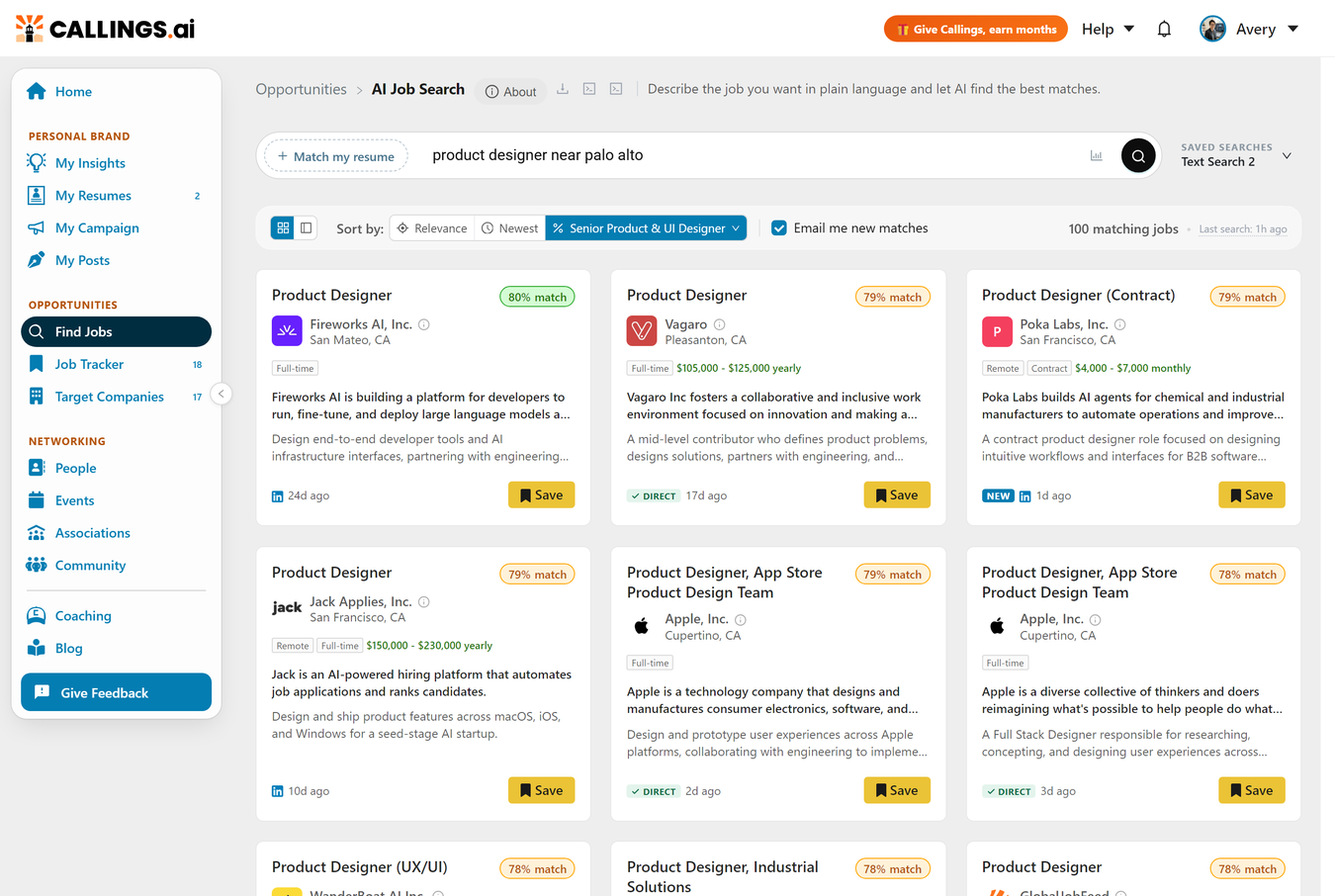
The same experience opens from the AI Job Search button on the Job Tracker page. Your saved searches are shared between the two: a search saved in one place appears in the other.
How It Works
Every search is a plain-English sentence, and one sentence can combine several criteria at once:
- "Senior product manager in Denver or remote, salary above 150k"
- "Data scientist jobs in VA, NC, or TX posted in the last 2 weeks"
- "Jobs at Apple or Amazon in California"
- "Product manager in fintech, not at Meta or Google"
- "Registered nurse within 10 miles of Atlanta, at least 36 hours a week"
- "Software engineer that requires React and Python, no security clearance required"
- "Director of product in the SF Bay Area, remote OK, salary $200k+"
Titles, industries, companies (included or excluded), one or several locations, commute distances, remote or hybrid work, salary floors, weekly hours, skills, posting recency, security clearances, and visa sponsorship can all be mixed freely. Zip codes work too. The AI interprets your sentence and searches for semantically similar opportunities, even when the exact keywords don't appear in the posting.
Press Enter to run the search; searches may take up to 20 seconds. The more specific your sentence, the better the results, and you can refine and re-run as often as you like. Your latest search and results are remembered between visits, and clicking into the box brings up your recent searches so you can jump back to an earlier one.
What You Can Say
- Job titles and roles: "senior product manager", "director of manufacturing"
- Companies: "at Google", "jobs at Apple or Amazon", "not at Meta"
- Industries: "in healthcare", "at a fintech company", "not in defense"
- Locations: "in San Francisco", "within 50 miles of Austin", "near 30328", "in Sunnyvale only", "Oakland or San Jose"
- Remote and hybrid: "remote", "hybrid", "remote OK" alongside a city
- Salary: "salary above 150k", "200k+"
- Hours and employment type: "part time", "no more than 20 hours a week", "at least 36 hours a week"
- Skills and tools: "that requires Python", "use my Photoshop skills", "requires to speak Spanish"
- Posting age: "posted this week", "in the last 5 days"
- Other criteria: "no security clearance required", "I need visa sponsorship", "no travel"
How Locations Are Interpreted
Naming a city searches about 25 miles around it, because that is the area most people would actually commute to. A search for Sunnyvale therefore also returns jobs in Mountain View and Santa Clara. A metro area ("the Bay Area") uses a wider circle, and a whole state ("Nevada") matches the state exactly and never spills into its neighbors.
You can change that area three ways:
- Set your own distance: "within 50 miles of Austin", "within 10 km of Toulon". Kilometers are converted for you.
- Restrict it to the city itself: "in Sunnyvale only", "only in Sunnyvale", "San Francisco proper", or "0 miles from Sunnyvale". This matches the city named on the posting and drops the surrounding towns entirely. Words like "only", "exactly" and "just" work on either side of the preposition.
- List several places: "Oakland or San Jose" searches both.
A note on restricting to a single city: postings are located by the city they name, so a Sunnyvale role advertised as "Santa Clara, CA" is filtered out. Because you were explicit, a thin city-only search is never quietly widened on place, and "only" excludes remote roles advertised from other cities too.
You can also treat remote work as an alternative to a place rather than a requirement. "In Barcelona or remote", "remote OK" alongside a city, or "within 25 miles of Barcelona and remote in Spain" all return both the commutable jobs and the remote ones; the remote half can name its own country or region.
Outside of a city-only search, a remote job within about 50 miles of the place you named is treated as local to it: the distance you type describes a commute, and a remote role does not ask you to make one.
When you search a place without naming a role ("jobs in Sunnyvale"), results come back closest first, newest within each distance. Name a role as well and results are ranked by how well they fit the role instead, across the whole search area.
Company Tags
Beside the search box you may see a tag, for example a company name with a small building icon. A tag is a filter attached to the search itself rather than a word inside it. Tags arrive when you open a search from somewhere that already knows the company, most commonly the Refine in AI Job Search button on a target company's Open Listings tab.
What a tag does differently from typing a company name:
- It is matched on the company's website, not its spelling, so "IBM" and "International Business Machines" resolve to the same organization and same-name lookalikes are excluded.
- It survives rewording: editing your search text never changes or drops it.
- It works alone or in combination: with an empty box it returns that company's recent postings, newest first; typing "or at Apple" alongside it searches both companies.
Remove a tag with the small x on it. Tags are saved with the search and drive its email alert.
Search Preferences (Advanced)
Some criteria come up again and again: companies you never want to see, a salary floor, a kind of employer you always skip. Write them once as your search preferences, then switch them on per search. They live in the match-options popover under Advanced: apply my global search preferences to this search, with an Edit link (also editable in Settings > My AI Prompts > My Job Search Preferences).
Write them in exactly the language the search box understands, for example:
Exclude these companies: Acme, Globex. No staffing agencies. Salary at least $80k.
The text is shared across all your saved searches but off until you tick the box on a search. The setting is remembered per search, so some searches run under your standing rules while others stay wide open, and editing the text once updates every search that uses it. When a search is applying them, a My preferences pill appears beside the search box: click it to edit the text, or its x to stop applying them to that one search. Preferences reach everywhere that search runs, including its daily email.
What Results Are Matched Against
At the left of the search box is a pill that says what the search matches against. When nothing is attached it reads Match my resume; click it to open Match results against and pick one of three:
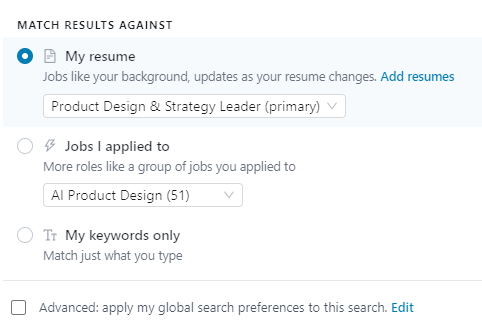
- My resume: jobs like your background, scored against your actual experience rather than only the words you typed. The pill then reads Jobs like your resume, and the results update as your resume changes. With more than one resume on file, a selector appears so you can choose which one.
- Jobs I applied to: more roles like a group of jobs you have already applied to. The pill reads Jobs like your applications. This needs at least three jobs marked Applied in your Job Tracker; we group similar ones and use the group as the reference.
- My keywords only: matches just what you type. This is what you get when nothing is attached.
The mode is part of the search, so it is saved with it and drives that search's daily email. You can still type alongside a resume or an applied group: the text narrows the results (location, seniority, salary and so on) while the resume or group does the matching.
Note: This is separate from the sort control above the results, which only re-orders and re-scores results you already have. The pill decides which jobs are found in the first place.
Saved Searches and Email Alerts
At the right end of the search box is the saved-search control. It reads Unsaved search - Save this search when the box holds something new, or shows the name of the saved search you are on. Click it to open your library:
- Save this search stores what is in the box. If you started from a saved search, you get two buttons instead: Update replaces the original in place, Save as new keeps both.
- The panel lists your saved searches with a slot counter (for example "3 of 5 slots available"). Click a search to load it into the box; use the pencil icon to rename it and the trash icon to delete it.
- Each row has an Email checkbox: tick it to receive a daily email of new matches for that search. Each search tracks its subscription independently. How that email is built, and how to tune it, is covered in Daily Job Email.
Editing never destroys a saved search. Change the text and the control reads Edited from with the original's name; the original stays untouched until you choose Update, so you can test any idea and simply load the saved version back.
The Email me new matches checkbox above the results does the same as the row checkbox for the search you are viewing. A recurring alert needs a saved search to attach to, so on an unsaved search ticking it opens the save dialog with the email option already selected.
New accounts start with one saved search named after the resume (Jobs like your resume title), created automatically when your first resume finishes processing: it has that resume attached, so it immediately surfaces jobs matching your background, and its daily email is on. It is an ordinary saved search; rename it, change it, or delete it. When you reopen AI Job Search, your searches and most recent results are restored.
Working with Results
Views and Toolbar
Use the icon buttons in the toolbar to switch between Grid view (cards in a grid) and List and detail view (list on the left, full description on the right). The toolbar also shows how many jobs matched, with close matches counted separately, and when the search last ran. Use Show more at the bottom to load further results.
Sorting and Match Scores
The Sort by control offers three options:
- Relevance: how well the job matches the text of your query. This is the default.
- Newest: most recently listed first.
- Resume match: how well the job fits one of your resumes; the option is labelled with the resume's name. Click it once to sort by that resume; click it again to switch resumes or set a minimum match score.
Score bands: Strong 80%+, Fair 70-79%, Low below 70%. Jobs under your minimum score are not hidden; they move to the close-matches section instead, and the sort option shows the active threshold so an old filter cannot quietly explain a short list.
Note: When you add a job to your tracker, its score comes with it, so the number is the same in both places. For a comprehensive qualification analysis, open the job's Job Fit Report from the tracker.
Result Cards
- The green Matches chips confirm which of your criteria the job satisfies (industry, salary, work arrangement, skills, and so on), so you can see at a glance why it is in your results.
- Tags show work arrangement, employment type, and salary when listed. NEW marks listings under 48 hours old; DIRECT means you apply on the employer's own site rather than a job board.
- Hovering a card reveals Details, Hide (removes it from future searches), Share, and the source link. Click Save to add the job to your Job Tracker, which unlocks the Job Fit Report, Custom Resume, and Cover Letter tools; if the job is already in your tracker, a duplicate notice lets you skip or add it anyway.
- Each card acts on its own, so you never have to wait for one Save or Hide to finish before clicking the next. To work through a long list, select several jobs and act on them together (see below).
- The tick box in a card's top right corner selects the job for a batch action.
Selecting Several Jobs at Once
Working through a long result set one card at a time is slow. Instead, select the jobs you want and act on them in a single step: tick a box and a bar appears above the results with Save and Hide for the whole selection.
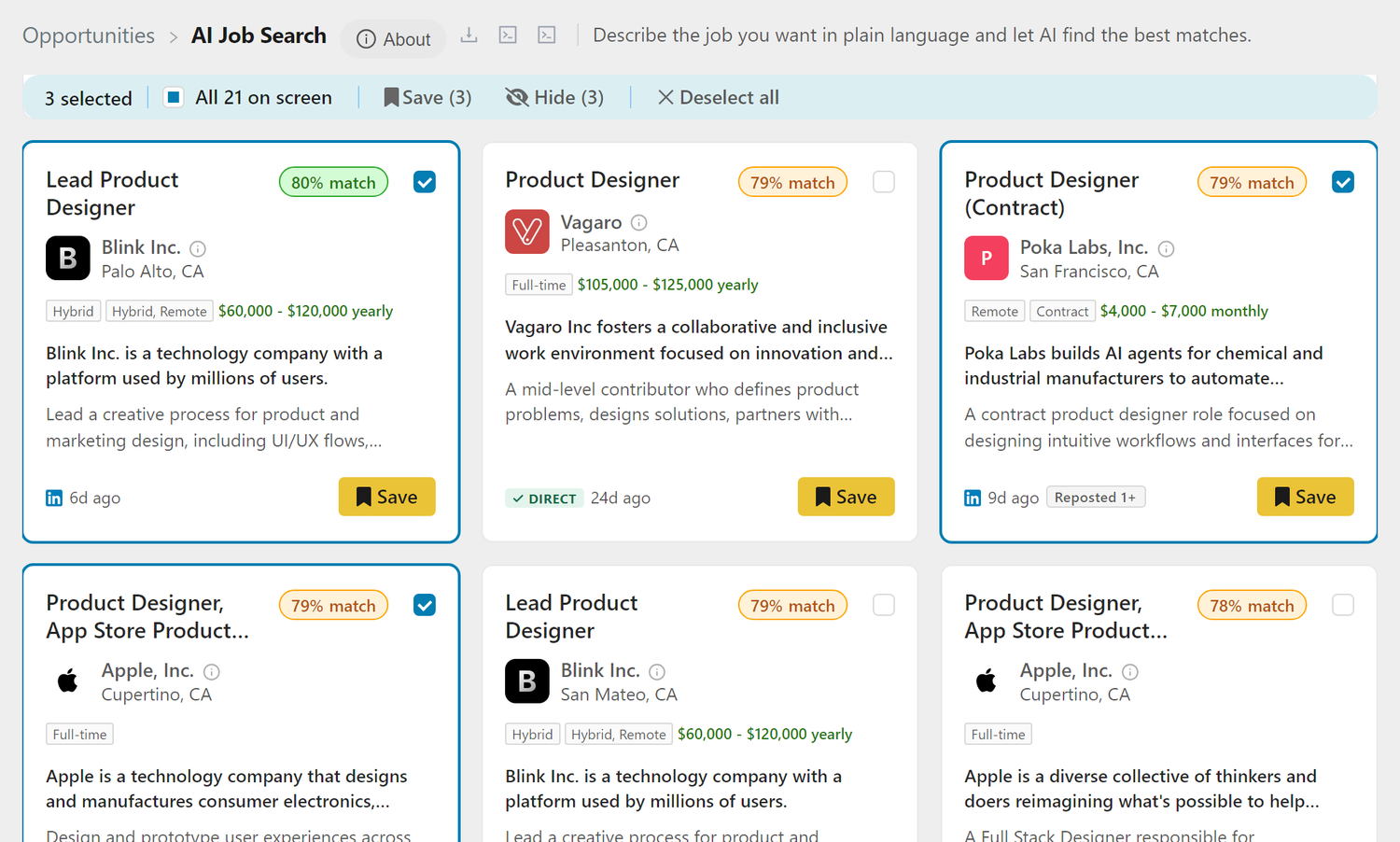
Three ways to build a selection:
- The tick box in a card's top right corner selects that job.
- Ctrl+click a card (Cmd+click on a Mac) adds it to, or removes it from, the selection without opening it.
- Shift+click selects everything between the last job you picked and the one you click, in the order the results are displayed.
A plain click still opens the job, whatever is selected, so you can read a listing without losing your picks.
The bar shows how many jobs are selected, a checkbox that selects everything currently on screen, Save and Hide labelled with the count, and Deselect all. Up to 100 jobs go in one batch.
- Save adds every selected job to your Job Tracker at once. Anything already in your tracker is skipped rather than added twice, and the bar says how many.
- Hide removes the selected jobs from this search and from future ones.
Either way the selected cards leave the list together and the bar reports what happened. Running a new search clears the selection, because it belongs to the results you were looking at.
Close Matches
If your query is narrow, the AI also looks for close-but-not-exact opportunities. Exact matches always stay on top and are counted separately; anything found by broadening appears below a Close matches banner, and each of those cards is labelled with the reason it is not exact (for example a missing listed salary).
Broadening follows a fixed order designed around what costs you the least: first it forgives unreliable data (industry and seniority labels on postings are often wrong), then it admits jobs that don't publish a salary, then more flexible work arrangements, then slightly older postings, then looser role wording. Showing hybrid roles on a remote search is kept for last and happens only when the page would otherwise be empty.
Some things are never relaxed: your target role stays your target role, your location is never widened to a different country, a city-only search is not widened at all, and a company you typed or tagged is never swapped for another.
Current Limitations
- On Relevance, the match score reflects query-to-posting alignment, not your full qualifications; switch to resume match, or open the Job Fit Report from the tracker for a full analysis.
- The job database is continuously refreshed but may not include every posting, and coverage of niche roles or very small companies can be limited.
- Location accuracy depends on how jobs are posted at the source.
Something looked wrong? Use the Feedback button in the platform; your search query and page context are attached automatically.
Frequently Asked Questions
Q: Can I filter by multiple states?
A: Yes. Use natural language like "jobs in VA, NC, or TX" and the system will search across all specified locations.
Q: Can I save or hide several jobs at once?
A: Yes. Tick the box in the top right corner of each card you want, then use Save or Hide in the bar that appears above the results. Ctrl+click a card (Cmd+click on a Mac) does the same without opening it, and Shift+click selects a whole range. Up to 100 jobs go in one batch.
Q: Do I have to wait for one Save or Hide to finish before clicking the next?
A: No. Each card acts independently, so you can click straight through a list. For more than a handful of jobs, selecting them and using the bar above the results is faster again.
Q: How do I filter by salary?
A: Type it into the search box, for example "$200k+" or "salary above 150k". It works alongside an attached resume too: the resume finds the jobs and your text narrows them. The About button at the top of the page lists everything else you can describe this way. To apply the same floor to every search without retyping it, put it in your search preferences.
Q: Why is my match score low for a job I think I'm qualified for?
A: On Relevance, the score reflects alignment with your search query, not your full qualifications. Switch the sort control to resume match to re-rank by resume fit, or add the job to your tracker and open the Job Fit Report for a full qualification analysis.
Q: Does the score follow the job into my tracker?
A: Yes. A job added from AI Job Search keeps the score you saw here. You can recalculate it any time from the tracker: select the job and use Rescore, or ctrl+click its Match % cell.
Q: Can I exclude certain companies or industries?
A: Yes, use negative phrasing like "not at Google" or "not in defense". To reuse the same exclusion across searches without retyping it, put it in your search preferences and tick the preferences box on each search you want it applied to.
Q: How do I stop seeing a company in all of my searches at once?
A: Add it to your search preferences, for example "Exclude these companies: Acme". Preferences are one shared text, applied to every search where you have ticked the box, so you write the exclusion once rather than editing each search.
Q: What is the "My preferences" pill next to my search box?
A: It means this search is applying your global search preferences. Click the pill to edit them, or its x to stop applying them to this one search. Other searches are unaffected.
Q: What is the difference between the pill on the left of the box and the sort control above the results?
A: The pill decides which jobs are found (your resume, a group of jobs you applied to, or just your keywords). The control above the results only re-orders and re-scores the results you already have.
Q: Why do I see remote jobs from a neighboring city?
A: A remote job within about 50 miles counts as local, because the distance you typed describes a commute and a remote role does not require one. If you want strictly one city, say "in Sunnyvale only": that excludes remote roles from elsewhere too.
Q: Why am I seeing hybrid roles when I asked for remote?
A: Only when nothing remote matched at all. Rather than show an empty page, the search takes one last step and includes hybrid roles, shown under the close-matches banner rather than as exact matches. Exact matches, when they exist, always sit above that line.
Q: How do I get daily emails for a search?
A: Check Email me new matches above the results, or tick the Email checkbox on the search's row in the saved-searches panel. On a search you have not saved yet, this opens the save dialog with the email option already selected.
Q: I edited a saved search by mistake. Did I lose it?
A: No. Editing never changes a saved search: the control above the search box reads "Edited from" while the box holds your unsaved version. Open it and click the original search to load it back, or click Update if you want to keep the edited version.
Related Topics
- Daily Job Email - How the daily email is built and how to tune it
- Chrome Extension - Add jobs from any website
- Job Tracker - Manage your job pipeline
- Job Fit Report - Detailed qualification analysis
Describe your dream job, point us at your resume, or share your LinkedIn profile, and let AI do the searching. AI Job Search turns the job hunt from keyword filtering into a conversation about what you actually want.