Subscription Management
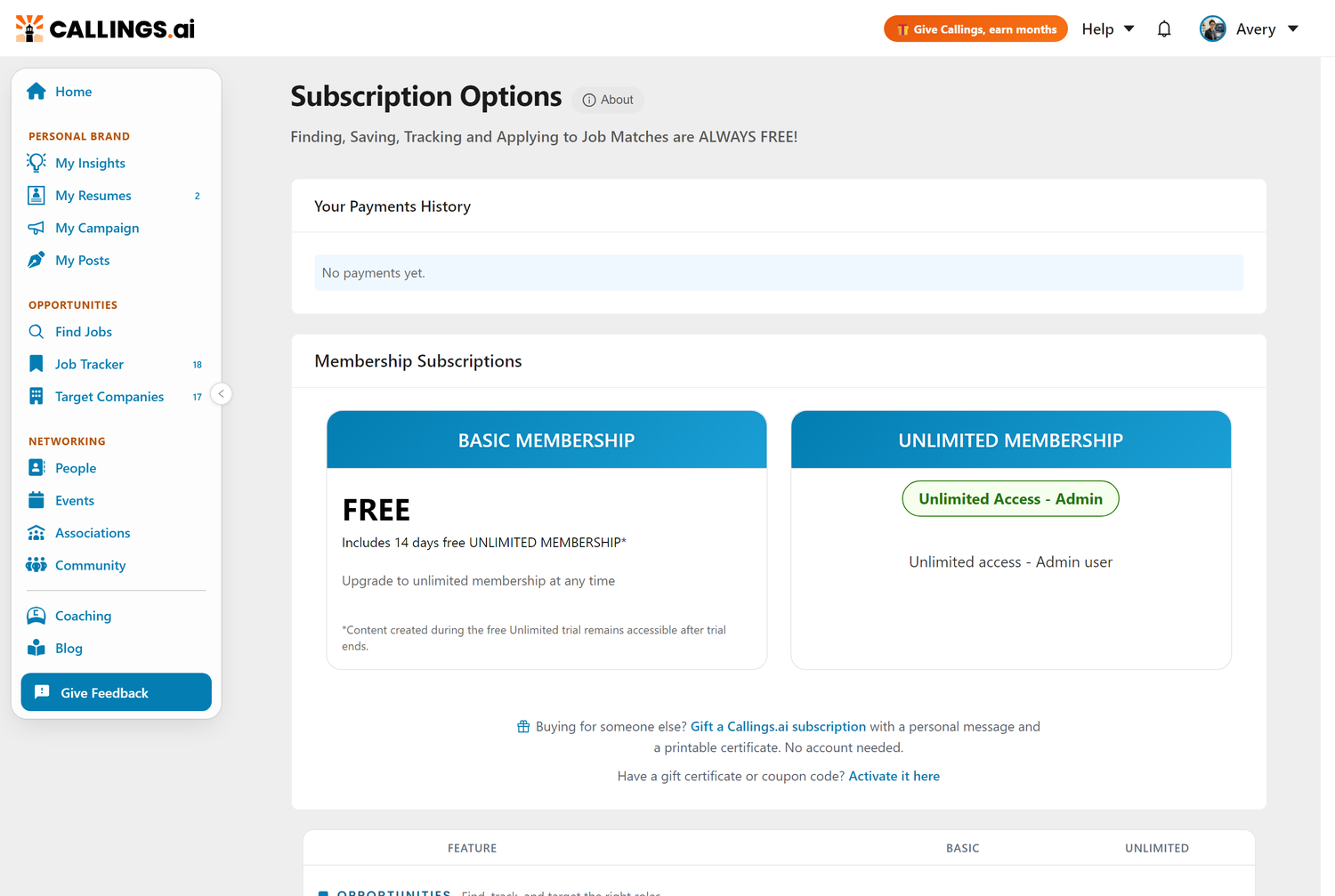
Subscription is the Callings.ai billing management page where you view your current plan and expiration date, access payment history and invoices, update payment methods, upgrade or downgrade plans, cancel your subscription, and compare available subscription options.
View your current plan, manage billing, and access payment history.
Overview
The Subscription page provides complete visibility into your Callings.ai membership, including:
- Current plan details - What plan you're on and when it expires
- Billing information - View past payments and invoices
- Subscription management - Upgrade, downgrade, or cancel your plan
- Payment methods - Update credit card details
- Plan comparison - Explore different subscription options
Accessing Subscription Settings
To view your subscription:
- Click on your profile icon in the top navigation bar
- Select "Subscription" from the dropdown menu
Understanding Your Subscription
Subscription Types
Callings.ai offers different subscription models:
1. Recurring Subscriptions (Monthly)
- Billed monthly - Charged automatically each month
- Cancel anytime - No long-term commitment
- Immediate access - Full platform features
- Auto-renewal - Continues until you cancel
2. One-Time Payment Plans (6-Month & Annual)
- Single payment - Pay once for extended access
- No auto-renewal - Access expires at end of period
- Cost savings - Discounted rate compared to monthly
- Extended commitment - 6 months or 1 year of access
3. Free Tier
- Limited access - Basic features only
- No payment required - Try before you buy
- Upgrade anytime - Switch to paid plan when ready
4. Free Trials
- No card requested - A trial that starts from a signup or invitation link never asks for payment details
- Nothing to cancel - With no payment method on file, nothing can charge you, so there is no cancellation to make
- Ends by itself - On the last day the account moves to the free Basic plan; everything you created during the trial stays
- The one exception - A trial you started by choosing a paid plan and entering a card does convert to a payment on the day it ends, and that one can be cancelled in the Stripe Customer Portal
If you are unsure which kind you are on, the Billing line on this page answers it: it either says that no payment method is on file, or it shows when the next charge is due.
5. Gift Memberships
- Given or received as a gift - Bought for you (or by you) through Give Callings
- 6 months or 1 year - Full Unlimited Membership, paid once
- Starts on activation - The clock starts the day the recipient activates, not the purchase date
- Stacks with your plan - Activating adds the gifted months on top of an existing plan or trial
- No auto-renewal - Access simply ends when the gifted period is over; no card is ever requested
Current Plan Card
Your subscription dashboard shows:
Plan Name - Monthly Subscription - 6-Month Plan (One-time) - 1-Year Plan (One-time) - Free Plan
Status - Active - Currently active and accessible - Active - Unlimited Membership (one-time payments) - Trialing - Free trial period - Past Due - Payment failed, action required - Canceled - Will expire at end of current period - Expired - Access has ended
Price - Monthly subscription cost or one-time payment amount - Shown in USD (or your local currency)
Description - "Unlimited access" - Full platform features - "Monthly recurring" - Ongoing monthly billing - "No auto-renewal" - One-time payment plans
Renewal Information - Next Billing Date - For recurring subscriptions - Expiration Date - For one-time payment plans - Auto-renewal status - Indicates if plan will renew
Billing - Appears when nothing is attached to your account that could charge you - States that no payment method is on file, and that there is nothing to cancel - On a free trial it also says what happens on the last day: the account moves to the free Basic plan
Available Plans
For the latest pricing and plan details, visit our Pricing Page.
We offer flexible subscription options including monthly recurring plans and one-time payment plans (6-month and annual) with no auto-renewal. All paid plans include full access to the platform's features.
Managing Your Subscription
Upgrading Your Plan
To upgrade from free to paid or switch plans:
- View Available Plans
- Navigate to the Pricing/Subscription page
-
Review plan options and features
-
Select Your Plan
- Click "Subscribe" or "Upgrade" on your chosen plan
-
You'll be redirected to Stripe checkout
-
Enter Payment Details
- Provide credit card information
- Review billing details
-
Confirm purchase
-
Access Granted Immediately
- Full access activates upon payment
- You'll receive a confirmation email
- Start using all premium features right away
Downgrading or Canceling
First, check whether there is anything to cancel. The Manage Subscription button appears only when you have a paid subscription. If the Billing line on your Subscription page says no payment method is on file, then nothing can charge you and no button will be shown; that is the whole answer, and there is nothing further to do. This is the normal state for anyone whose trial started from a signup or invitation link.
To change or cancel a paid subscription:
- Access Subscription Management
- Click "Manage Subscription" button on the subscription page
-
You'll be redirected to Stripe Customer Portal
-
Stripe Customer Portal
- Secure Stripe-hosted management interface
- View all subscriptions and payment methods
-
Access billing history and invoices
-
Available Actions:
- Update Payment Method - Change credit card on file
- Download Invoices - Get PDF receipts for expenses
- Cancel Subscription - Stop recurring charges
-
Update Billing Information - Change address or tax details
-
Cancellation Details:
- Recurring subscriptions: Access continues until end of billing period
- One-time plans: Cannot be canceled (access until expiration)
- Free plans: Nothing to cancel, keep using as long as you want
- Free trials with no card on file: Nothing to cancel; the trial ends by itself and the account moves to the free Basic plan
Reactivating a Canceled Subscription
If you previously canceled:
- After Expiration:
- Choose a new plan on the Pricing page
- Subscribe as a new subscription
-
Your previous data and history remain intact
-
Before Expiration:
- Access Stripe Customer Portal
- Look for "Resume Subscription" option
- Reactivate to prevent loss of access
Payment History
Viewing Your Payments
The Payments History section shows:
For Each Payment: - Date - When the payment was processed - Amount - How much you paid - Status - Succeeded, Failed, Pending, etc. - Description - Plan type and period covered - Metadata - Additional payment details
Payment Types Shown: - Recurring subscription charges - One-time payment plan purchases - Trial period conversions - Refunds or credits (if applicable)
Downloading Invoices
- Through Stripe Portal:
- Click "Manage Subscription"
- Access invoices in the Stripe Customer Portal
-
Download PDF copies for expense reports
-
Email Receipts:
- Invoices are automatically emailed after each payment
- Check your account email inbox
- Search for "Callings.ai receipt" or "Stripe invoice"
Billing & Payment Methods
Accepted Payment Methods
Callings.ai accepts: - 💳 Credit Cards - Visa, Mastercard, American Express, Discover - 💳 Debit Cards - With Visa/Mastercard logo - 💳 International Cards - Most international cards supported
Payment processing handled securely by Stripe
Updating Your Payment Method
- Access Stripe Customer Portal
- Click "Manage Subscription" button
-
Navigate to payment methods section
-
Add or Update Card
- Enter new card details
- Set as default payment method
-
Previous card is automatically removed or kept as backup
-
Confirm Changes
- Save your changes
- New card will be used for next billing cycle
- You'll receive a confirmation email
Payment Security
Callings.ai does not process or store any payment information directly. All payments are handled securely through Stripe, a trusted third-party payment provider used by millions of businesses worldwide.
- 🔒 No payment data stored - Callings.ai never sees or stores your credit card numbers
- 🔒 Stripe encryption - Bank-level security for all transactions
- 🔒 PCI compliance - Stripe maintains the highest level of payment industry security standards
- 🔒 Secure tokenization - Your card details are replaced with secure tokens
Frequently Asked Questions
Q: Can I switch from monthly to a one-time plan?
A: Yes! Cancel your monthly subscription (it will end at the period close), then purchase a one-time plan. Your data carries over seamlessly.
Q: What happens to my data when my subscription expires?
A: Your account automatically reverts to the free plan. All content you generated during your paid subscription (resumes, cover letters, notes, and saved jobs) remains accessible. You simply won't be able to generate new premium content or access features exclusive to paid plans until you resubscribe.
Q: Can I get a refund if I cancel my subscription?
A: Monthly recurring subscriptions: No refund for current period, but access continues until period ends. One-time payments: Generally non-refundable, but contact support for extenuating circumstances.
Q: Do you offer student or non-profit discounts?
A: We occasionally offer extended free Unlimited trial periods for students, recent graduates, and non-profit employees. Contact support to inquire about current promotions.
Q: Can I share my subscription with someone else?
A: No, subscriptions are for individual use only and cannot be shared. Each user needs their own account. If you want to give someone access, you can gift them a membership instead.
Q: I activated a gift membership. How does it interact with my plan?
A: The gifted months are added on top of whatever you have. On a paid or trial plan, your access is extended by the gifted term; on the free plan, the gift starts a full Unlimited Membership immediately. Gifts never auto-renew: when the gifted period ends, your previous arrangement resumes or your account reverts to the free plan.
Q: What happens if my payment fails?
A: You'll receive an email notification. Update your payment method within 7 days to avoid service interruption. After 7 days, your account may be downgraded to free tier.
Q: Can I pause my subscription temporarily?
A: We don't offer pause functionality. For temporary breaks, consider canceling and resubscribing when ready (your data is preserved).
Q: Do subscriptions auto-renew?
A: Monthly subscriptions auto-renew each month. One-time payment plans (6-month and annual) do NOT auto-renew, and neither does a free trial: a trial that never asked for a card cannot turn into a payment.
Q: How do I cancel auto-renewal for monthly plans?
A: Access the Stripe Customer Portal via "Manage Subscription" and cancel your subscription. You'll retain access until the end of your current billing period.
Q: I do not see a "Manage Subscription" button. Where is it?
A: It only appears when there is a paid subscription to manage. If your Billing line says no payment method is on file, nothing can charge you and there is nothing to cancel, which is why no button is shown. If you believe that is wrong and a charge is coming, email [email protected] and we will check the account and confirm in writing.
Q: Can I upgrade from 6-month to annual plan mid-period?
A: Contact support to discuss options. We may be able to apply credit from your existing plan toward an annual plan.
Q: Will I be notified before my plan expires?
A: For free Unlimited trials, the application displays an in-app banner showing how many days remain, with messages like "Your free Unlimited trial ends in X days." For paid plans (6-month and annual), you can check your expiration date on the Subscription page.
Q: Is there a commitment or contract?
A: No long-term contracts. Monthly plans can be canceled anytime. One-time plans provide access for a fixed period with no renewal obligation.
Q: Can I use international credit cards?
A: Yes, Stripe accepts most international cards. Currency conversion may apply depending on your card issuer.
Related Topics
- Profile - Update personal details that appear in generated documents
- Settings - Manage security and email preferences
- Give Callings - Earn free months by inviting friends or gifting memberships
- Custom Resume - Premium feature for paid subscribers
- Networking Tools - Premium feature for paid subscribers
Invest in your career search with full access to powerful tools. An Unlimited Membership unlocks everything you need to stand out: tailored resumes, compelling cover letters, interview preparation, and networking insights. Your next opportunity is worth it.