Give Callings
The Give Callings page gives you two ways to give someone a head start on their job search: invite a friend for free, or buy them the full membership as a gift. Either way, you earn a free month of Premium for each person, with no cap on how many months you can earn.
Your network is full of people who are searching too, or who soon will be. Inviting them costs nothing, and gifting a membership is a genuinely useful present for a new grad, a friend between roles, or your own kid. It is the rare win-win where helping someone also helps you.
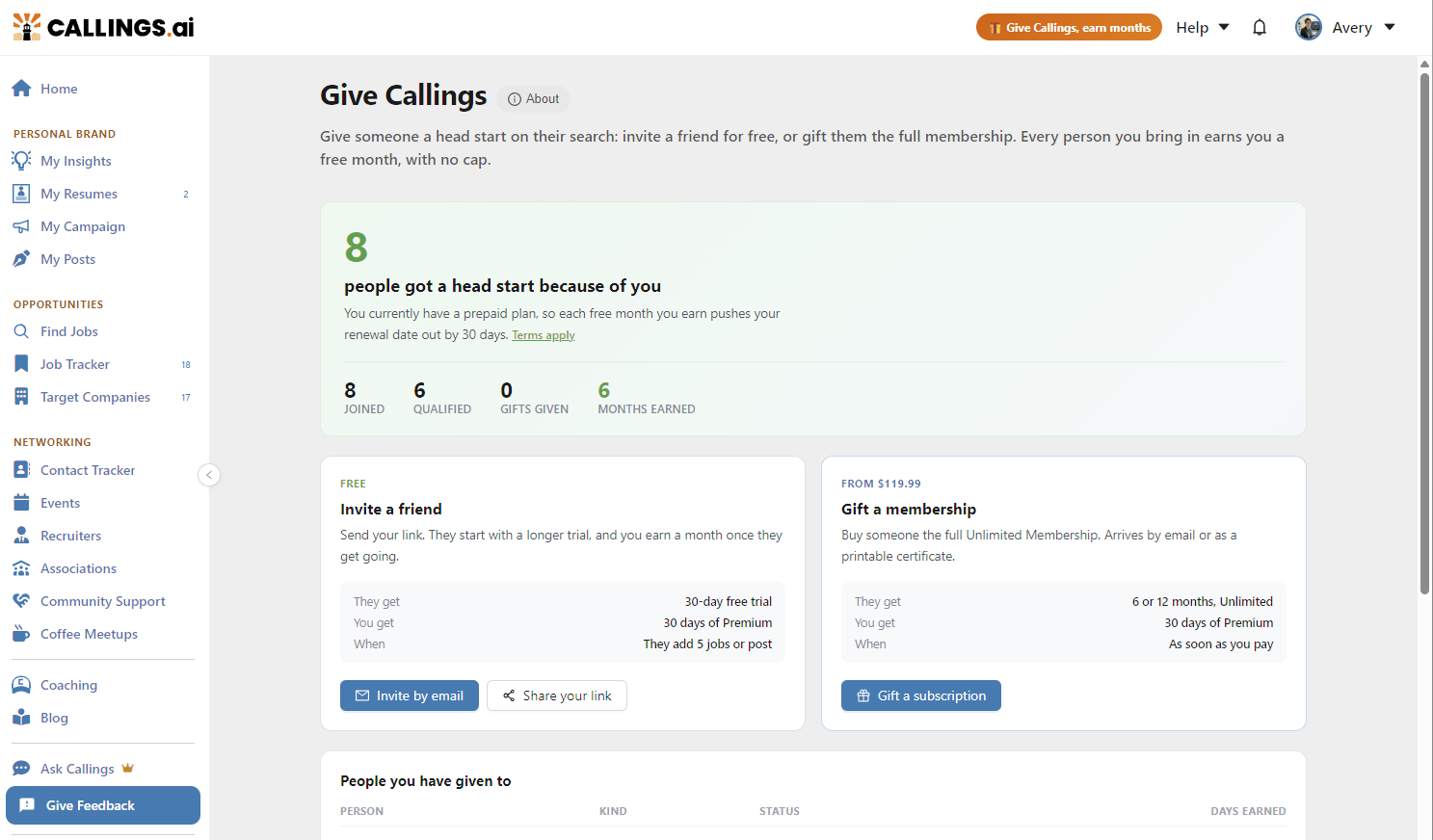
Two Ways to Give
| Invite a friend (free) | Gift a membership | |
|---|---|---|
| They get | A 30-day free trial instead of the usual two weeks | 6 months or 1 year of the full Unlimited Membership |
| You get | A free month of Premium | A free month of Premium |
| When you earn it | Once they join and get set up | As soon as your payment completes |
| It costs you | Nothing | A one-time payment (current prices are shown on the gift page) |
Invites and gifts are two ways of doing the same thing, so the page shows them together: one set of totals at the top and one People you have given to list underneath.
Inviting Friends for Free
You earn 30 days of Premium for every friend who joins through your link and qualifies, applied to your account automatically within a few days of them qualifying. There is no cap on how many friends you can refer or how many months you can earn. Refer 12 friends, get 12 free months.
A friend qualifies once they join and then do either of the following:
- Add 5 jobs to their Job Tracker, or
- Publish to LinkedIn using the My Posts feature.
Tying the reward to real activity (tracked jobs or a published post) ensures the people you invite are genuinely getting value from Callings, not just clicking a link. Your friend also starts with a 30-day free trial instead of the usual two weeks, so they have room to experience the platform properly.
Rewards apply to new members only. You earn a reward when you invite someone who does not already have a Callings account. If you invite an existing member, that invitation shows on your page as "Already a member" and does not earn a reward.
Ways to invite
- Invite by email. Enter a friend's email and Callings drafts a warm, personalized invitation with your referral link already included. If someone you invited has not joined yet, use Resend invite to send it again. Invites are sent from Callings, and replies go to your contact email if you have set and verified one in Me > Profile, otherwise to your account email. You can send up to 20 email invitations in any 24 hours (5 in your account's first week); an address past that shows Daily limit reached and can be invited the next day. If you add a personal note, it is checked automatically before anything is sent, to keep spam and scams out of our invitations. If it is not sent, you can edit it, choose Send without your note, or choose This is a mistake and we will review it.
- Share your link. Callings generates a ready-made post you can share on LinkedIn, Instagram, Threads, or anywhere else, with your invite link included. You can also copy the link itself and send it in a text, a DM, or a group chat; anyone who signs up through it is automatically attributed to you.
Gifting a Membership
A gift is the full Unlimited Membership, bought outright for someone else: everything Callings.ai offers, with nothing held back. You can gift 6 months or 1 year. It is a one-time payment: the gift never auto-renews, and the recipient is never asked for payment details.
The clock starts the day the recipient activates the gift, not the day you buy it, so a gift bought in May for a June graduation loses nothing.
Buying a gift
From the Give Callings page, click Gift a subscription. A three-step wizard walks you through it:
- Plan. Pick the term (6 months or 1 year).
- Recipient. Add their name, a personal message (up to 500 characters), and how you want to sign it, then choose how the gift should arrive. A live preview shows exactly what they will receive.
- Pay. Confirm your own name and email (used for your receipt, the gift code, and the certificate), then pay securely through Stripe.
You can also buy a gift without a Callings account at callings.ai/gift/buy: a parent or friend can pay and hand over the gift without ever signing up themselves. Note that the free-month reward for the buyer is only earned when you are signed in as a member (see below).
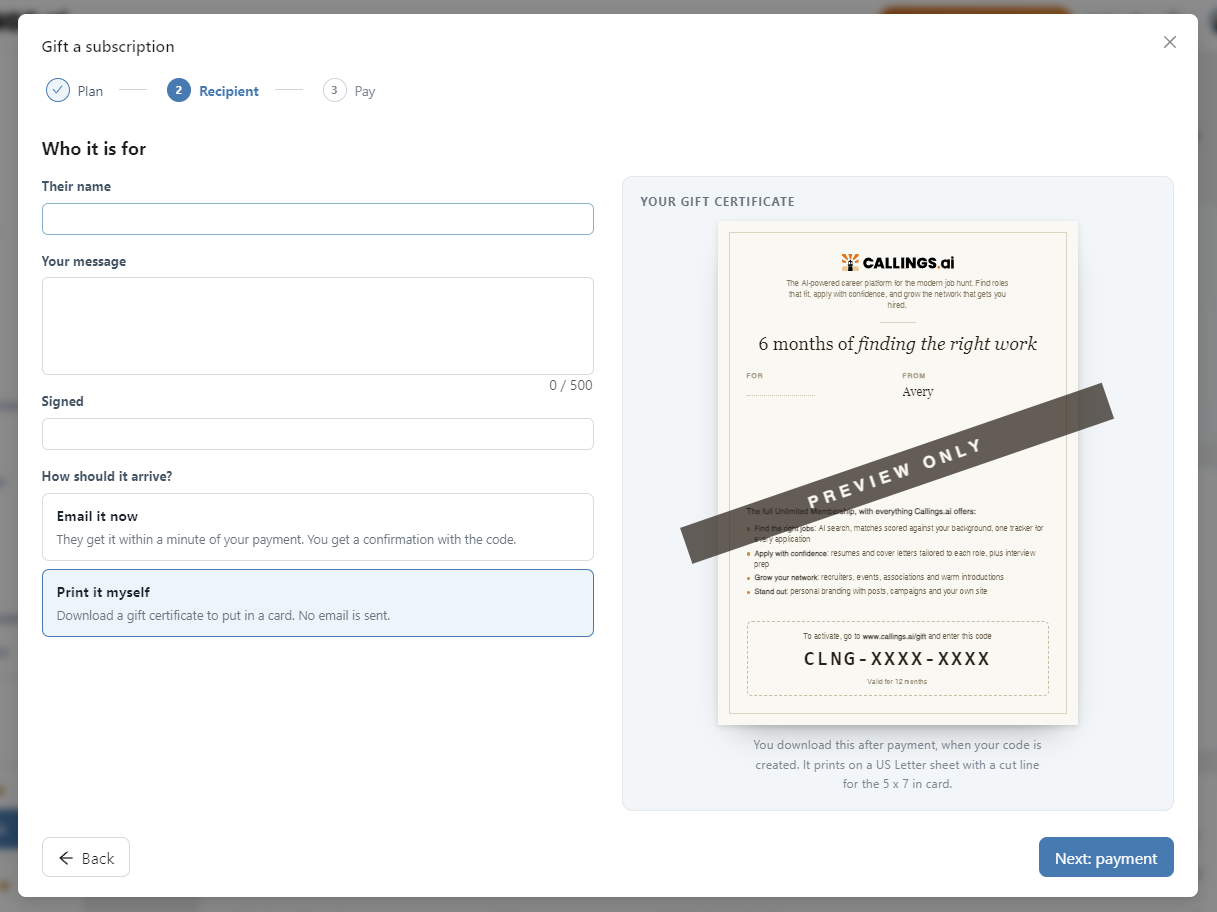
Email it or print it
- Email it now. The recipient gets the gift email, with your message and an activation button, within a minute of your payment. You get a confirmation email with the code. If the gift is still unopened two weeks later, Callings sends the recipient one reminder (only one, and only for gifts delivered by email). You can also Resend it yourself at any time from the Give Callings page.
- Print it myself. No email is sent. You download a printable gift certificate (PDF) carrying your message and the gift code, ready to put in a card or hand over in person.
After you pay
The confirmation page shows the gift code (it looks like CLNG-XXXX-XXXX) and a button to download the certificate. Your receipt email carries both as well, so nothing is lost if you close the page. From then on, the Give Callings page is where you follow the gift: it shows whether the recipient has opened it and whether they have activated it.
The code is the gift: whoever has it can activate it, and only the first activation counts. Printing or previewing the certificate never consumes the gift.
How the recipient activates it
The recipient clicks the button in their gift email, or goes to callings.ai/gift and enters the code from the certificate. The activation page shows who the gift is from, the term, and your message.
- New to Callings: they create a free account and the gift activates in the same step.
- Already a member: they sign in and activate. The gifted months are added on top of whatever plan or trial they already have, so nothing is wasted.
Their access starts the moment they activate and simply ends when the gifted period is over: no auto-renewal, no card on file, no cancellation to remember.
What you earn for gifting
If you are signed in as a Callings member when you buy, you earn 1 free month of Premium per gift, applied as soon as the payment completes. There is no cap.
If your gift brings someone brand new to Callings, they also appear in your People you have given to list like an invitee, and once they get set up (the same activity as a referral) you earn the standard referral month on top.
Gifts bought while signed out (for example, from the public gift page) do not earn the reward.
Refunds, expiry, and reissues
- Refunds: unopened gifts are refundable within 30 days of purchase. Contact support.
- Expiry: a gift stays redeemable for 12 months from purchase.
- Reissues: if a gift expires unredeemed, the value is not lost; the buyer can contact support for a reissue.
Tracking What You Have Given
The top of the page shows your running totals: how many people joined, how many qualified, how many gifts you have given, and the total months you have earned. Months that are qualified but still inside the short verification window show as "on the way".
Below that, the People you have given to list shows every invite and gift with its kind, status, and the days you earned from it.
- People you invited by email and gift recipients appear by the name or address you entered.
- People who joined through your link or a social post appear as initials only, so their identity stays private to you.
Invite rows show the progression each person has reached: Invited, Joined, activity progress ("3 of 5 jobs added" or "Published on LinkedIn"), and Qualified. "Free month on the way" means they qualified and the reward is in its short verification window. "Already a member" marks an address that already had an account and is not eligible.
Gift rows show where the gift currently is:
| Status | What it means |
|---|---|
| Ready to give | Paid, and the code is yours to deliver |
| Sent | The gift email went out (use Resend if it went unnoticed) |
| Opened, not activated | The recipient viewed the gift but has not activated it yet |
| Waiting to be given | A printable gift, waiting for you to hand it over |
| Activated | The recipient activated it and their membership is running |
| Expired | The redemption window passed; contact support for a reissue |
Every gift row also has a download icon for the printable certificate. A gift whose recipient became a new member shows their setup progress on the same row, since that can earn you a second month.
Tips and Best Practices
- Invite the people most likely to get value. Friends who are actively searching will set up quickly, which is what earns you the reward and helps them most.
- Gift when the moment calls for it. A graduation, a layoff, a career change: the membership lands as real help, and the printable certificate makes it feel like a proper present.
- Use the email invite for close contacts. A personalized message to someone by name lands better than a generic link.
- Post once to your network. A single honest social post can reach dozens of people who did not know you would recommend Callings.
- Nudge politely. If an invite or a gift email went unnoticed, Resend sends a friendly reminder.
Frequently Asked Questions
Q: How much do I earn per person?
A: 30 days of Premium per friend who joins through your link and qualifies, and 30 days per gift you buy while signed in. There is no limit on how many free months you can earn.
Q: What does an invited friend have to do for me to earn the reward?
A: After joining through your link, they need to either add 5 jobs to their Job Tracker or publish to LinkedIn using the My Posts feature. Doing either one qualifies them, and your free month is applied automatically within a few days.
Q: How is a free month applied to my account?
A: It depends on your plan at the time. On the monthly plan, your next billing charge is skipped. On a 6-month or 1-year plan, your subscription is extended by a month. On a free trial, the trial is extended by 30 days. On the free plan, a 30-day Premium trial is added to your account.
Q: What exactly does a gifted membership include?
A: The full Unlimited Membership for the term you choose, 6 months or 1 year: AI job search, tailored resumes and cover letters, interview preparation, networking, and personal branding. It starts the day the recipient activates it, never auto-renews, and never asks them for payment details.
Q: Do I need a Callings account to buy a gift?
A: No. Anyone can buy at callings.ai/gift/buy with just an email address for the receipt. Only signed-in members earn the free-month reward for gifting, though.
Q: How does the recipient activate their gift?
A: Through the button in their gift email, or by entering the code (CLNG-XXXX-XXXX) at callings.ai/gift. New users create an account and activate in one step; existing members sign in and activate.
Q: What if they never activate it?
A: For gifts delivered by email, Callings sends the recipient a single reminder if the gift is still unopened two weeks after delivery. That is the only automatic nudge; you can send more yourself with Resend on the Give Callings page. The code stays valid for 12 months either way, and expired gifts can be reissued by support.
Q: What if the person I gifted already has a subscription?
A: Nothing is wasted. Activating adds the gifted months on top of whatever plan or trial they already have.
Q: How long does a gift stay valid, and can I get a refund?
A: A gift is redeemable for 12 months from purchase. Unopened gifts are refundable within 30 days. If a gift expires unredeemed, contact support for a reissue.
Q: Can one gift earn me two free months?
A: Yes. You earn one month when your payment completes, and if the recipient is brand new to Callings, they also count like an invitee: once they get set up, you earn the standard referral month too.
Q: What if I invite someone who already has a Callings account?
A: Invite rewards apply to new members only. The invitation appears on your page as "Already a member" and does not earn a reward. To give an existing member something, gift them a membership instead.
Q: Can I see who joined through my link?
A: People you invited by email and gift recipients appear by the name or address you entered. People who joined through your link or a social post appear as initials only, so their identity stays private.
Q: Will my invitees see my email address?
A: Invites are sent from Callings with your name, not your address. If an invitee replies, the reply goes to your contact email if you have set and verified one in Me > Profile, otherwise to your account email. The invite preview shows exactly which address will be used before you send.
Related Topics
- Subscription - How plans, trials, and free months work
- Plan Expiration - What happens when a plan or trial ends
- My Community Overview - See how the community tools fit together
- My Posts - Publish to LinkedIn, one of the ways a friend qualifies
Job searching is easier with friends in it with you. Invite the people you would want in your corner, or put the whole toolkit in someone's hands as a gift. Everyone moves forward together.