Find a Coach
Find a coach suggests seven coaches, resume writers and programs picked for your background, and Find Coaches searches the whole directory. Coaches come from our directory of career coaches, resume writers, interview coaches, career counselors and group programs across the United States.
Find it under Coaching > Find a coach, the second tab of the Coaching page. Until you work with a coach on Callings, the My Coach tab shows three of your seven too, beside the way to invite the coach you already work with.
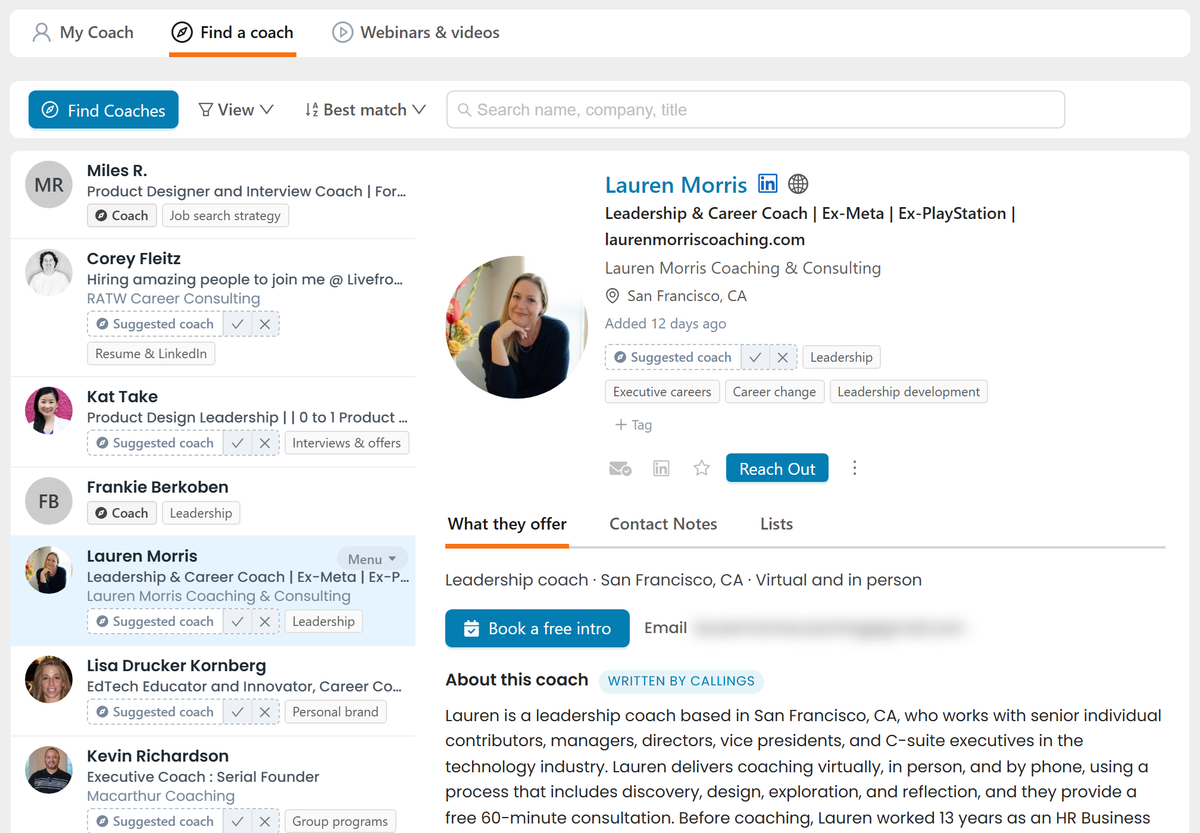
Your seven suggestions
The first time you open Find a coach (or My Coach, before you have a coach) we read your resume and pick seven coaches; that takes a few seconds, once.
The seven are a mix, not seven of the same. Each fills one kind of help, and the mix follows your background:
| Kind of help | What it covers |
|---|---|
| Job search strategy | Targeting, networking and applications |
| Resume & LinkedIn | Having your resume and LinkedIn profile written, done for you |
| Interviews & offers | Interview prep and salary negotiation |
| Direction & career change | Working out what is next, or changing careers |
| Leadership | Leadership and executive coaching |
| Personal brand | Visibility and thought leadership, mostly on LinkedIn |
| Group programs | Cohorts, bootcamps and courses, usually cheaper than one-on-one |
Someone early in their career gets more group programs and a career counselor; directors and executives get executive career and leadership coaches; if your job searches point away from your resume, you get two coaches for changing careers. Within each kind we pick the coach whose own focus best matches your target roles, industry and level, and we prefer two or three near where you live when they fit almost as well as the best remote coach. You never see two coaches from the same practice.
Reading a coach row
Each row wears a Coach chip (a compass) and the kind of help the coach is on your list for. The specialties the coach leads with (for example Interview prep or Career change) sit under their name when you open their record.
A suggestion reads Suggested coach, dashed, with Keep and Ignore on it. Keep keeps them in your Find a coach list, and the chip becomes Coach. Ignore removes them: they are never suggested again, and the next coach for the same kind of help takes the seat. The chip reads the same on the coach's record and anywhere else they appear.
A coach's record
Open a coach and the What they offer tab lays out:
- Who they are and how they work: the kind of coach, where they are, virtual or in person, and how long they have been coaching.
- Book, when the coach publishes a booking page, and the email address they published, if any.
- About this coach: a short summary Callings writes from their website and professional profile, dated, with a line in their own words when they publish one. The coach has not reviewed it.
- Your match: what fits your situation, what is worth checking, and questions to ask them, written for you from your profile and the services they publish. It is not a rating, and the coach never sees it. It is ready a few seconds after you first open the coach, and you can update it when your profile or their services change.
- Why this coach: what in your background matched theirs.
- Their specialties, who they work with, industries, levels, formats and credentials.
- Their services and prices, with what each one includes (sessions, length, turnaround, revision rounds) and a free intro call when they offer one. Many coaches share prices only on request.
- Background and terms: what they did before coaching, the assessments they use, what they published, the testimonials on their website, and their refund terms. A coach who promises a job or interviews carries a warning: no coach can guarantee either.
- What clients say, in our own summary of public reviews.
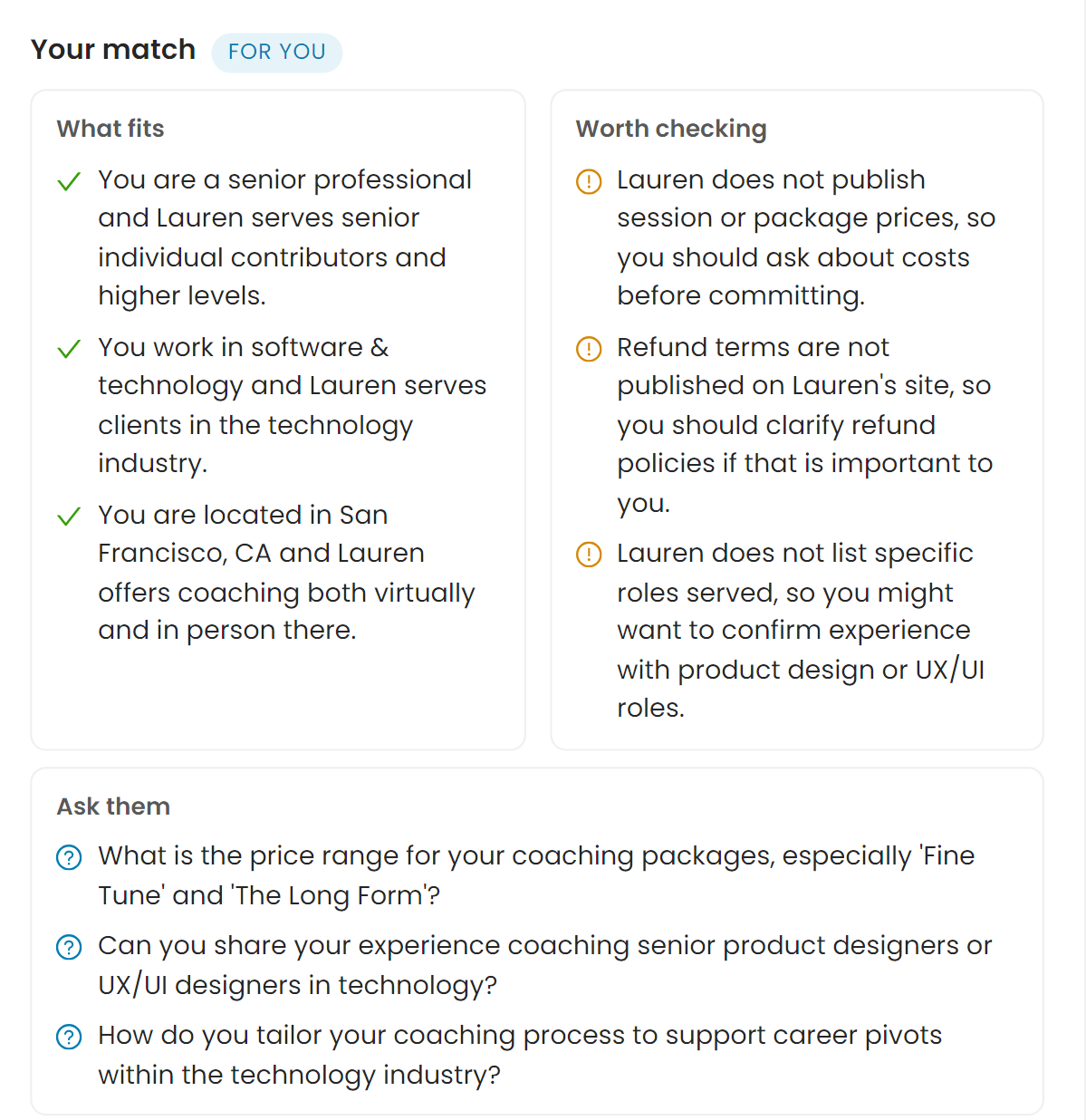
Their website and LinkedIn are the icons beside their name.
Reaching out to a coach
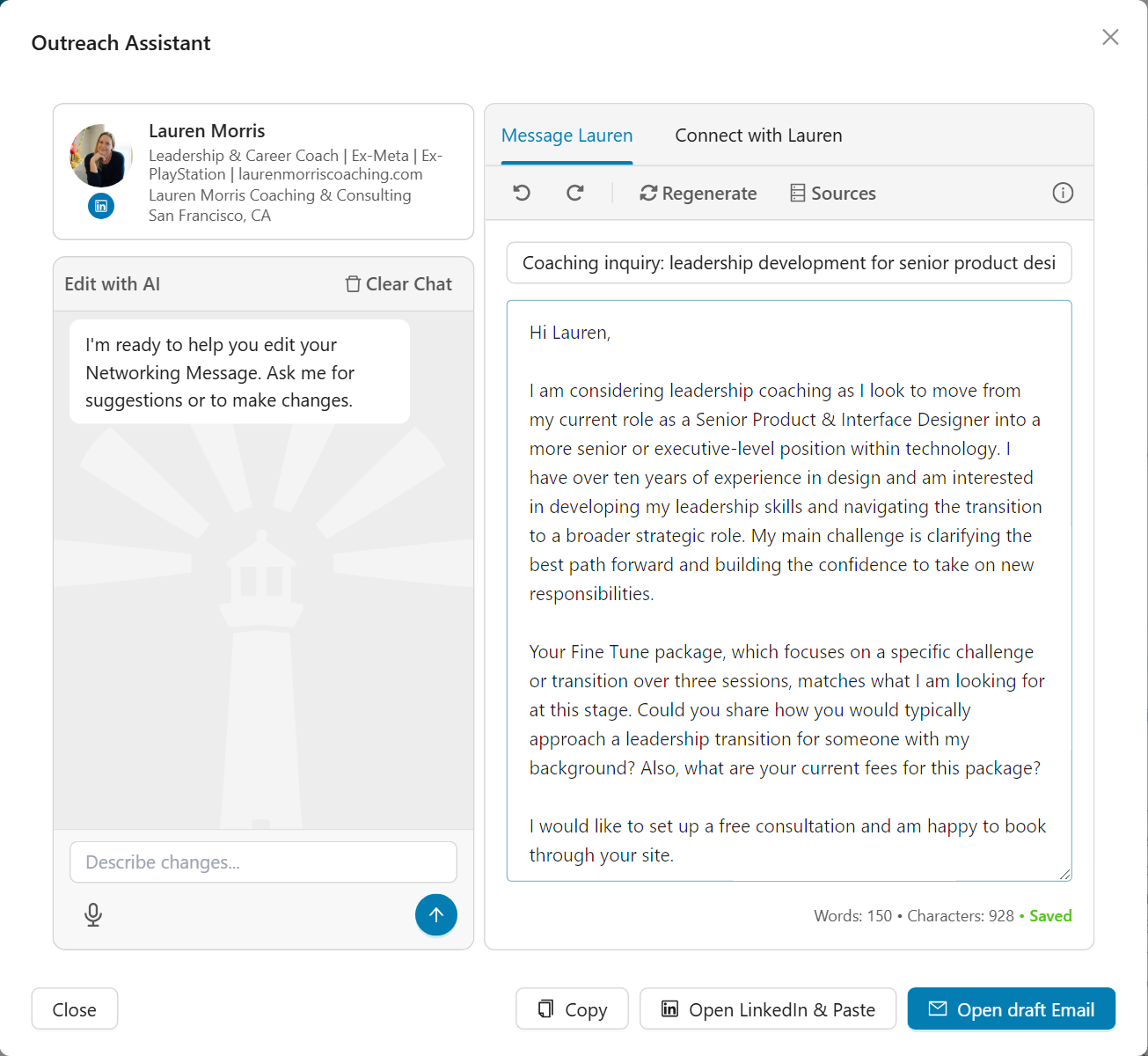
Reach Out opens the Outreach Assistant with an inquiry about hiring the coach, not a networking message. Message drafts an email; Connect drafts a LinkedIn connection note under 300 characters.
The email follows what a coach needs from a first inquiry:
- What you want help with, and that you are considering working with them.
- Where you are and where you are heading, in two or three plain sentences from your resume and goals.
- One concrete thing from their own services or background that fits your situation.
- One or two questions their website leaves open, such as their fees when they publish none, or how they would approach a case like yours. Questions from your match report come first.
- The next step: their free consultation or booking page when they have one, otherwise a short intro call.
The draft never mentions Callings, a suggestion or your match report, and it leaves out your scheduling link, because coaches book through their own calendar. Sources shows what the draft drew on (your resume, the coach's offering, your goals and your match report) and lets you leave any of them out. Edit with AI keeps the same shape when you ask for changes.
Find Coaches
Find Coaches searches the whole directory. With your resume attached, coaches are ranked on the roles, industry and level they serve against yours, and anything you type narrows it: a need ("interview prep"), a place ("in Chicago") or a level ("for directors"). Without a resume, your words are the whole search.
- The chips filter by kind of help; pick several to see any of them.
- Only near me, Free intro call and Prices listed narrow the results further.
- Not sure what you need? Pick one of the goals, such as Have my resume written, and it searches for you.
Save puts a coach on your Find a coach list; Hide keeps them out of your results for good.
Frequently Asked Questions
Q: Where do the coaches come from?
A: From our own directory of US coaches, resume writers and programs, built from their public websites and professional profiles. We show what they publish about their practice, and only an email address a coach published themselves. Reviews appear as our own summary with a count, never the reviews themselves.
Q: Where did the Coaches tab on People go?
A: It moved to the Coaching page as Find a coach, next to My Coach, on October 8, 2026. Your coaches, your notes on them and your match reports moved with it, and old links to the tab open Find a coach.
Q: Are these coaches affiliated with Callings?
A: No. They are independent professionals, listed from public information for your convenience. Hiring and paying a coach is between you and them: Callings is not a party to it and earns nothing from it unless a listing says otherwise. Check a coach's credentials, prices and terms before you hire them.
Q: Can the coach I hire follow my search on Callings?
A: Yes, for free. Callings gives coaches their own dashboard at callings.ai/coach. Invite your coach from Coaching > My Coach; they see your job search only once they accept, you message each other there between sessions, and you can stop sharing at any time. See My Coach.
Q: Which parts need a subscription?
A: None. The seven suggested coaches, Keep and Ignore, Find Coaches, and each coach's record are free on every plan.
Q: Do coaches know I looked at them?
A: No. Nothing is sent to a coach unless you contact them yourself, through their booking page, their email or Reach Out. Your match report stays in your account; the coach never sees it.
Q: Does Reach Out send anything to the coach?
A: No. It writes a draft. You send it yourself, from your email with the open-draft button (Gmail, Outlook on the web or your default email app, see Opening a Draft Email) or on LinkedIn with Open LinkedIn & Paste.
Q: What does the match report read?
A: Your career profile from your resume, your saved search preferences, how many jobs you applied to in the last 30 days, and what the coach publishes about their services. Each point must rest on both sides; anything we cannot tie to a fact is left out.
Related
- My Coach: invite the coach you work with and message them between sessions
- People: your recruiters and the people you added yourself
- Custom Outreach: draft a message for any recipient and any channel