My Goals Questionnaire
My Goals Questionnaire is a Callings.ai feature that generates approximately 25 personalized questions based on your resume to help you clarify career goals, work style preferences, culture requirements, and deal-breakers. Your answers feed into multiple AI-powered features across the platform, including My Goals, My Ideal Job, Personal Branding, Calling Cards, Cover Letters, Custom Resumes, and more.
Note: The questionnaire is produced from all of your active resumes, so a career made up of several different chapters is represented in full. If you want it built from one resume only, use Select sources (advanced) in the Regenerate dialog and pick that resume.
The My Goals Questionnaire helps you articulate detailed preferences and priorities for your ideal next role through a personalized AI-generated questionnaire. Multiple features across Callings.ai use your questionnaire responses together with your resume to generate personalized insights and content.
Card Layout
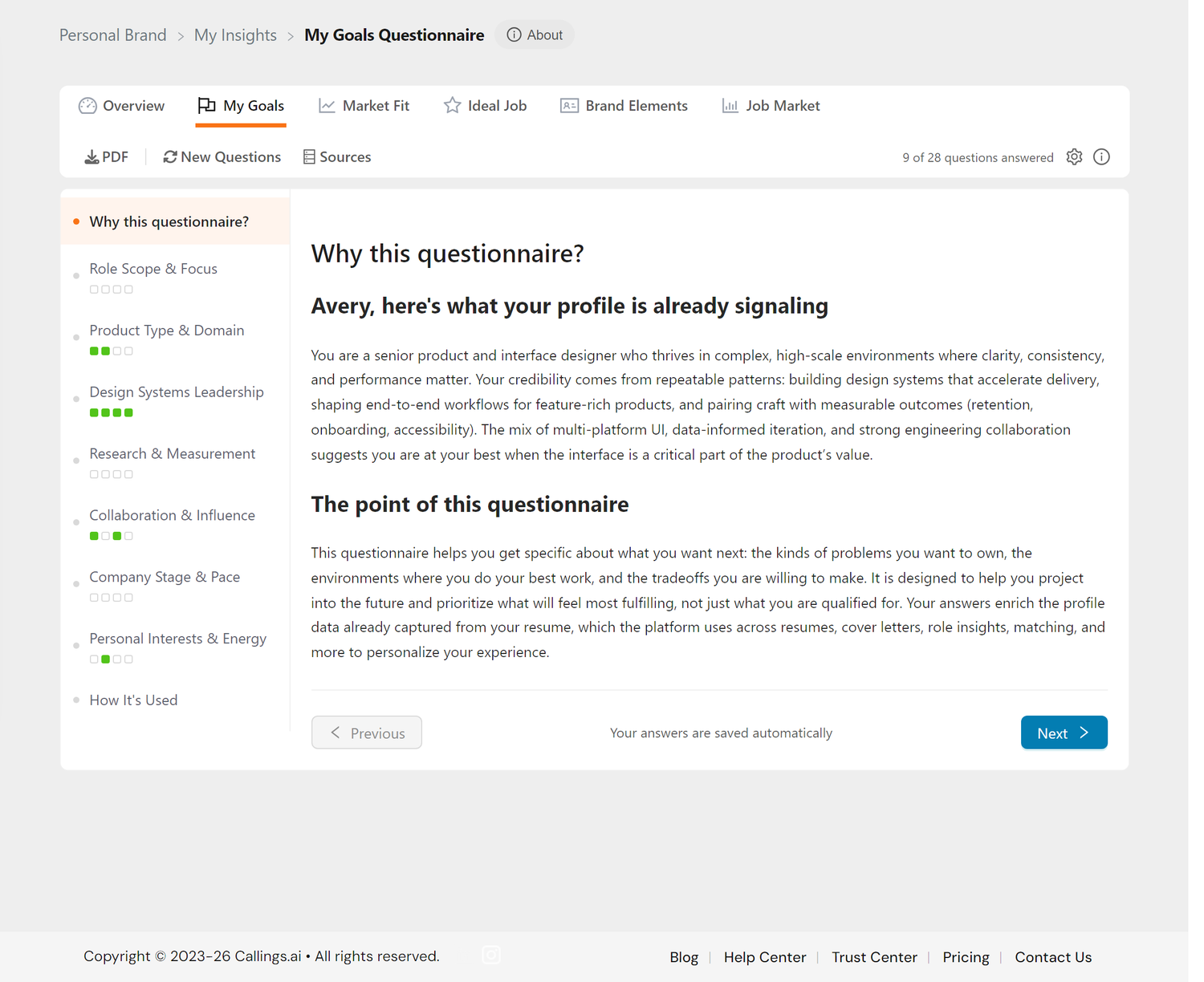
The My Goals Questionnaire sits under the My Insights tab strip, with a toolbar above the question area.
Header Utility Icons
At the right-hand end of the toolbar you'll find:
| Icon | Purpose |
|---|---|
| ⚙️ Settings | Opens a modal to configure paper size for PDF exports |
| ℹ️ Info | Opens a quick tips modal with usage guidance |
Card Toolbar
The toolbar provides quick actions:
| Button | Action |
|---|---|
| Download your questionnaire and answers as a formatted PDF | |
| New Questions | Generate a fresh set of questions based on your current resume (requires subscription) |
| Sources | Shows which parts of your profile and resume the content was drawn from |
| (counter) | The toolbar also shows how many questions you have answered, for example "9 of 28 questions answered" |
Overall Progress Counter
In the top-right area of the card, you'll see a counter like "11 of 28 questions answered". This updates in real time as you answer questions and gives you a quick sense of how far along you are.
Side Navigation
The questionnaire uses a side navigation layout with categories listed on the left and content displayed on the right. Click any category name to jump directly to that section:
- Why this questionnaire? - Introduction explaining the purpose
- Category sections - Your personalized question categories based on your background
- How It's Used - Summary of how your answers power features across the platform
Category Progress Indicators
Each category in the side navigation shows small colored squares beneath the category name, one square per question in that category:
- Empty square (gray border) - Question not yet answered
- Filled green square - Question answered
This gives you a visual at-a-glance view of your progress within each category. The currently selected category is also marked with an orange dot next to its name.
Navigate between sections using the side navigation or the Previous/Next buttons at the bottom of each section.
What Is the Questionnaire?
Based on your active resumes, Callings.ai generates approximately 25 targeted questions designed to understand what you're looking for in your next role. The categories of questions vary from person to person based on your background, experience, career trajectory, and role. Examples of question categories include: - Work style and environment preferences - Career motivations and drivers - Company culture preferences - Deal-breakers and must-haves - Long-term career aspirations - Industry and domain interests - Team dynamics and leadership style - Technical vs. strategic focus
Your questionnaire will include categories most relevant to your unique profile.
How It Works
Question Generation
The AI analyzes your background, experience, and skills to create questions specific to you. Each question includes context explaining why it's being asked, helping you understand the AI's thinking.
Answering Questions
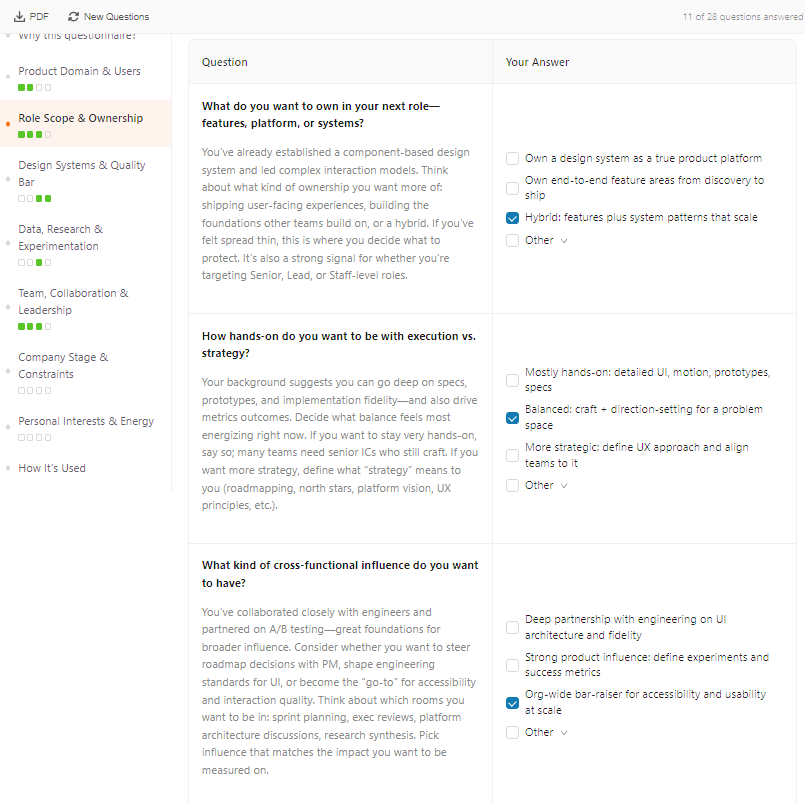
Question Format: Most questions come with AI-generated multiple-choice options tailored to your profile. You can:
- Select one or more options using checkboxes. Multiple selections are allowed since career preferences are rarely black and white.
- Use the "Other" option to add your own free-text response when none of the provided choices fully capture your thinking. Click the "Other" checkbox to expand a text area.
- Combine both by selecting some of the predefined options and adding additional context via "Other."
Some questions (typically at the end of a section) may be open-ended with only a free-text area, allowing you to share anything else on your mind.
Your answers are saved automatically when you click away from a question.
Tips for Good Answers: - Be honest. This data helps you, not evaluators - Think about past experiences (what worked, what didn't) - Consider must-haves vs. nice-to-haves - Select multiple options when they apply, and use "Other" to add nuance - It's okay to skip questions you're unsure about
Sample Questionnaires with Answers
Because every career path is unique, no two questionnaires are alike. Below are examples showing how the AI generates personalized questions with tailored multiple-choice options based on individual profiles.
Elena Rodriguez, Senior UI Designer
Background: Moved from graphic design at an agency to product design at a fintech startup.
Section: Work Environment & Pace
Context: Your resume shows a transition from a large agency structure to a fast-paced startup environment. These settings require different working styles.
Question: "You've experienced both the high-structure environment of an agency and the rapid agility of a startup. Which pace and structure allowed you to do your best work?"
Options: - ☑️ Growth-stage company with some process but still fast-moving - ☐ Established company with structured design reviews and clear timelines - ☐ Early-stage startup where speed and scrappiness are the norm - ☐ Other
Sample use of "Other": "The startup pace was energizing, but I missed having time for craft and polish. I'd love a company that ships fast but still invests in quality."
Section: Design Leadership & Impact
Context: You mentioned leading the 'Design System Overhaul' project in your portfolio, which suggests an interest in infrastructure and scalability.
Question: "How important is it for you to join a team with an established design system versus one where you would be responsible for building and maintaining it from scratch?"
Options: - ☑️ Build from scratch with dedicated resources and organizational buy-in - ☐ Join a team with an established design system to contribute to and evolve - ☐ Mature design system already in place so I can focus on product work - ☐ Other
David Park, Operations Lead
Background: 10 years in logistics, recently completed an MBA, looking to pivot into tech strategy.
Section: Strategic vs. Tactical Focus
Context: You have deep operational experience on the ground, but your recent MBA suggests a shift toward high-level strategy.
Question: "Are you looking for a role that leverages your hands-on logistics expertise immediately, or are you willing to trade seniority for a more purely strategic role in a new industry?"
Options: - ☑️ Open to stepping back in seniority for a strategy-focused role in tech - ☐ Leverage logistics expertise directly in a leadership role - ☐ Hybrid role bridging operations and strategy in a new domain - ☐ Other
Section: Scale & Complexity
Context: You've managed teams of 50+ people in warehousing. Tech strategy roles often have smaller teams but higher cross-functional influence.
Question: "How would you feel about a role as an individual contributor or small-team lead after managing large organizations?"
Options: - ☑️ Happy as an IC or small-team lead if the problems are complex - ☐ Want to continue managing large teams (10+) - ☐ Small team lead (3-5 people) with high autonomy - ☐ Other
Sample use of "Other": "I'm more motivated by solving complex problems than by people management. Managing 50 people was rewarding but exhausting."
Sarah Chen, Marketing Director
Background: Led rebranding at TechStart Inc., experience spans B2B and B2C, skills include brand strategy and data-driven marketing.
Section: Industry & Company Focus
Context: Your experience spans both B2B (Acme Solutions) and B2C (TechStart Inc.) marketing. Understanding your preference helps identify the right opportunities.
Question: "Your experience spans both B2B and B2C marketing. Which environment do you find more fulfilling?"
Options: - ☑️ B2C with emotional storytelling and fast feedback loops - ☐ B2B with longer sales cycles and deep customer relationships - ☐ B2B company with a strong consumer-like brand voice - ☐ Other
Section: Role Responsibilities
Context: You led the rebranding initiative at TechStart Inc., which was a significant strategic undertaking.
Question: "You led the rebranding initiative at TechStart Inc. What aspects of that project energized you most?"
Options: - ☑️ Strategy and positioning: defining audience, brand voice, and direction - ☐ Creative execution: visual identity, campaigns, content creation - ☐ Cross-functional leadership: aligning stakeholders and teams - ☐ Other
Sample use of "Other": "The strategy work was the most energizing. Vendor management and asset production were less exciting but necessary."
How Your Answers Are Used
Your questionnaire answers are a foundational data source used by multiple AI-powered features across Callings.ai. Combined with your resume, they help the platform understand not just what you've done, but what you want next.
Insight Reports
The core insight reports draw directly from your answers: - My Goals - High-level priorities and career direction - My Ideal Job - Specific job criteria and your north star profile - Personal Branding - Value proposition, headlines, and communication elements - Market Fit Report - How you compare to market and industry demands
Calling Cards and My Calling
Your answers inform AI-generated content for calling cards such as Cover Image, My Story, Future Me, Biography, Workstyle, Skills, and Achievements, among others.
Job Application Documents
Features like Cover Letters and Custom Resumes can reference your questionnaire answers to better capture your voice, priorities, and positioning.
Self-Clarity
Going through the questions helps you: - Clarify what you're actually looking for - Practice articulating your goals - Prepare for networking conversations and interviews
Reference Document
Your answers become a personal reference you can revisit throughout your job search to stay focused on what matters.
Exporting Your Questionnaire
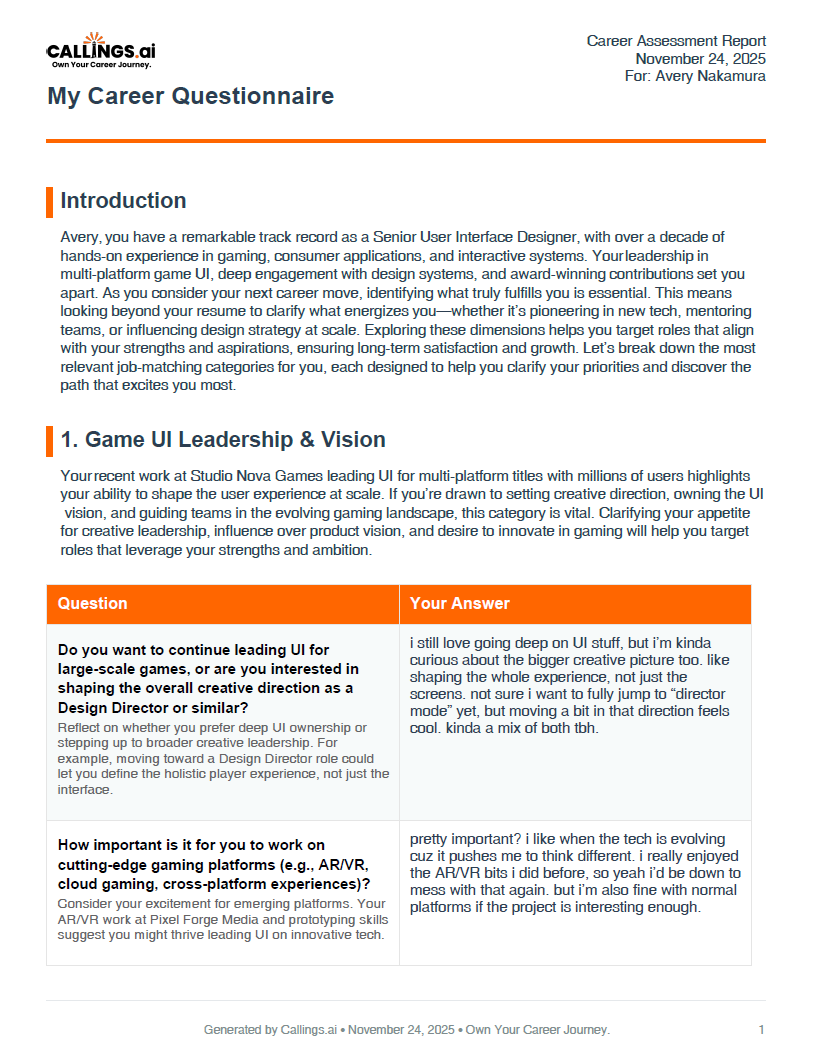
You can download your completed questionnaire as a PDF document for your personal records or to review offline.
How to Export
- Click the PDF button in the card toolbar
- Your questionnaire with all questions and answers will be formatted as a professional PDF document
- The PDF uses the paper size configured in Settings (US Letter or A4)
What's Included
The PDF export contains: - All questions generated for you - Your complete answers - Formatted for easy reading and reference
When to Use the PDF
- Keep as a personal reference document
- Review before networking events or interviews
- Share with career coaches or mentors (optional)
- Archive different versions as your goals evolve
Updating Your Answers
When to Update
- When your priorities change
- After interviews reveal new insights
- Every 2-3 months as a check-in
How to Update
- Navigate to the question you want to update using the side navigation
- Click on any answer to edit it
- Update your response. Changes are saved automatically
- Consider regenerating your reports (not the questionnaire) to reflect the new answers
Understanding Regeneration
There are two different regenerate actions in My Insights, and it's important to understand what each one does:
Regenerate Questionnaire (New Questions)
Warning - Destructive Action: Clicking "New Questions" in the toolbar will: - Generate an entirely new set of questions based on your current active resumes - Permanently delete all your existing questions and answers - Start you over with a fresh questionnaire
Before regenerating the questionnaire: 1. Download your current questionnaire as a PDF to preserve your answers 2. Consider if you really need new questions, or if you just need to update your answers or regenerate your reports
When to regenerate the questionnaire: - You've added or activated a resume for a significantly different direction (e.g., adding a Marketing resume alongside a Tech one) - You want questions that better reflect a major career pivot - It's been a long time since generation and your career direction has fundamentally changed
Regenerate Reports (Goals, Ideal Job, Personal Branding)
Non-destructive: Regenerating individual reports (My Goals, My Ideal Job, Personal Branding) will: - Use your existing questionnaire answers plus your current primary resume - Generate fresh AI analysis and content for that specific report - NOT affect your questionnaire or its answers
When to regenerate reports: - You've updated several questionnaire answers and want the insights to reflect them - You've updated your primary resume and want reports that reflect the changes - You want a fresh perspective on the same underlying data
Tips & Best Practices
Take Your Time - Block 20-30 minutes for initial completion - Don't rush through responses - Save and return if needed
Think Concretely - Reference specific past experiences - "I thrived when..." vs. "I think I'd like..." - Consider what actually motivated you, not what "should"
Be Realistic - No job will match every preference - Identify your non-negotiables - Be flexible on nice-to-haves
Revisit Regularly - Priorities evolve through your job hunt - Update as you learn from interviews - Refine based on what's actually available
Connect to Your Goals - Keep your answers consistent with your stated priorities - Use the questionnaire to refine your thinking - Contradictions in your answers may indicate areas to reflect on further
Frequently Asked Questions
Q: Do I have to answer all questions?
A: No, but the more you answer, the richer your reports and AI-generated content will be, and the more clarity you'll gain about what you're looking for.
Q: Can I select multiple options?
A: Yes. Most questions allow you to check as many options as apply. Career preferences are rarely one-dimensional, so feel free to select everything that resonates.
Q: What is the "Other" option for?
A: If none of the AI-generated options fully capture your thinking, check "Other" to expand a free-text area where you can write your own answer. You can also combine "Other" with the predefined options.
Q: Can I add my own questions?
A: Not currently, but you can use the "Other" option on any question to provide additional context beyond the predefined choices.
Q: How often should I update my answers?
A: Review every few months and update when your thinking changes. Major updates after interviews that revealed new preferences are especially valuable.
Q: Will companies see my answers?
A: No, these are private to you. They're used only to generate your personal insight reports, calling cards, and other AI-powered content.
Q: What if I don't know how to answer?
A: Skip it for now. Answer after interviews give you perspective, or reflect on past roles for guidance.
Q: Which features use my questionnaire answers?
A: Many features across the platform draw from your answers, including My Goals, My Ideal Job, Personal Branding, Market Fit Report, Calling Cards, Cover Letters, and Custom Resumes, among others.
Related Topics
- My Goals - High-level career goals
- My Ideal Job - Specific job criteria
- Personal Branding - Your value proposition
A few thoughtful answers unlock deep insights about your career direction. The questionnaire isn't just data collection: it's a guided self-reflection that helps you discover what you truly want, practice articulating those desires, and build a foundation for AI-generated insights that feel genuinely like you.