Work Search Log
If you receive unemployment benefits, your state asks you to look for work every week and to keep a record of it, or to enter it when you certify. The Work Search Log keeps that record for you: it fills in from the jobs you mark as applied in your Job Tracker, lets you add everything else you did, shows your progress against your state's weekly number, and gives you the record as a PDF or CSV, or ready to copy into your state's site. It can also email you before you certify, with the record ready.
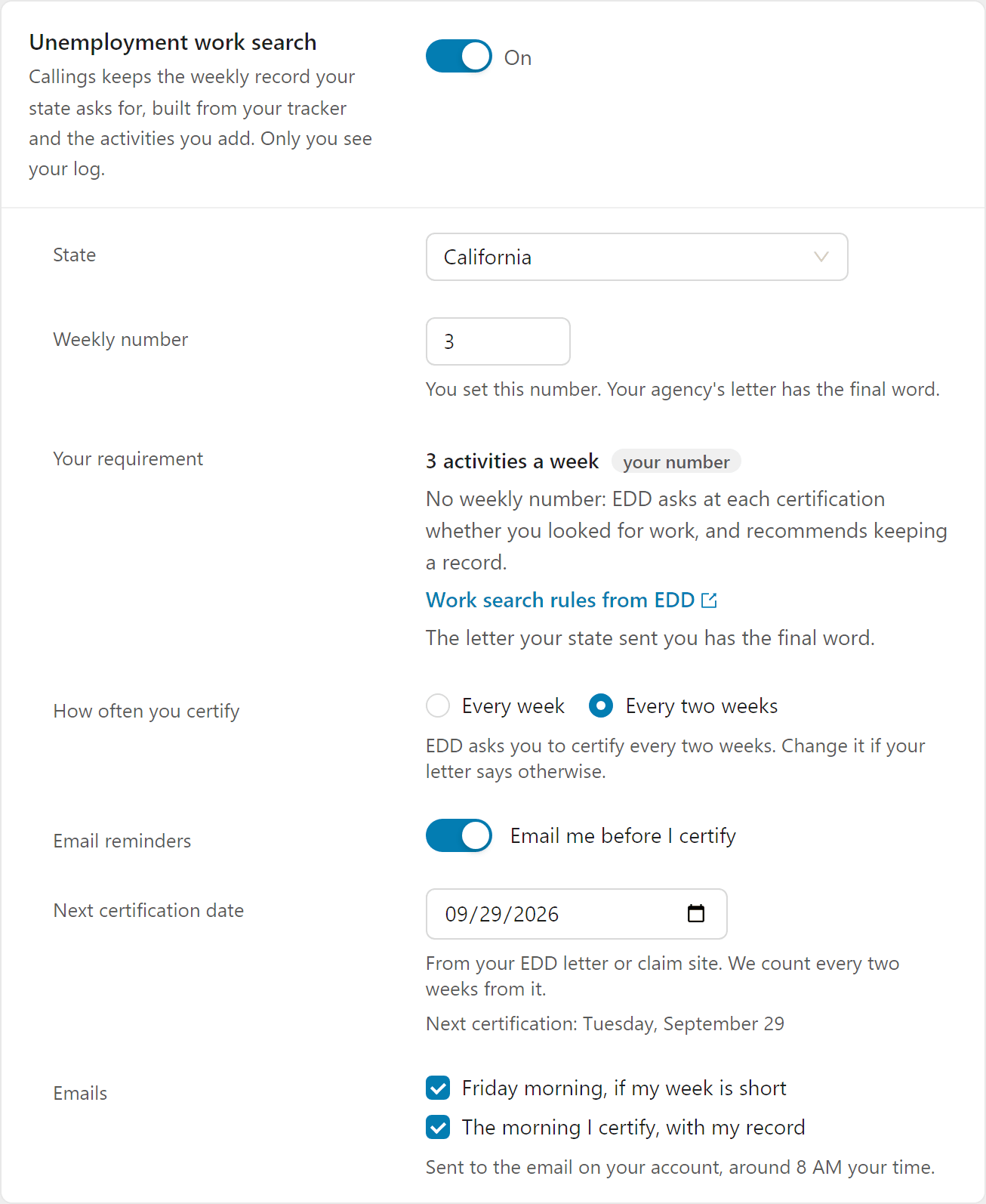
Turn it on
The log is off until you turn it on, and nothing changes in your tracker until you do.
- Open Settings > Preferences and find Unemployment work search.
- Switch it On.
- Check your state. It starts from the state in your profile.
- Check the weekly number. It starts from your state's rule. If your state sets it by county (Texas), or your letter from the agency says something else, type the number from your letter: the letter always has the final word.
- Check how often you certify: every week or every two weeks. It starts from your state's rule; change it if your letter says otherwise. It also sets the period your downloaded record covers.
- Optionally, turn on email reminders and tell the log when you certify (see Reminder emails).
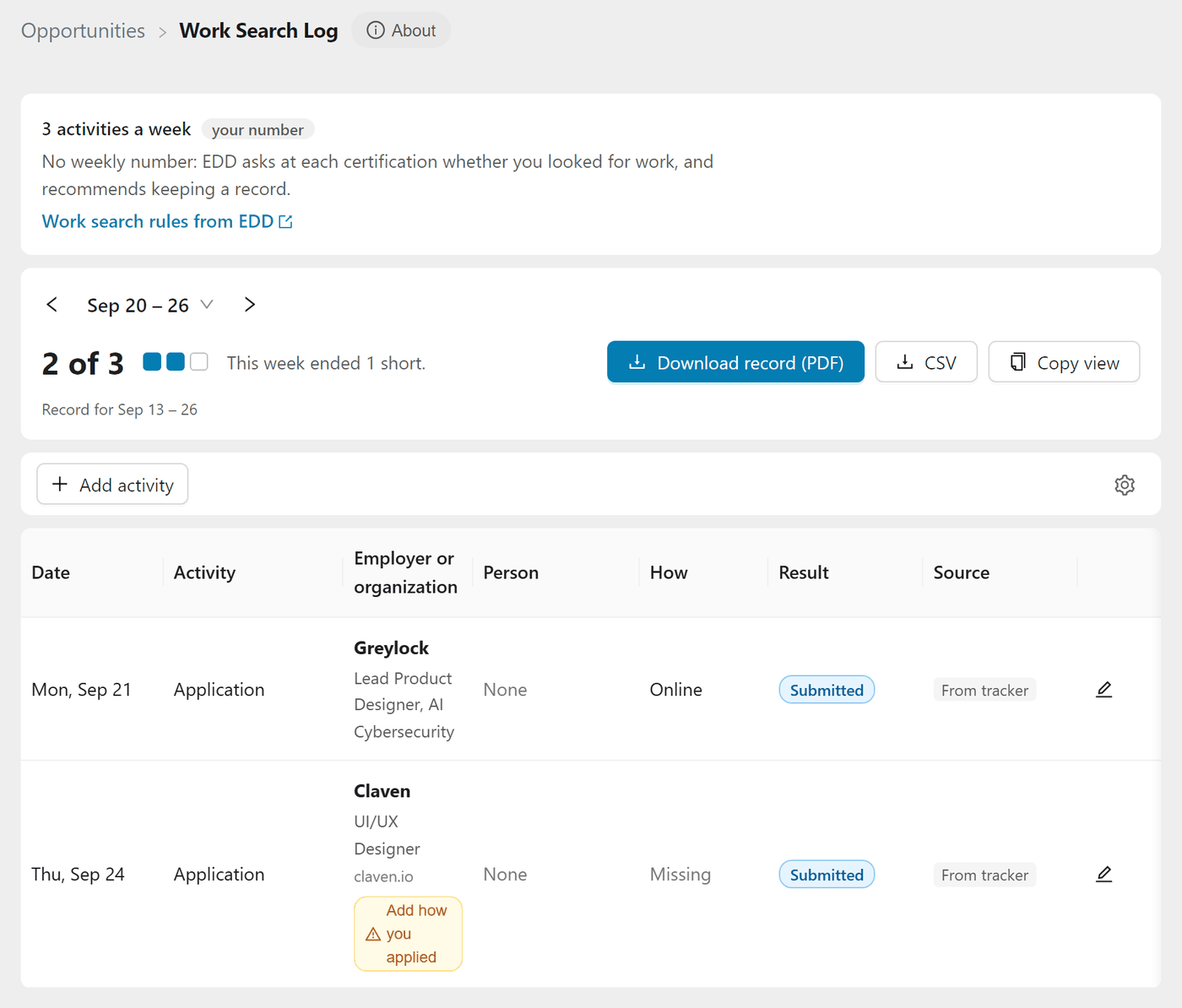
Once it's on, Work Search Log appears in the side menu, under Job Tracker. To change these settings later without leaving the log, click the gear at the right end of the log's toolbar.
What counts, and where it comes from
Every entry counts as one activity toward your weekly number.
| Entry | Where it comes from |
|---|---|
| Applications | Every job you mark as applied in your Job Tracker, on the day you applied |
| Interviews | Interviews you schedule on a job's contacts, once the day has passed |
| Other activities | What you add yourself: job fairs, workshops, networking events, registering on your state's job site, and the other activities your state accepts |
Weeks run from Sunday to Saturday, the claim week of every state except New York, where they run from Monday to Sunday as the New York State Department of Labor counts them. The log opens on the current week: use the arrows beside the week's dates to step back and forward, or click the dates to pick one of the last 8 weeks. Each week in that list shows its count and Met once you reach your number, In progress for the current week, or how many activities it was short.
Reminder emails
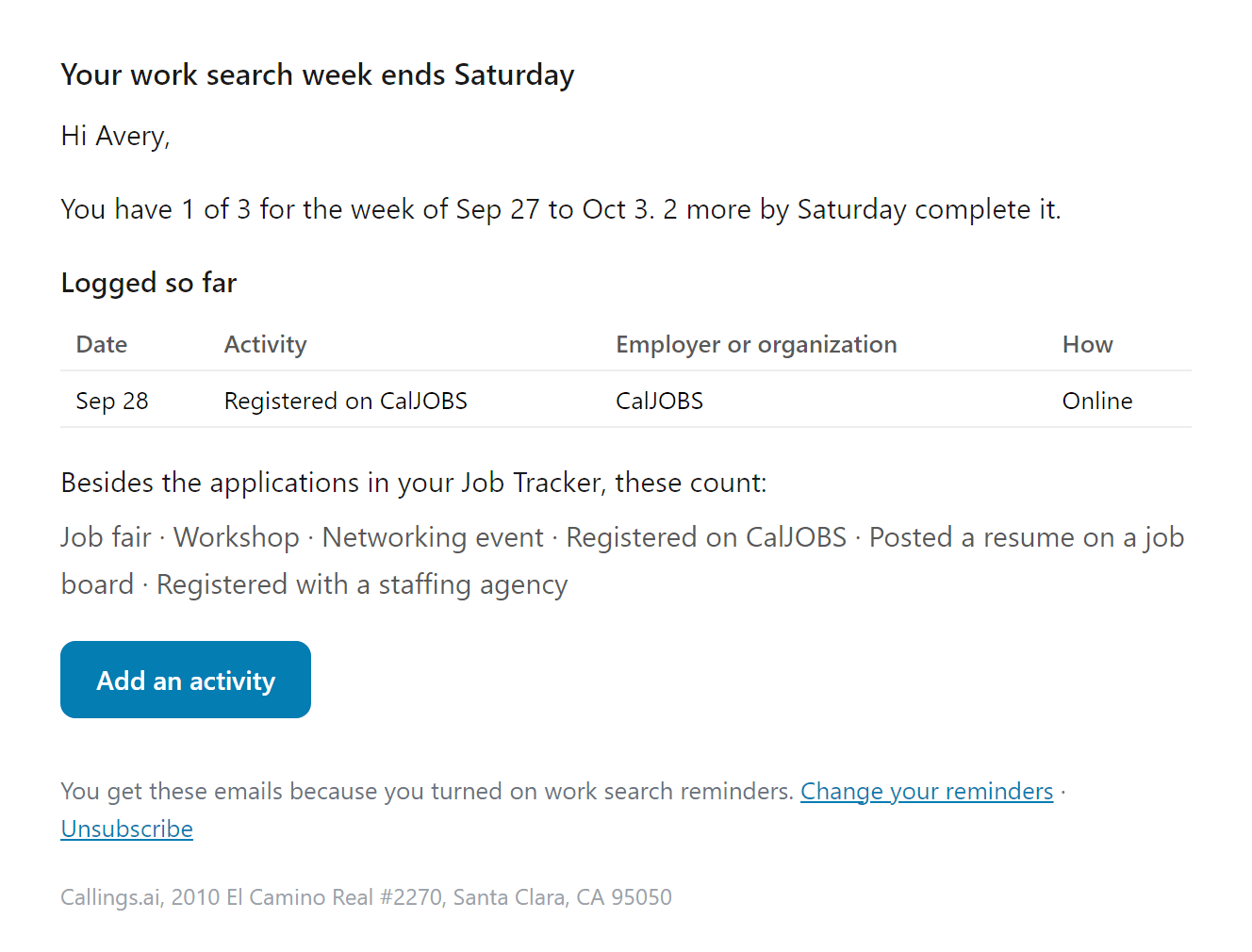
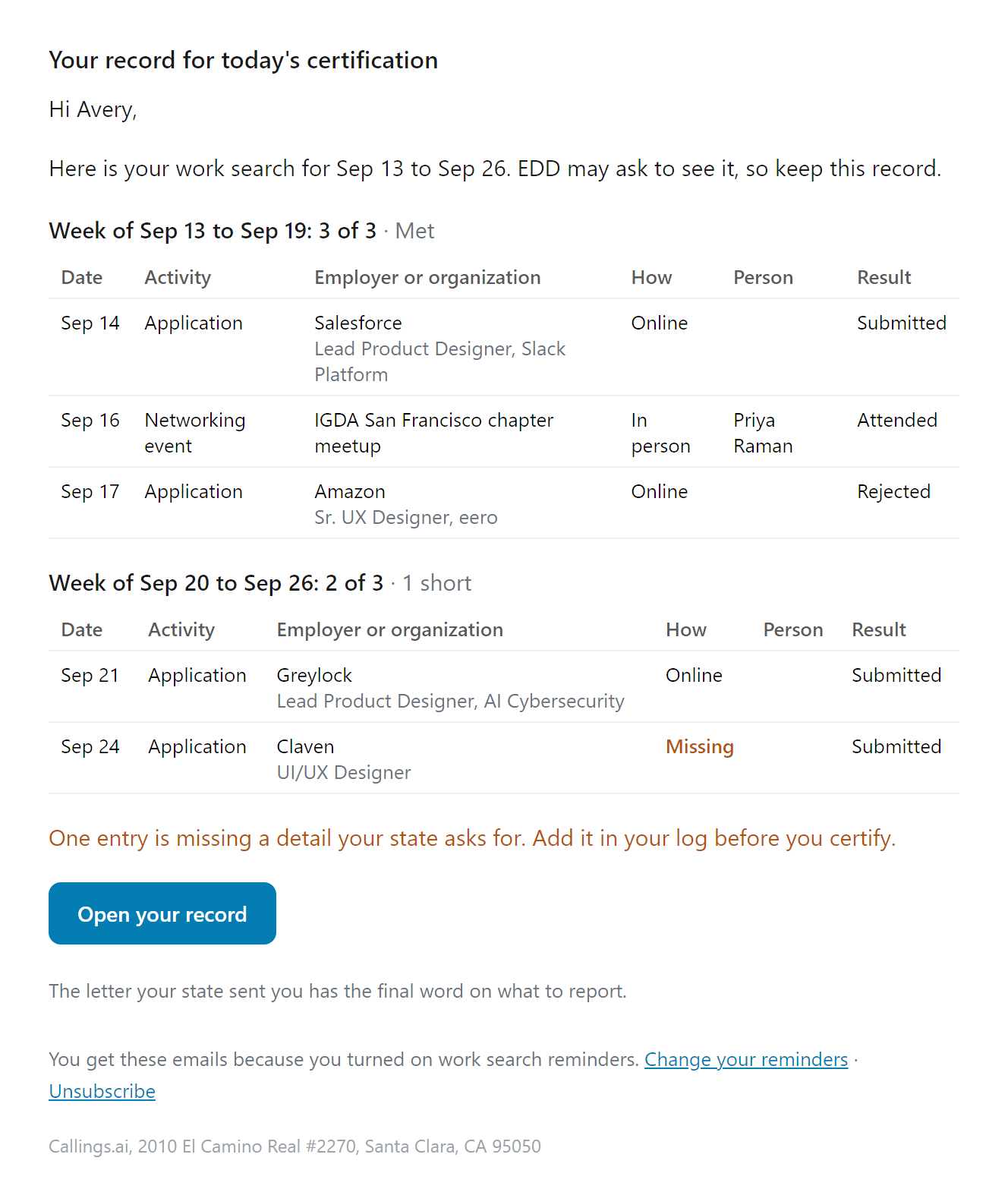
Turn on Email me before I certify and the log emails you at the two moments that matter:
- Friday morning, if your week is short. Weeks end on Saturday, so Friday still leaves two days to add what's missing (in New York, where the week ends on Sunday, it comes on Saturday morning). The email says where you stand, lists what you logged so far and what your state accepts. It's sent only when the week is short: a week that already meets your number gets no email.
- The morning you certify, with your record. A certification covers the week that ended on the Saturday before it, or the two weeks before it if you certify every two weeks. In New York, a certification made on a Sunday is for the week ending that day. The email lists each of those weeks against your number, every entry in it, and anything still missing a detail your state asks for. From it, open your record to download it, or copy each entry into your state's site.
To time them, the log needs to know when you certify:
- Every week: pick the day you certify. Most states open the weekly claim on Sunday, for the week that just ended.
- Every two weeks: enter your next certification date from your agency's letter or claim site. The log counts every two weeks from it and shows your next date so you can check it.
Emails go to the email on your account, around 8 AM your time, and each is sent once. Clear either checkbox under Emails to stop that one. Every email has an Unsubscribe link that turns the reminders off without turning off the log.
Record how you applied
When you mark a job as applied, a short panel asks how you applied. The day is already filled in, and so is anything you recorded before:
- Applied on: today, or the day you actually applied. You can't pick a future day.
- How: online, email, in person, phone, mail or fax. Nothing is picked for you: choose how you actually applied. Until you do, the log flags the application with Add how you applied.
- Person contacted: one of the job's contacts, someone else, or nobody specific.
- Result so far: submitted, interview, offer, hired, rejected, not hiring or no response.
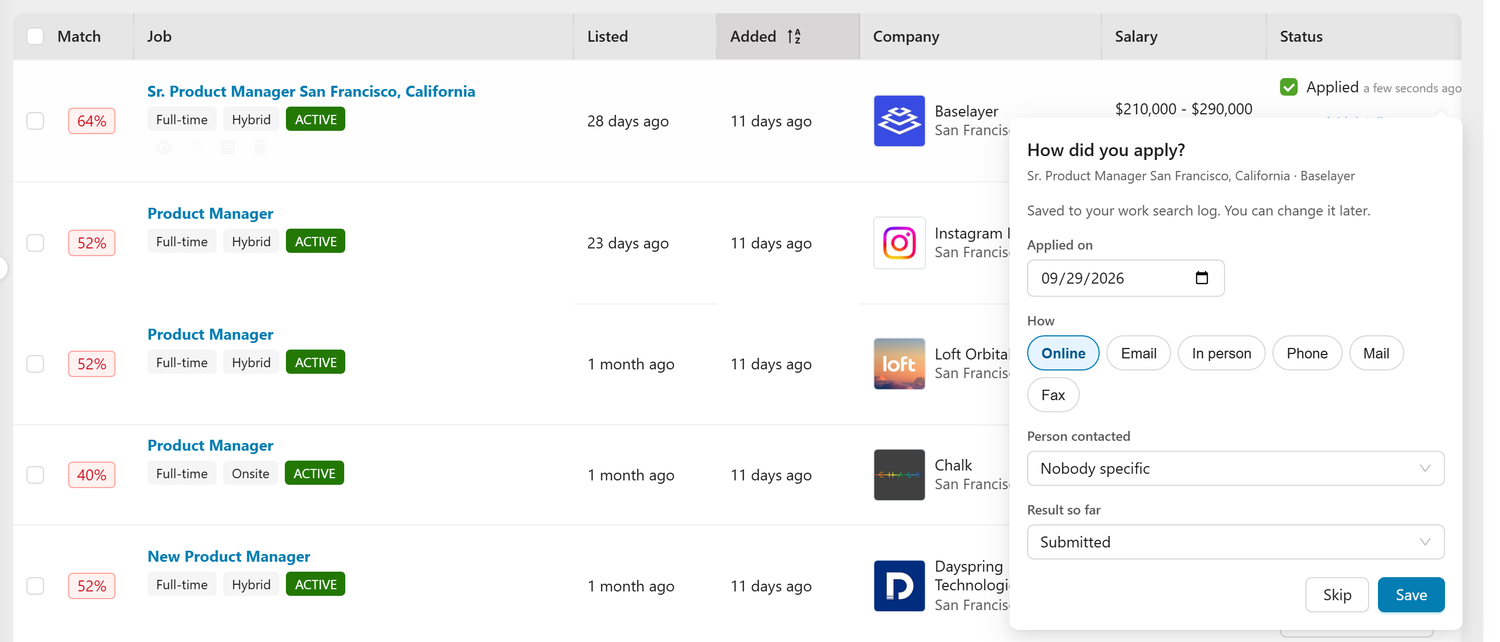
You can change these later from the applied line under the checkbox in the tracker, on the job page, or from the application's row in the Work Search Log, with Edit. Choose Skip and the application still counts, with today's date. The log then flags the missing detail on that row so you can add it before you certify.
To mark several jobs at once, select them in the table view and choose the day in the bulk bar before you mark them applied.
Add other activities
On the Work Search Log page, choose Add activity, pick what you did from your state's list, and add the day, the name of the event or organization, and where it took place (an address or a website). The form asks only what fits the activity: a job fair asks who you talked to and whether you went in person or online, while a resume posted on a job board asks only for the board and its website. When your state has a job bank, registering on it starts with the job bank's name filled in.
If you saved an event in Events and its day has passed, the log asks whether you went. Choose Yes, add it and it's added for you.
You can edit or delete the activities you added. Applications and interviews change with the job they come from.
Get your record
What you need depends on how your state works.
- States that ask you to keep a record (such as Texas, New York, Pennsylvania and Washington): choose Download record to get a PDF of the current claim period. It lists each week and each activity with the details state forms ask for, and has a line for your signature. A CSV with the same columns is also available.
- States that ask you to enter each contact when you certify (such as Florida, Georgia, North Carolina and Michigan): choose Copy for your state's site. You get one card per activity, with a copy button on each field, in the order the site asks for them. Tick Mark as entered as you go.
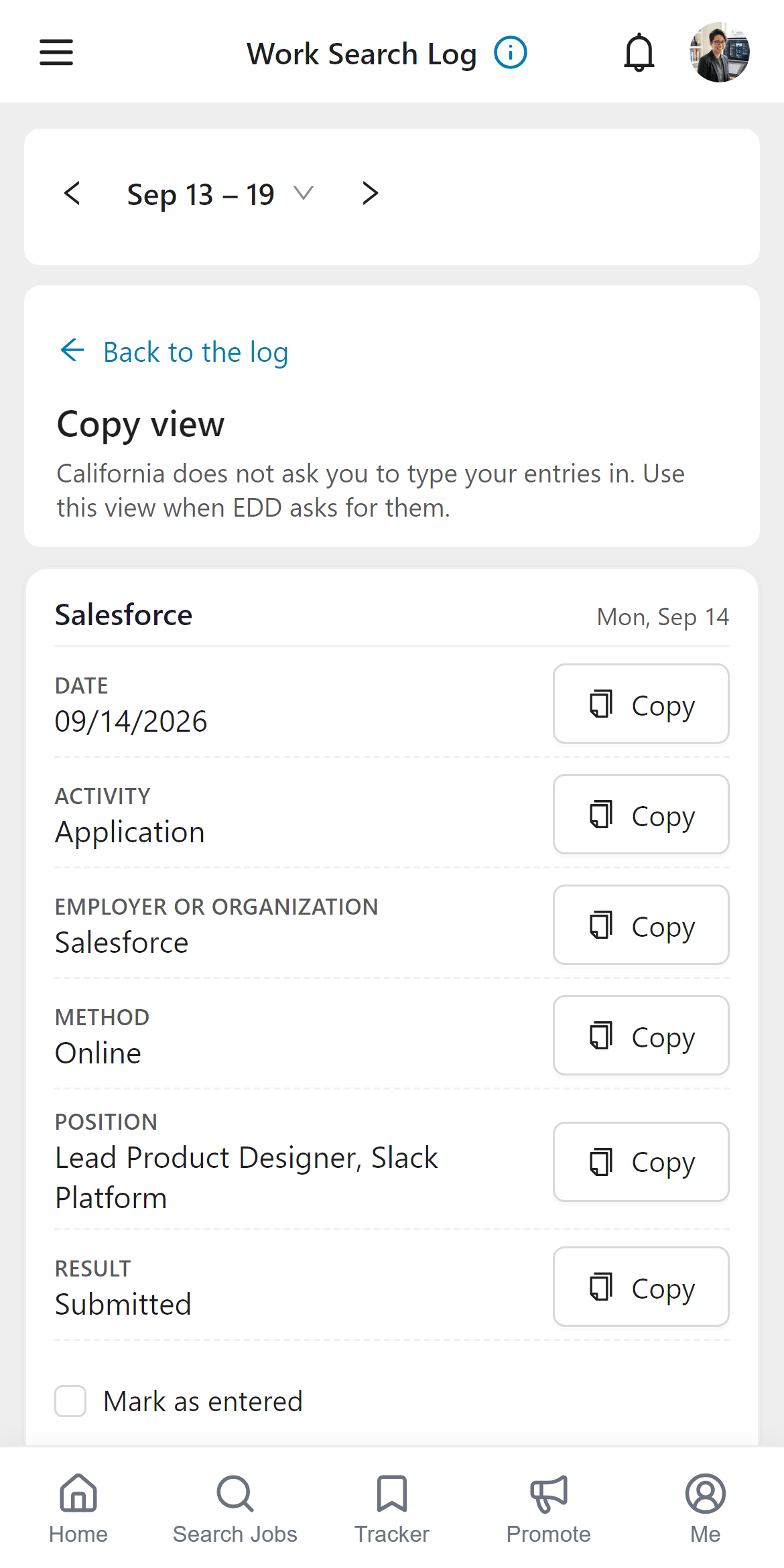
Download your record at the end of each claim period and keep it. Where your state says how long to keep it (two years in Pennsylvania, three in Connecticut), the rule at the top of the log says so too. The log reads your applications from your tracker, so deleting a job or unmarking it as applied also removes it from the log.
Privacy
Only you see your log and whether you use it. Callings never sends it to your state agency, an employer, or an organization that pays for your access: you download or copy it and submit it yourself. The record never includes your Social Security number. If your state's form asks for it, write it in yourself. See the Trust Center for details.
Frequently Asked Questions
Q: Does Callings submit my work search to my state?
A: No. No state accepts records from an outside service. You download your record or copy it into your state's site yourself.
Q: My state's rule on the page doesn't match my letter. Which one is right?
A: Your letter. Rules change and some depend on your county. Change the weekly number in Settings to the one in your letter.
Q: Georgia only accepts its own form. Can I still use the log?
A: Yes. Georgia takes work search entries online with your weekly claim, and on paper only on its own form (DOL 2798). Use the copy view to enter them online, and the copy sheet as your own reference.
Q: Why is an application missing from last week?
A: The log shows applications on the day they were marked as applied. If you marked it later, open the job and use Edit on the applied line to set the day you actually applied.
Q: Do interviews count?
A: Most states count them. They appear once the interview day has passed, as long as the interview is on one of the job's contacts and wasn't canceled.
Q: I didn't get the Friday email. Why?
A: It's sent only when your week is short of your number (or, in a state with no number, when nothing is logged yet). Check that Email reminders is on and that Friday morning, if my week is short is ticked (Saturday morning in New York).
Q: My certification email covers the wrong weeks.
A: Check How often you certify and your certification day or date in Settings. A certification always covers the week or weeks that ended before it (on the Saturday before it, or in New York on or before that Sunday), never a week still in progress.
Q: How do I stop the emails?
A: Use Unsubscribe in any of them, or turn off Email reminders in Settings. The log stays on either way.
Q: What happens if I turn the log off?
A: The page, the menu item and the weekly counter go away. The activities you added are kept, and they come back if you turn the log on again.