Security and Privacy
Connecting an assistant to Callings gives that one assistant permission to read your own job hunt and to make a small number of changes you ask for. It expires on its own, it can be revoked from Callings in one click, and it never reaches anybody else's account. This page says exactly what is shared, because a permission you do not understand is not one you have really given.
MCP connections are new to most people and the honest summary is short: the assistant can see what you could see by logging in, and it can do a few of the things you could do. It cannot do anything you could not.
What the Assistant Can Read
Thirty-two of the 44 tools only read, and every one of them is scoped to your account by the connection itself.
| Area | What it can read |
|---|---|
| Jobs and applications | Your tracker, stages, dates, match scores, job descriptions |
| Your plan | Your weekly plan, today's actions, what to apply to next |
| Job market | Live job searches, run fresh when you ask |
| Contacts | The people you have saved, and their details |
| Companies | The companies you are targeting, and their reports |
| Resumes | Your resumes and what is in them |
| Profile and insights | Your goals, location, career profile, insights |
| Content | Your notes, posts, Calling Cards |
| Coaching | Your conversations with your own career coach on Callings, if you have one |
| Account | Your settings and which plan you are on |
| Product help | Callings help articles, which are the same for everybody |
It cannot read your password, your payment details, or anything belonging to another Callings user. There is no tool that reaches another account, so this is not a rule we enforce but a shape the surface does not have.
What the Assistant Can Change
Twelve tools write, and they are the whole list.
- Add a job to your tracker
- Record your decision on a job (its stage, or archiving it)
- Hide a job listing you are not interested in from your searches (you can show it again)
- Add a note to a job, a saved company or a contact (it only adds notes; it never edits or deletes one)
- Save a found email address onto one of your contacts
- Save someone a people search found to your contacts
- Save an event, or mark it registered or not for you
- Log an activity in your Work Search Log
- Start a tailored resume for a job
- Start a cover letter for a job
- Start interview prep for one interviewer on a job (it replaces earlier prep for that interviewer)
- Send a message to your career coach on Callings, only after you approve it: the first request only shows you the exact message, and nothing is sent until you say yes
Nothing deletes your data. Nothing sends an email, applies to a job, posts anything publicly, changes your plan, or spends your money. A good assistant will tell you before it writes anything, and you should still check its work in the tracker, exactly as you would your own.
If you would rather it could not change anything at all, some assistants let you request read-only access when you connect; Callings honours that and simply does not offer the write tools to that connection.
Where Your Data Travels
This is the part worth understanding before you connect. When your assistant asks Callings a question, the answer goes to the assistant, which means it passes through the company that runs it: Anthropic for Claude, OpenAI for ChatGPT, and whoever runs any other app you connect.
That is not a side effect of Callings; it is what connecting an assistant means. Those companies' own terms and retention policies then apply to the conversation, including the parts of your job hunt that appear in it. If your search is confidential, that is the thing to weigh, and it is a good reason to keep sensitive notes out of a connected chat.
What does not happen in the other direction: Callings never receives your conversation. We see which tool your assistant called and the arguments it passed (for example, the words of a job search), because we have to run it and we keep operational logs of it. We do not see what you typed, what the assistant said back, or anything else in that chat.
We also keep a small record of the paid tools: which tool, when, and whether it ran or was refused, so the limits below can be enforced and so we can tell whether the free tier is drawn in the right place.
How the Connection Itself Is Protected
The connection uses OAuth 2.1, the same standard behind "Sign in with Google", with the protections that standard asks for.
- You approve it in a browser, on a Callings page. Your password is never given to the assistant, and never passes through it.
- The approval screen is built from the actual permissions, not written by hand, so it cannot describe less than the connection can do.
- The approval screen names an app by where it sends you back. Claude and ChatGPT appear under their own names only when the approval returns to claude.ai or chatgpt.com. Any other app is shown with the site it returns to and marked unverified, so an app borrowing a familiar name cannot pass for it.
- Access expires every hour and is renewed quietly in the background. A copied access token stops working on its own.
- Renewal rotates the credential, so a stolen one stops the real assistant from renewing, which is how theft becomes visible instead of silently permanent.
- A connection left unused for 90 days ends on its own. Using it keeps it going; after a long break, connect again.
- Changing or resetting your password disconnects every assistant. It is how you take an account back, so nothing someone else connected survives it. Reconnect the assistants you use afterwards.
- Identity comes from the connection, never from the assistant. If a connected app claimed to be a different Callings user, that claim is discarded and the call runs as you.
- The tools that cost money have a ceiling of a few dozen calls a day each. An assistant can call a tool in a loop with nobody watching, which a person clicking a button cannot, so the ceiling exists to stop an unattended mistake from running away.
How to Disconnect
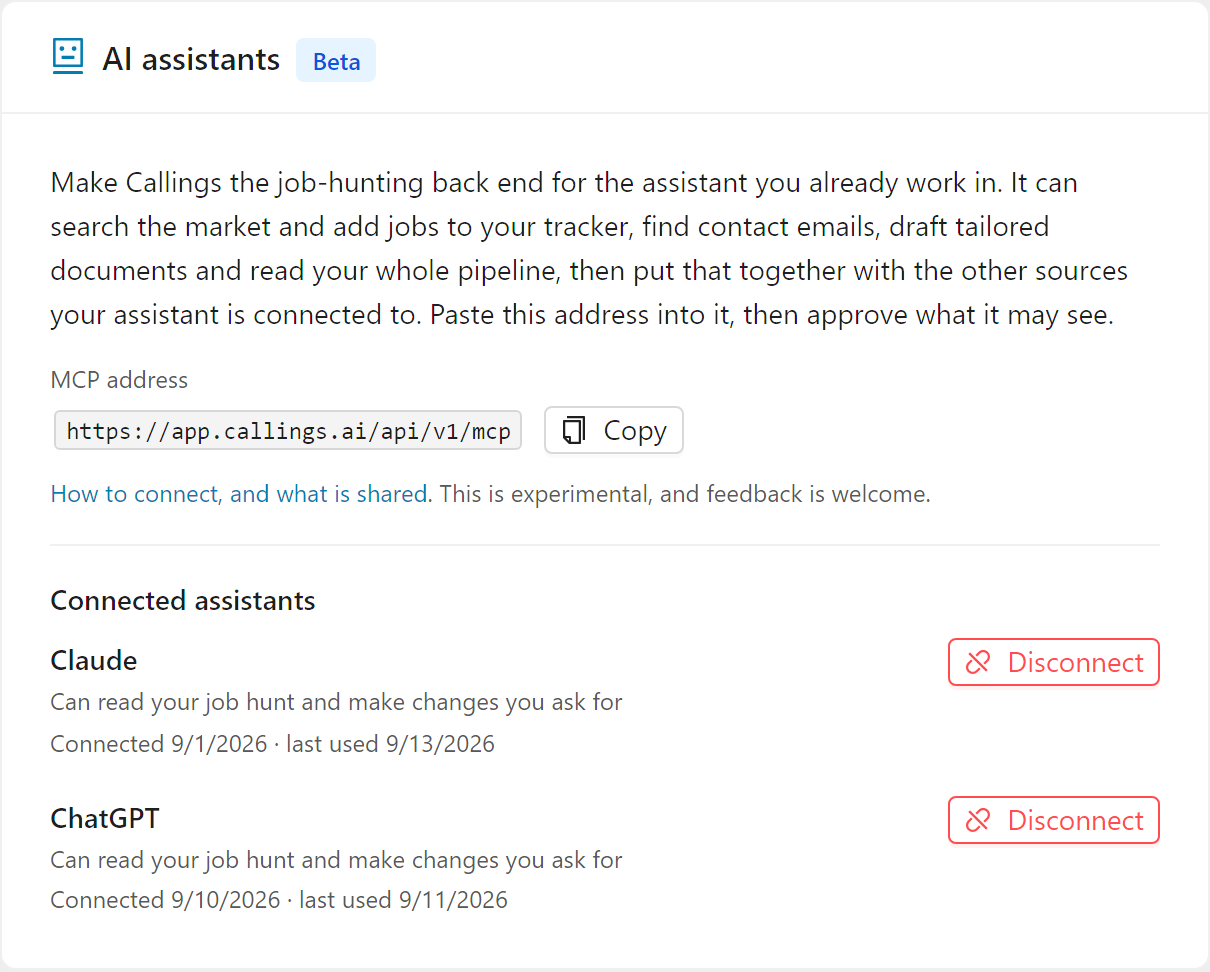
Go to Settings > Integrations in Callings, find the app, and press Disconnect. Access ends immediately.
This is the one that matters, and it is why the page exists: revoking in Callings ends the permission at the source, so it stops working whatever the assistant does next. Removing the connector inside Claude or ChatGPT tidies up their side, but only Callings can actually end the grant.
The same page shows you what is connected, what each app can do, when you connected it, and when it was last used. If something is listed there that you do not recognize, disconnect it and contact us.
Tips & Best Practices
- Connect the assistant you trust with the rest of your work. The judgement is about that company, not about the connection.
- Treat this as experimental. It is new, and if something looks wrong, tell us rather than assuming it is meant to work that way.
- Keep genuinely confidential notes out of a connected chat. If your current employer must not know you are looking, remember the conversation lives with the assistant's provider.
- Review the approval screen rather than clicking through it. It is generated from the real permissions and it is the only place they are all listed.
- Disconnect what you stopped using. An unused connection is permission still standing.
- Check anything it wrote. Eleven tools change your account, and a wrong stage on a job is easier to fix the day it happens.
Frequently Asked Questions
Q: Can the assistant see other people's Callings accounts?
A: No. Every tool runs as your account and there is no tool that reads another one. The connection carries your identity and an assistant cannot override it.
Q: Does Callings read my conversations with the assistant?
A: No. We receive the tool calls your assistant makes and the arguments it sends, which is what we need in order to answer them, and we keep operational logs of that. The conversation itself never reaches us.
Q: Does my job search data get used to train an AI model?
A: Not by Callings. Once an answer reaches your assistant, the provider's own policies govern the conversation, so check the training and retention settings in whichever assistant you connected if that matters to you.
Q: What happens if someone steals the connection?
A: An access token expires within the hour, and renewing rotates the credential, so a stolen one locks out the real assistant and the theft shows up rather than lasting quietly. You can also end everything instantly with Disconnect, and changing your password disconnects every assistant at once.
Q: Can I give read-only access?
A: Yes, where your assistant lets you ask for it. Callings honours a read-only request by not offering the write tools to that connection at all.
Q: Can the assistant apply to jobs for me?
A: No. Nothing in this surface submits an application, sends an email or posts anything. It can draft documents and record what you decided; the acting is yours.
Q: Is this the same as the Chrome extension?
A: No, they are separate. The extension works on pages you browse; this works inside an AI assistant. Connecting one has no effect on the other.
Related Topics
A permission you understand is one you can withdraw. Read this once, connect what you trust, and know exactly where the Disconnect button is.