ATS Compatibility Report
ATS Compatibility Report is a Callings.ai tool that analyzes how Applicant Tracking Systems read your resume, identifies potential parsing issues (wrong date associations, sidebar problems, formatting failures), and automatically generates ATS-optimized PDF and Word versions designed to be parsed correctly by any system.
Applicant Tracking Systems (ATS) need to correctly extract information from your PDF or Word document. While modern ATS systems have improved significantly, older systems can still struggle with certain formatting choices, and when extraction fails, it often fails silently, leaving you unaware that your resume data is garbled or incomplete.
Where to Find It
Open My Resumes from the Personal Brand section of the sidebar, select a resume in the list, and open its ATS tab. Every resume has its own report. The check runs when you open the tab and takes a few seconds.
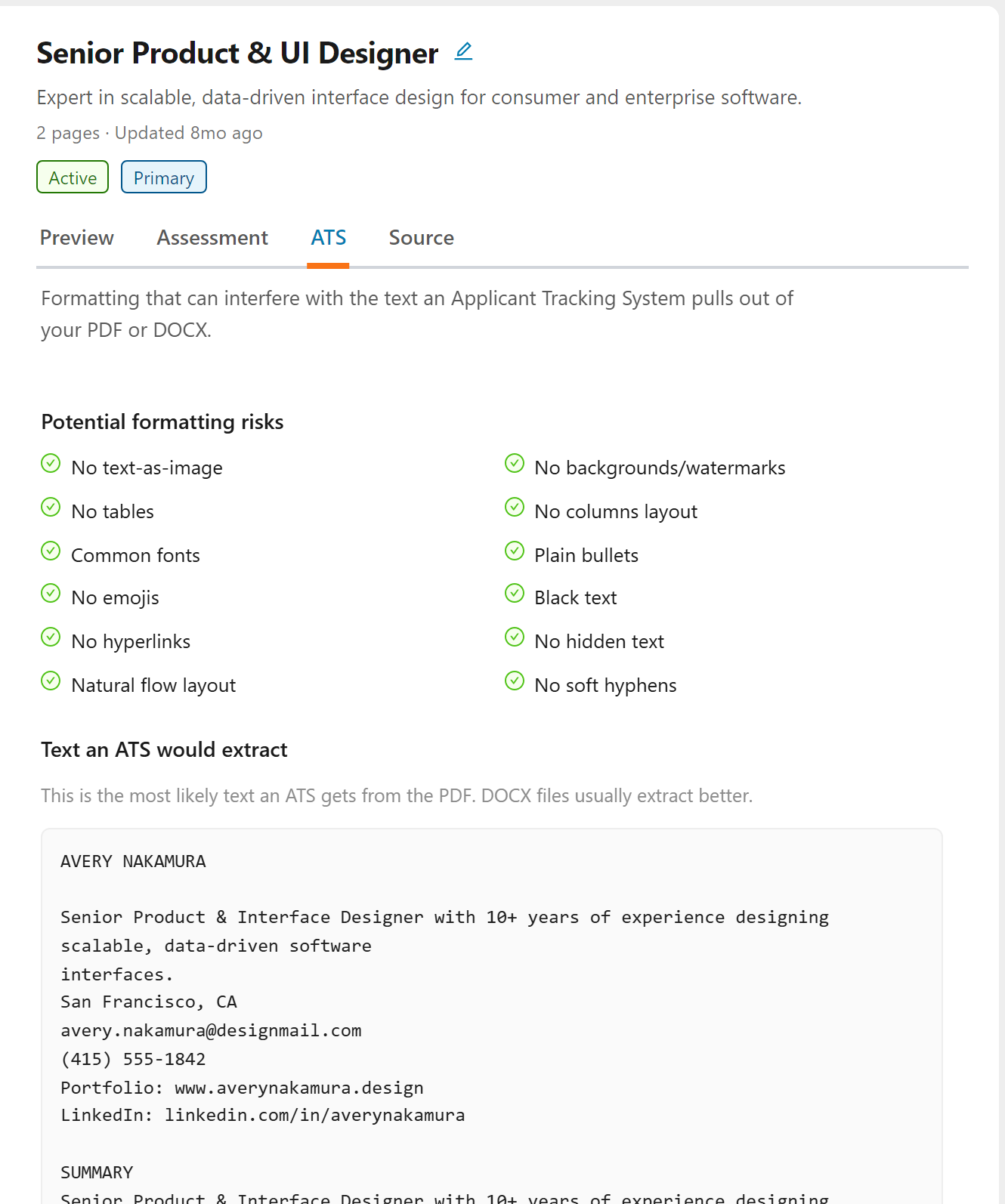
The tab has two parts:
- Potential formatting risks: twelve checks on the resume file we generate, covering text inside images, backgrounds and watermarks, tables, multi-column layouts, uncommon fonts, fancy bullets, emojis, colored text, hyperlinks, hidden text, reading order, and soft hyphens. A green tick means the check passed; a flagged check says what was found.
- Text an ATS would extract: the plain text an ATS most likely pulls out of your PDF, in the order it would read it. Read it top to bottom: if a date sits next to the wrong job or a section is missing, an ATS sees it that way too.
What is an ATS?
An ATS is software used by companies to collect, sort, and rank job applications. The system extracts text from your resume file to create a digital profile. To be safe, it's best to use a carefully crafted PDF or Word document that ensures all ATS systems, including older ones, can correctly extract your information.
Common Extraction Issues
Even when a resume looks perfect to the human eye, ATS systems can encounter problems:
- Dates mixed with wrong experiences: If you align dates to the right side of your resume, the ATS may not correctly associate them with the corresponding job. Depending on how the PDF was generated, right-aligned dates can be parsed out of order.
- Sidebars and columns: Information in sidebars or multi-column layouts often gets extracted in the wrong sequence or missed entirely.
- Headers and footers: Content placed in document headers or footers may be ignored by some ATS systems.
- Special formatting and characters: Unusual fonts, symbols, or decorative elements can cause parsing failures.
- Silent failures: The most frustrating issue is that extraction problems often occur silently: you won't know your resume was misread unless you check.
The Callings.ai ATS Solution
We automatically generate ATS-optimized versions of your resume that are structured to be readable by any system, including older ATS platforms.
What We Ensure:
- Correct structure: The PDF and Word documents we generate use a structure that can be opened and parsed by any ATS system.
- Proper date association: Employment dates are clearly linked to the correct experiences.
- Clean extraction: No hidden characters, problematic formatting, or layout issues that could cause parsing failures.
The ATS-Optimized Resume
Regardless of how your original resume looks, Callings.ai rebuilds it into one clean, ATS-friendly resume. That rebuilt version is what the PDF and DOCX buttons on the toolbar of the resume's Preview tab download.
- Standardized layout: single column, standard fonts, clear headings.
- PDF and Word downloads: both designed to be readable by virtually all ATS systems.
Recommendation
Keep your beautifully designed resume for in-person interviews or emailing directly to hiring managers. But for online applications through job portals, use the PDF or DOCX you download from My Resumes to ensure your information is extracted correctly.
Frequently Asked Questions
Q: Do all companies use ATS systems?
A: Most Fortune 500 companies use ATS systems, and approximately a third of other companies do as well. With an increasing number of affordable ATS solutions available, more companies are adopting these systems every year.
Q: Will a creative resume format hurt my chances?
A: Creative formats can cause extraction issues, especially with older ATS systems. Use our ATS-optimized version for online applications and save your creative version for interviews or direct emails.
Q: I have an old resume from a previous job search. Could it have ATS issues?
A: Quite possibly. Older resumes generated by online resume builders or design-focused applications often prioritized visual appearance over data structure. Some of these tools converted text into images or used complex formatting that many ATS systems cannot extract properly. The good news is that we support any format, any layout, and any legacy resume: just upload it and we'll take care of cleaning it up and structuring it properly for ATS compatibility.
Q: How do I know if my resume has extraction issues?
A: That's the challenge: you often don't know. ATS failures are usually silent. Open the resume's ATS tab: it flags formatting risks and shows the text an ATS would extract, and our optimized versions are designed to eliminate those issues.
Q: What causes date parsing problems?
A: Right-aligned dates, dates in sidebars, or dates separated from job titles by columns can all cause the ATS to associate dates with the wrong experience. Our optimized format ensures dates are correctly linked.
Q: Should I keyword-stuff my resume to beat the ATS?
A: Keyword stuffing is not recommended. Modern ATS systems have moved beyond simple keyword matching: they now evaluate your overall experience, skills, and how well your background aligns with the role. Focus on clearly articulating your relevant experience and accomplishments rather than cramming in keywords. Our Custom Resume generator helps with this by tailoring your content to match specific job requirements naturally.
Q: Can I see what the ATS sees?
A: Close to it. The ATS tab shows the text an ATS would most likely extract from your PDF, in the order it would read it. Each ATS parses a little differently, so treat it as a close preview rather than an exact copy.
Q: What format should I use for online applications?
A: Follow the requirements specified by each application form. When both PDF and Word are accepted, either of our ATS-optimized versions will work well. If the application specifies a particular format, use that one.
Don't let formatting issues disqualify you before a human ever sees your resume. With ATS-optimized versions that ensure correct parsing by every system, you can confidently apply knowing your qualifications will be accurately read, giving your experience the fair chance it deserves.