Custom Resume Generator - ATS-Optimized Tailored Resumes
Generate AI-tailored, ATS-optimized resumes customized for each job opportunity with keyword integration and professional formatting.
# Custom Resume
**Custom Resume is an AI tool that generates a tailored, ATS-optimized resume for each specific job by analyzing the job description and highlighting your most relevant experience and skills.** Instead of sending the same generic resume to every employer, you get a job-specific version that uses the exact keywords hiring managers are looking for—generated in under 90 seconds.
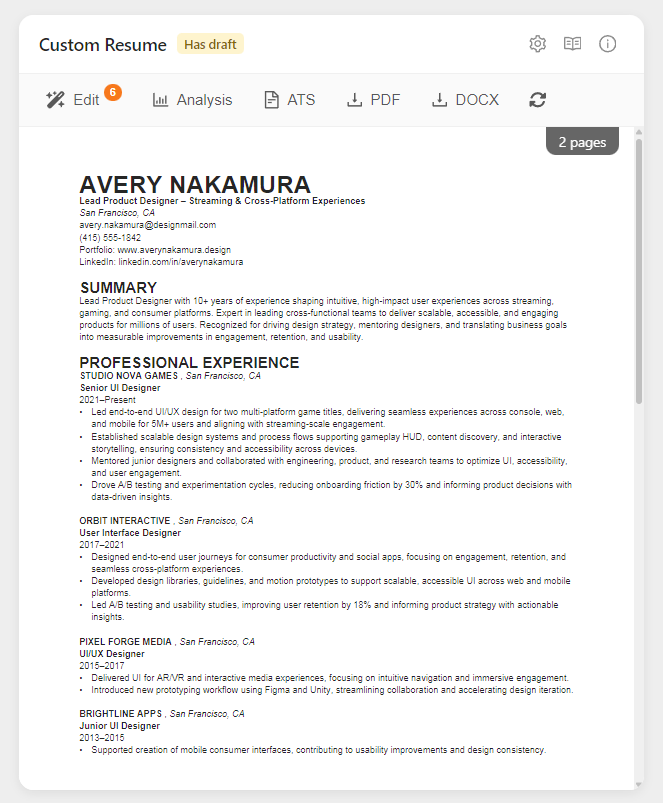
The Custom Resume appears as an interactive card in the [Prepare section](./overview), displayed alongside your Custom Cover Letter for efficient application preparation.
## What You'll See
### AI-Generated Custom Resume
A complete, professionally formatted resume specifically tailored to the job:
**What gets customized:**
- **Professional Summary** - Rewritten to emphasize fit for this specific role
- **Skills Section** - Reordered and enhanced to match job requirements
- **Work Experience** - Descriptions adjusted to highlight relevant accomplishments
- **Education & Certifications** - Positioned to match their priorities
- **Keywords** - Strategic placement of terms from the job description
- **Emphasis** - Your strongest relevant experience moved forward
**What stays consistent:**
- **Factual accuracy** - No invented experience or false claims
- **Your voice** - Maintains your professional tone
- **Core achievements** - Real projects and results
- **Timeline** - Accurate dates and progression
- **Contact information** - Your actual details
- **Layout and formatting** - Your base resume's structure is preserved (see below)
### Layout Inheritance from Base Resume
Your Custom Resume inherits the layout and formatting from your base resume. The AI preserves:
| Element | What's Preserved |
|---------|------------------|
| **Page breaks** | Manual page breaks stay in the same positions relative to content |
| **Section order** | Your section sequence (Summary → Experience → Education → Skills, etc.) is maintained |
| **Bullet formats** | Bullet point styles and indentation levels remain consistent |
| **Spacing** | Line breaks and spacing between sections are kept |
| **Document structure** | The overall document structure serves as the formatting template |
**Why this matters:** If you've carefully arranged your base resume with specific page breaks and section ordering, your Custom Resumes will follow that same layout—you don't need to reformat each one.
**Important:** Custom Resumes are generated using your base resume as it exists at generation time. If you later update your base resume's layout (add page breaks, reorder sections, change formatting), those changes only apply to **newly generated** Custom Resumes. Existing Custom Resumes won't automatically update. To apply your updated layout to a Custom Resume, click the **Regenerate** button (🔄) in the toolbar.
### Page Preview
As you work on your resume, you can see exactly how it will look when downloaded. The preview shows page breaks between pages, so you know precisely where content splits:

## Card Toolbar
Once your resume is generated, the card displays a toolbar with quick-access tools:
| Tool | Description |
|------|-------------|
| **Edit** | Open the AI Editor to review suggestions and refine your resume. Shows a badge with pending suggestion count (e.g., "Edit 6"). |
| **Analysis** | View the match/mismatch analysis comparing your base resume to the job requirements. |
| **ATS** | Open the ATS Compatibility Report to check for parsing issues. |
| **PDF** | Download your resume as a PDF file. |
| **DOCX** | Download as Microsoft Word format. |
| **Regenerate** (🔄) | Create a fresh version from scratch (confirms before replacing). |
### Analysis Modal
Click **Analysis** to view how your base resume compares to the job listing:

The analysis shows:
- **Match Analysis** - Skills and experience that align with job requirements
- **Mismatch Analysis** - Gaps between your background and what they're looking for
- **Tailoring Strategy** - Recommendations used to generate your custom resume
> **Note:** This analysis is based on your Base Resume and the job description at generation time. It doesn't update when you edit the Custom Resume—it shows the foundation used to create the initial suggestions.
### Header Utility Icons
The card header includes three utility icons:
| Icon | Action |
|------|--------|
| ⚙️ **Settings** | Configure AI Custom Instructions and paper size |
| 📖 **Documentation** | Open this documentation page |
| ℹ️ **Tips & Info** | Quick tips modal with usage guidance |
### Using the AI Editor
The AI Editor provides an interactive way to review, refine, and perfect your customized resume section by section. Click anywhere on the resume thumbnail or the **Edit** button in the toolbar to open